![[Laser cut and engrave] Barn Quilt Star Ornament Featuring Beautiful Woods (Score + Cut) FAST Project](https://image-res.atomm.com/resource/xtool/community/attachment/xtool-community/d9819283-8165-4ad3-9f65-8f32ed252bb6.jpg?x-oss-process=image/resize,w_1200,h_900,limit_0/interlace,1/format,webp/auto-orient,1)
![[Laser cut and engrave] Barn Quilt Star Ornament Featuring Beautiful Woods (Score + Cut) FAST Project](data:image/png;base64,iVBORw0KGgoAAAANSUhEUgAAAAoAAAAKCAYAAACNMs+9AAAAAXNSR0IArs4c6QAAABdJREFUKFNjZCASMBKpjmFUId6QIjp4AAppAAuXjCs4AAAAAElFTkSuQmCC)
![[Laser cut and engrave] Barn Quilt Star Ornament Featuring Beautiful Woods (Score + Cut) FAST Project](https://image-res.atomm.com/resource/xtool/community/attachment/xtool-community/d9819283-8165-4ad3-9f65-8f32ed252bb6.jpg?x-oss-process=image/resize,w_200,h_150,limit_0/interlace,1/format,webp/auto-orient,1)
![[Laser cut and engrave] Barn Quilt Star Ornament Featuring Beautiful Woods (Score + Cut) FAST Project](https://image-res.atomm.com/resource/xtool/community/attachment/xtool-community/86b18da8-52a1-4421-ab79-0903820d928e.jpg?x-oss-process=image/resize,w_200,h_150,limit_0/interlace,1/format,webp/auto-orient,1)
![[Laser cut and engrave] Barn Quilt Star Ornament Featuring Beautiful Woods (Score + Cut) FAST Project](https://image-res.atomm.com/resource/xtool/community/attachment/xtool-community/a76ea39b-cc66-49ff-83a0-79f4c55046c0.jpg?x-oss-process=image/resize,w_200,h_150,limit_0/interlace,1/format,webp/auto-orient,1)
Barn Quilt Star Ornament Featuring Beautiful Woods (Score + Cut) FAST Project
 Instruction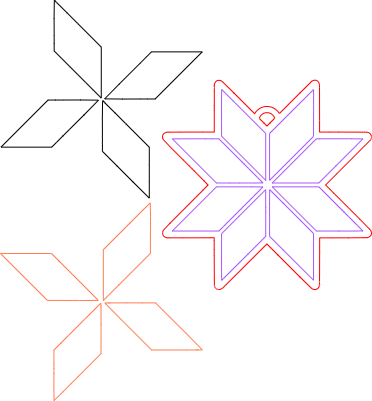


Information
This quick Christmas ornament is done for you - just pop it into the xTool software. This was made on the xTool F2 (processing time 3 minutes, 48 seconds total) but will work on the S1, M1, M1 Ultra, and P series lasers. The file includes a pre-shrunk score line for easy placement and a generous hanger cutout for a variety of ribbons, cords, and twines. Tutorial Here: https://youtu.be/yOW5MDkfaLI
Instruction
Step1
The video tutorial is here: https://youtu.be/yOW5MDkfaLI
Load the 3mm (1/8th) basswood plywood into the machine and secure so that the material is level.
Open the software, load the file, and connect the machine you're using.
Auto-measure and position the backing piece (score and cut piece) into place using marking or a camera, depending on your machine.
Validate or insert settings for score and cut. F2 15 watt blue light 1/8th basswood plywood: score - 70, 140, 1; cut - 90, 6, 1. If you're new, you can do a materials test using the guidance for the basswood plywood material in the EasySet library to determine your laser's best settings.
NOTE: Quickly set parameters by using the colors layers provided in the layers and objects panel. Depending on your machine, you can run the orange layer at the same time (also cut from basswood ply). I chose to add 3M 467MP to the small pieces for both the walnut and basswood star pieces, however, you can run them without it.
Run the score and cut layers for basswood ply (purple, red, and orange layers). Remove the basswood and clean up, if necessary.
Load a piece of 3mm (1/8th) walnut plywood into the machine and secure so that it is level. Set the cut settings (F2 90, 6, 1) and process the cut. Clean up, if necessary.
If using, remove the 3M backing from the pieces and affix into place using the inset score as a guideline. If you did not use the adhesive tape, apply each with glue and clamp to set.
Seal, if desired, and add a suede cord for hanging. You can customize the back with your business name or a custom holiday message.
Remixes
License



You may also like

Customizable Christmas Snowflake Ornament


Laser Cut Wooden Old World Santa Claus Christmas Ornament with Star


Laser Cut Wooden Star Christmas Tree Ornament Decoration


Star Christmas Ornament Decoration - Laser Cut Wooden


Christmas Tree Ornament


Decorative Star Tree Topper


Laser Cut Wooden Christmas Ornament with Bold Text


'/%3e%3cdefs%3e%3clinearGradient%20id='paint0_linear_1433_15726'%20x1='12'%20y1='5.25'%20x2='12'%20y2='18.75'%20gradientUnits='userSpaceOnUse'%3e%3cstop%20stop-color='%23FFC654'/%3e%3cstop%20offset='1'%20stop-color='%23FF8D12'/%3e%3c/linearGradient%3e%3c/defs%3e%3c/svg%3e)
Laser Cut Mini Christmas Tree Decoration with Ornaments and Star Topper


Personalized Laser Cut Wooden Christmas Hat Ornament with Gold Foil


Laser Cut Star-Shaped Stitch Wooden Christmas Tree Ornament with Crown Design


Laser Cut Wooden Star Christmas Ornament Personalized with Name 2025


Laser Cut Merry Christmas Wooden Tree Ornament Decoration


Laser Cut Wooden Star Christmas Ornament with Santa Sleigh Design


Laser Cut Star Christmas Ornament with Gold Glitter Backing


Laser Cut Wooden Christmas Ornament Number 67 with Santa Hat 2025


Laser Cut Star Wars X-Wing and Tie Fighter Christmas Tree Ornaments


Laser Cut Wooden Christmas Tree Ornament with Humorous Quote

Laser Cut Wooden Christmas Ornament with Star Pattern