
Report
![[Laser cut and engrave] Wooden Coffee Coasters Bean There Done That](https://image-res.atomm.com/resource/xtool/community/attachment/xtool-community/ccc7f546-f66a-40fe-bf1b-5d169e875f01.png?x-oss-process=image/resize,w_1200,h_900,limit_0/interlace,1/format,webp/auto-orient,1)
![[Laser cut and engrave] Wooden Coffee Coasters Bean There Done That](data:image/png;base64,iVBORw0KGgoAAAANSUhEUgAAAAoAAAAKCAYAAACNMs+9AAAAAXNSR0IArs4c6QAAABdJREFUKFNjZCASMBKpjmFUId6QIjp4AAppAAuXjCs4AAAAAElFTkSuQmCC)
![[Laser cut and engrave] Wooden Coffee Coasters Bean There Done That](https://image-res.atomm.com/resource/xtool/community/attachment/xtool-community/ccc7f546-f66a-40fe-bf1b-5d169e875f01.png?x-oss-process=image/resize,w_200,h_150,limit_0/interlace,1/format,webp/auto-orient,1)
![[Laser cut and engrave] Wooden Coffee Coasters Bean There Done That](https://image-res.atomm.com/resource/xtool/community/attachment/xtool-community/420bcb4a-6baa-49de-a4f0-96d264be525d.jpg?x-oss-process=image/resize,w_200,h_150,limit_0/interlace,1/format,webp/auto-orient,1)
![[Laser cut and engrave] Wooden Coffee Coasters Bean There Done That](https://image-res.atomm.com/resource/xtool/community/attachment/xtool-community/e46385ca-6760-46ee-b8ff-2a456f5eedc3.JPG?x-oss-process=image/resize,w_200,h_150,limit_0/interlace,1/format,webp/auto-orient,1)
![[Laser cut and engrave] Wooden Coffee Coasters Bean There Done That](https://image-res.atomm.com/resource/xtool/community/attachment/xtool-community/1e7baf51-cf7d-4f76-a96a-c207f744636e.png?x-oss-process=image/resize,w_200,h_150,limit_0/interlace,1/format,webp/auto-orient,1)
Wooden Coffee Coasters Bean There Done That
 Instruction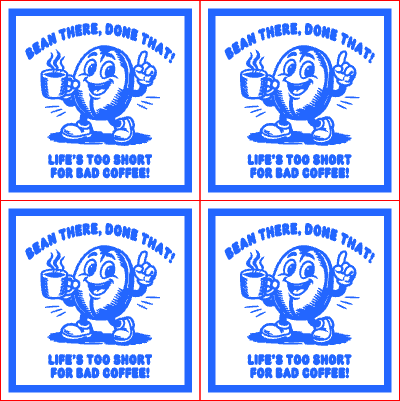
coffee bean coaster
.xcs
Application scenario
Laser processing
Machine & module

xTool P2S
55WCompatible xTool Machine
M2
10W, 20WF2 Ultra UV
5WF2
15WP3
80WF2 Ultra
40WF1 Ultra
20WM1
5W, 10WD1
5W, 10W, 20WD1 Pro
5W, 10W, 20W, 40WP2
55WF1
10WS1
10W, 20W, 40WM1 Ultra
10W, 20WMaterial used

1/8"(3mm) Basswood Plywood

24
717
Information
I created a Coffee Bean character and a saying that used "bean" to create a "Bean there, Done That!"
Instruction
1
Step1: Load Wood and Add settings

Preview

Preview
- I used 3mm basswood sheets that measured 12x12 inch sheets in the center of my P2S.
- In the software, I positioned the main design on top of the basswood centering all 4 coasters after I refreshed the background.
- Click on the design pieces, and confirm that the cut is 60/27/1 and engrave is set to 30/500/1
- Click on Preview to confirm the cut and engrave is correct.
2
Step2: Laser Cut

Preview

Preview
- Press Aimed-Measure, then move the blue box cursor over the wood surface and click anywhere on the wood cutting area.
- Click the Process button on the bottom right of the screen.
- A preview will be shown. Click the Start button (top right) to send it to the machine.
- Press the button on the P2S machine to start. It should take about 25 minutes to complete.
3
Step3: Finished Project

Preview
- Remove project from machine
- Clean the wood with a sponge to remove char marks or lightly sand
- Enjoy the coasters
Comments
Remixes



You may also like

Laser Engraved Coffee Cup Bean There Done That

3
14

Laser Engraved Cork Coffee Coaster with Funny 'Don't Talk I Need Coffee' Text

3
11

Laser Cut Wooden Coffee Bean Coasters for Coffee Cup

5
31

Laser Engraved Slate Coffee Coaster with Humorous Quote

7
39

Laser Engraved Coffee Slate Coaster I Love You A Latte

17
52

$0.99
$0.99
Credits99
Laser Engraved Wooden Coffee Coaster with Espresso Yourself Design

0

Laser Engraved Wooden Coffee Coaster with Cute Highland Cow Design

5
36

'/%3e%3cdefs%3e%3clinearGradient%20id='paint0_linear_1433_15726'%20x1='12'%20y1='5.25'%20x2='12'%20y2='18.75'%20gradientUnits='userSpaceOnUse'%3e%3cstop%20stop-color='%23FFC654'/%3e%3cstop%20offset='1'%20stop-color='%23FF8D12'/%3e%3c/linearGradient%3e%3c/defs%3e%3c/svg%3e)
Laser Cut Wooden Coffee Bean Character and Serving Tray with Removable Coaster

5
22

Coffee Time on wood coaster

44
455

His and Hers Set Laser Engraved Cork Coffee Coasters
2
18

Laser Cut Wooden Coffee Temperature Guide Coaster with Coffee Art

4
31

Slate Coaster – Coffee Bean Heart Engraving
8
36

Nicholas Cage Themed Funny Coffee Drink Coaster Bless This Nest

1
3

OutIn Inspired Wooden Coffee Coasters

12
22

Freshly Brewed Coffee Coaster
2
23

Laser Engraved Slate Coaster with Coffee Mug Quote

3
25

Laser Engraved Wooden Coffee Plant Hexagonal Coaster Set
28
113

Slate coffee coaster
10
63