
The xTool M series is the craft line, and it is the only xTool family where the laser is not the only tool in the machine. The M1 Ultra and M2 also carry an inkjet print head, and the M1 Ultra takes a cutting blade and a hot foil pen as well.
That widens the material list in a way wattage never could. This page covers what each head is for, what the machines cut, what they only engrave, and what should never go in one.
Key Takeaways
- The laser cuts wood, acrylic, paper, card and vinyl, and engraves stone, tile, glass, leather, fabric and coated metal.
- The print head puts full colour onto materials the laser can only scorch — plywood, sticker paper, card.
- The blade cuts vinyl and sticker stock without melting or discolouring the edge. Only the M1 Ultra has it.
- Bare metal is out on all three. Never laser PVC or unidentified vinyl — use the blade for those instead.
FYI: what are the xTool M-series machines?
Short version, so the rest of this makes sense. All three are enclosed craft machines built around a blue diode, with a small work area and a camera for placement. What separates them is how many heads they take.
| Machine | Heads it takes | Price and availability |
|---|---|---|
| xTool M1 | 10W blue diode | No machine page on xtool.com |
| xTool M1 Ultra | 10W or 20W blue diode, fine-point blade, inkjet print head, hot foil pen | No machine page; the 20W module kit and other accessories are still sold |
| xTool M2 | 10W or 20W blue diode, 3W infrared module, inkjet print head | From $599 (10W) or $999 (20W) |
The M1 Ultra is the widest of the three on heads, and that is what widens its material list rather than wattage.
For the machines themselves, read what the xTool M1 is and what the xTool M2 is. To compare across families, every xTool machine compared is the wider view.
What can you engrave and cut with an M-series machine?
Read the head column first. Several materials on this list are handled by something other than the laser, and that is the whole point of the family.
| Material | M1 | M1 Ultra | M2 |
|---|---|---|---|
| Wood, plywood and MDF | Yes · cut & engrave (10W) | Yes · cut & engrave (10W or 20W) | Yes · cut & engrave (10W or 20W) |
| Acrylic and plastic | Yes · cut & engrave (10W) | Yes · cut & engrave (10W or 20W) | Yes · cut & engrave (10W or 20W) |
| Paper, card and sticker stock | Yes · cut & engrave (10W) | Yes · laser (10W or 20W) or the fine-point blade | Yes · cut & engrave (10W or 20W) |
| Vinyl | Laser only (10W) | Blade, or laser (10W or 20W) | Laser only (10W or 20W) |
| Leather and PU | Yes · cut & engrave (10W) | Yes · cut & engrave (10W or 20W), plus the hot foil pen | Yes · cut & engrave (10W or 20W) |
| Coated and anodized metal | Yes · engrave (10W) | Yes · engrave (10W or 20W) | Yes · engrave (10W, 20W or 3W infrared) |
| Stone, slate and ceramic tile | Yes · engrave (10W) | Yes · engrave (10W or 20W) | Yes · engrave (10W or 20W) |
| Glass, surface frost only | Yes · engrave (10W) | Yes · engrave (20W) | Yes · engrave (10W or 20W) |
| Fabric | Yes · engrave (10W) | Yes · engrave (10W or 20W) | Yes · engrave (10W or 20W) |
| Rubber | Yes · engrave (10W) | Yes · engrave (20W) | Yes · engrave (10W or 20W) |
| Full-colour printing | No | Yes · inkjet print head | Yes · inkjet print head |
Every material links to its own section below. The wattages are each machine’s own laser heads. Bare metal, thick stock and PVC in the laser are covered in what not to put in.
Wood, plywood and MDF
Wood is what these machines are mostly bought for, and the small bed suits the work: coasters, boards, ornaments, signs. Engraving is fast and light; cutting is slow and near full power.

A monogram engraved into a bamboo cutting board.
Bamboo darkens cleanly, which is why it is such a common gift blank on these machines.
More wood our makers have tested
Plain wood engraves at 117 mm/s and 86% on a 10W. Cutting is a different world — poplar plywood at 4mm takes 4 mm/s at 70% on a 20W head.
Thickness is the real limit on a 10–20W diode. Above about 4mm you are fighting the machine. The wood material page lists boards with tested settings, and the wood machine comparison covers heavier options.
Paper, card, sticker stock and vinyl
This is where the M series stops behaving like a laser. Sticker paper and vinyl can be cut two ways, and the blade is usually the better one.
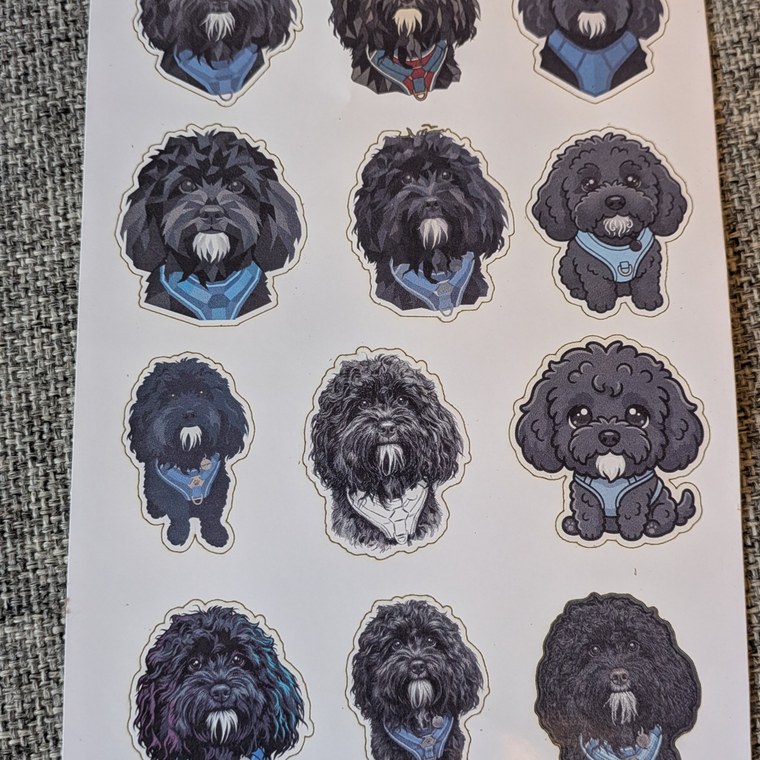
A sheet of die-cut dog stickers on glossy sticker paper.
Sticker sheets are one of the most common jobs in this family, on the laser or the blade.
More paper and vinyl our makers have tested
A laser cut on sticker stock browns the edge and can melt the adhesive. The fine-point blade cuts the same 0.1mm sheet cleanly at 100 mm/s with blade pressure 200, and the inkjet head prints the artwork onto it first.
If you do use the laser, keep it light: the sticker sheet above cuts at 30 mm/s and 90%, and white matte vinyl at 3 mm/s and 53%. See the paper material page for stock that behaves.
Never laser PVC vinyl. It releases hydrogen chloride, which corrodes the machine and is dangerous to breathe. That is exactly the gap the blade fills.
Acrylic and plastic
Cast acrylic cuts and engraves, but 3mm is slow going on a 20W diode. Thin sheet and foam are much happier, and engraving is comfortable at any tier.

A hummingbird design engraved into a clear acrylic keyring.
Thin acrylic is where these machines are comfortable. Three millimetres is already slow going.
More plastics our makers have tested
The same material cuts too, but slowly — 3mm black acrylic takes 3 mm/s at 80% on a 20W head, while EVA foam cuts at 4 mm/s and 40%. Two-tone sign plastic also works well and is the cheapest way to get crisp lettering.
Avoid polycarbonate, which yellows and burns instead of cutting. The acrylic material page covers which grades behave.
Leather and PU
Leather wants speed and a light touch on any diode. Too much power and you get a burnt halo instead of a clean line.

A mountain logo engraved into a hexagonal PU leather patch.
Fast and light is the rule on any coated leather. Excess power leaves a burnt halo.
More leather our makers have tested
A PU tag engraves at 200 mm/s and 35%, pink kangaroo leather at 250 mm/s and 75%. The same kangaroo hide also cuts through at 10 mm/s and 70% — cutting leather works, but it is slow and thickness varies across a hide.
The M1 Ultra’s hot foil pen adds a second option here: metallic foil pressed into leather and card, which no laser can do. The leather material page covers which hides behave.
Coated and anodized metal
A blue diode marks the coating on metal — powder coat, anodising, paint, laserable lacquer — and does nothing at all to the metal underneath. That is the ceiling, and it is a useful one.

An eagle crest engraved into a 20oz powder-coated tumbler.
The coating is removed to reveal the steel below. The metal itself is untouched.
More coated metal our makers have tested
Anodized aluminium business cards engrave at 300 mm/s and 100%, and a stainless dog tag at 20 mm/s and 100%. Bare stainless and brass do nothing at all — see the metal material page for the distinction between coated and bare stock.
Stone, slate and ceramic tile
Hard mineral surfaces engrave and never cut. They also take high power comfortably, which makes slate the cheapest way to test a new design on this family.

A skull design engraved into a slate coaster.
Slate takes high power comfortably and costs very little, so it is the cheapest way to test a design.
More stone and tile our makers have tested
A slate blank engraves at 155 mm/s and 45% on a 20W head, and a white wall tile at 140 mm/s and 90%. Painting the engraved area and wiping it back fills the mark for more contrast.
Glass
Glass frosts rather than carves. The beam abrades a shallow white layer you can feel with a fingernail, and that is the whole effect available on a diode of this size.

A quote engraved into the back of a round mirror.
Mirrors are engraved from the reverse so the mark sits behind the glass and stays protected.
More glass our makers have tested
A glass tumbler engraves at 110 mm/s and 60% on an M1 Ultra. What no diode can do is engrave inside a block — that needs UV, which the glass and crystal page explains.
Fabric and rubber
Two smaller materials with opposite habits. Fabric is engrave-only in practice on these machines; rubber is an engraving job that wants depth rather than speed.

A castle scene engraved into dark coated canvas.
The coating gives the beam a layer to remove, which plain canvas cannot offer.
More fabric and rubber our makers have tested
Cotton engraves at 100 mm/s and 45%. Synthetic cloth takes a mark better than cotton, which scorches. The fabric page explains which fibres behave.
Stamp rubber is the opposite: one tested sheet runs at 35 mm/s and 100% over three passes to cut a usable relief depth.
The non-laser heads: print, blade and foil
Three heads that are not lasers, and each one adds materials or finishes the beam cannot produce.

A full-colour jigsaw printed onto 3mm basswood plywood, then cut out. The colour is ink; the laser only does the cutting.
Inkjet print head (M1 Ultra and M2): full colour onto plywood, card and sticker stock. Print first, cut second, and the machine keeps registration between the two.
Fine-point blade (M1 Ultra): cuts vinyl and sticker paper with no heat at all, which is the only safe way to handle PVC and the only clean way to handle adhesive-backed stock.
Hot foil pen (M1 Ultra): presses metallic foil into leather, card and faux leather. It is a finishing tool rather than a cutting one, and nothing else in the xTool range does it.
What not to put in an M-series machine
PVC in the laser
Hydrogen chloride corrodes the machine and is dangerous to breathe. Use the fine-point blade instead, or switch to a PVC-free vinyl. This is the one material that damages the hardware as well as you.
Bare metal
Not dangerous, just futile on a blue diode — the beam reflects and nothing happens. Coated, anodised or painted stock is the workaround, and it covers most metal gift work.
Thick stock
These are 10–20W machines with a small bed. Above roughly 4mm you are better off on a CO2 machine than stacking passes and scorching the cut face.
Which M-series machine should you buy?
Only the M2 is still on sale, so for most people this is a tier question rather than a model question.

A Route 66 sign engraved into 3mm MDF at 200 mm/s and 40%, two passes.
The 10W at $599 handles engraving on wood, stone, tile, coated metal and leather, plus printing. Step up to the 20W at $999 if you cut plywood or acrylic regularly.
If you already own an M1 Ultra, it stays the most versatile machine of the three — it is the only one with the blade and the foil pen, and those cover materials the M2 cannot.
Final thoughts
The M series covers more material types than any other xTool family, and not because the laser is special. It is because a print head, a blade and a foil pen fill in exactly where a 10–20W diode runs out.
The ceiling is the usual diode one: no bare metal, no thick stock, no engraving inside glass. Everything else is a settings problem.
What materials can the xTool M2 cut and engrave?
It cuts wood, plywood and MDF up to about 4mm, cast acrylic, paper, card and sticker stock. It engraves stone, slate, ceramic tile, glass, leather, fabric, rubber and coated metal. It does not mark bare metal.
Can an M-series machine engrave stainless steel?
Only coated, powder-coated or anodised stock — you are marking the surface layer. Anodised aluminium business cards engrave at 300 mm/s and 100%. A blue diode cannot mark bare steel and cannot cut metal at all.
What does the inkjet print head actually do?
It prints full colour directly onto the material, then the laser cuts it out with registration preserved. That covers colour on plywood, card and sticker paper — results a laser can only approximate with scorch tones.
Which M-series machine cuts vinyl?
The M1 Ultra, using the fine-point blade. It cuts 0.1mm sticker stock at 100 mm/s with blade pressure 200 and no heat. Never laser PVC vinyl on any machine — the chlorine gas corrodes the hardware and is unsafe to breathe.
Is the 20W M2 worth the extra over the 10W?
If you cut plywood or acrylic regularly, yes. Both tiers engrave the same material list; the 20W mostly buys cutting speed and a little more depth. For engraving-only work the 10W at $599 is enough.
Can you still buy an xTool M1 or M1 Ultra?
Neither has a machine page on xtool.com any more. M1 Ultra accessories including a 20W module kit are still sold, so existing machines are supported. The M2 is the only M-series machine currently listed.
Got the material? Get the settings.
Every material on this page has tested power, speed and pass numbers behind it. Browse the full material library, or filter it down to your own machine.
