
HTV stands for heat transfer vinyl — a thin coloured vinyl with a heat-activated adhesive on one side and a clear carrier sheet on the other. You cut a shape out of it, remove everything you do not want, and press what is left onto fabric.
This guide covers what HTV is and how the carrier sheet makes it work, the material types worth knowing, real projects made with it, and where it beats sublimation and DTF — and where it loses.
Browse HTV designsFree downloadable cut files from the Atomm community, ready to weed and press.See the designsKey Takeaways
- HTV is coloured vinyl with heat-activated glue. It sits on the fabric rather than dyeing it.
- The clear carrier sheet is what holds a cut design together until it is pressed.
- Unlike sublimation, HTV works on cotton and dark garments — the vinyl brings its own colour.
What Is HTV?
Heat transfer vinyl is a sheet or roll material made of three layers: a clear plastic carrier on top, the coloured vinyl in the middle, and a heat-activated adhesive underneath. Heat melts that adhesive and bonds the vinyl to fabric.

The distinction that matters: HTV adds a layer. Sublimation dyes the fibres and leaves nothing on the surface, while HTV places a physical piece of vinyl on top of the fabric, which you can feel with a fingertip.
That layer is also the advantage. Because the vinyl carries its own colour, it works on black, navy, or red cotton just as well as on white polyester — the exact situation where sublimation fails completely.
How HTV Works
Five stages, and the carrier sheet is the part beginners misunderstand.
Step 1: Cut the design mirrored
A cutting machine cuts through the vinyl and adhesive but not the carrier. The design must be flipped horizontally, because you press it face down.
Step 2: Weed away the excess
Pick out everything that is not part of the design — the space around letters, the middle of an O. What remains stays stuck to the carrier in the right position.
Step 3: Position it on the garment
The carrier is clear, so you can see exactly where the design will land. This is the whole reason the carrier exists.

Step 4: Press with heat and pressure
Typically around 150°C for 10–15 seconds, though every brand states its own figures. The adhesive melts and grips the fibres.
Step 5: Peel the carrier
Some vinyls peel hot, some cold, and the packaging says which. Peeling a cold-peel vinyl while hot lifts the design straight off the shirt.
Mirror is not optional
HTV is pressed face down, so an unmirrored cut produces backwards text. Cutting software usually has a mirror toggle specifically for iron-on, and forgetting it is the most common wasted sheet in the craft.
Types of HTV
They all apply the same way; what changes is the finish and how forgiving the material is to cut and weed.
| Type | Looks like | Notes |
|---|---|---|
| Standard / everyday | Flat matte or satin colour | Cheapest, easiest to weed, the default |
| Glitter | Embedded sparkle, thicker | Harder to weed; needs longer press |
| Holographic | Shifts colour with angle | Thicker; avoid very fine detail |
| Metallic / chrome | Mirror-like foil finish | Shows every crease in the garment |
| Flock | Raised, velvety texture | Thick; feels like a patch |
| Puff | Rises when heated | Needs exact temperature to puff evenly |
| Stretch | Thin and flexible | For performance fabrics that move |
| Printable | White vinyl you print on | Full colour without layering |
The practical hierarchy: standard vinyl for anything with fine detail or small text, speciality vinyl when the finish is the point. Glitter and holographic look better in photos and weed far worse in real life.
Layering has a limit
Multiple colours are built by pressing one layer over another, but each layer adds thickness and stiffness. Three layers is a sensible ceiling on a t-shirt, and speciality vinyls should always be the top layer — most are not rated to have anything pressed on top of them.
Good HTV Projects
Five community pieces that each show something HTV does that other methods cannot. All are downloadable designs.
1. Grumpy Monkey heat transfer vinyl transfer

A metallic gold character pressed onto a black hoodie. This is the case that defines HTV: the vinyl brings its own opaque colour, so a dark garment needs no white underbase and no pretreatment at all.
Get this design →2. How to make a Happy Halloween T-shirt using Heat Transfer Vinyl

A Halloween t-shirt cut and pressed in a single evening. Speed is the underrated HTV advantage: no printer, no ink, no curing — a cutting machine and a press turn a design into a finished shirt in about fifteen minutes.
Get this design →3. Thankful & Blessed HTV on Canvas
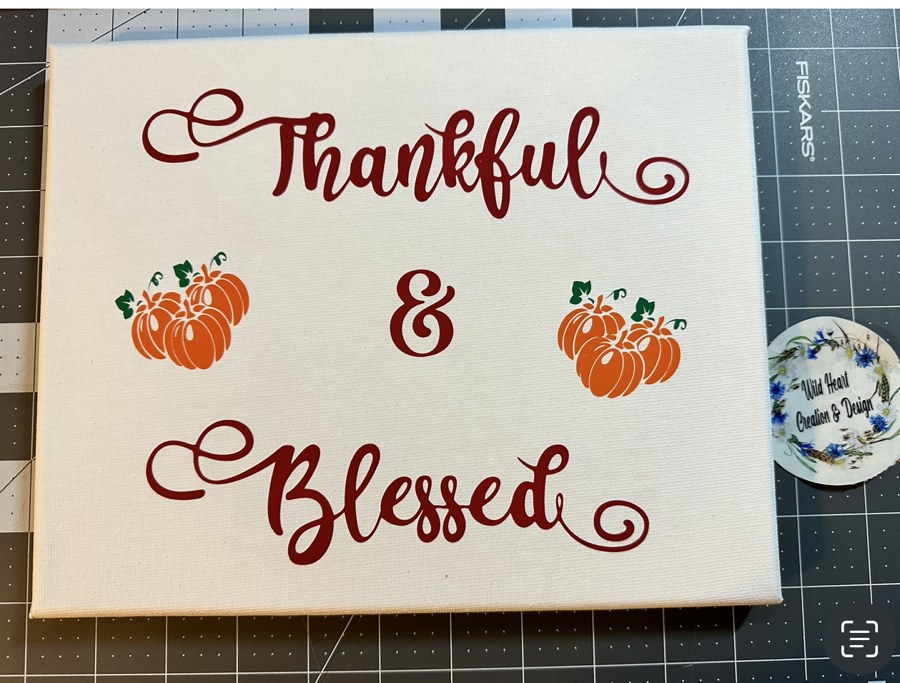
Multi-colour lettering and motifs on canvas. HTV is not limited to garments — anything that tolerates the press temperature and has some texture for the adhesive to grip will take it, canvas included.
Get this design →4. HTV Vinyl Make Your Own Magic Makeup Pouch
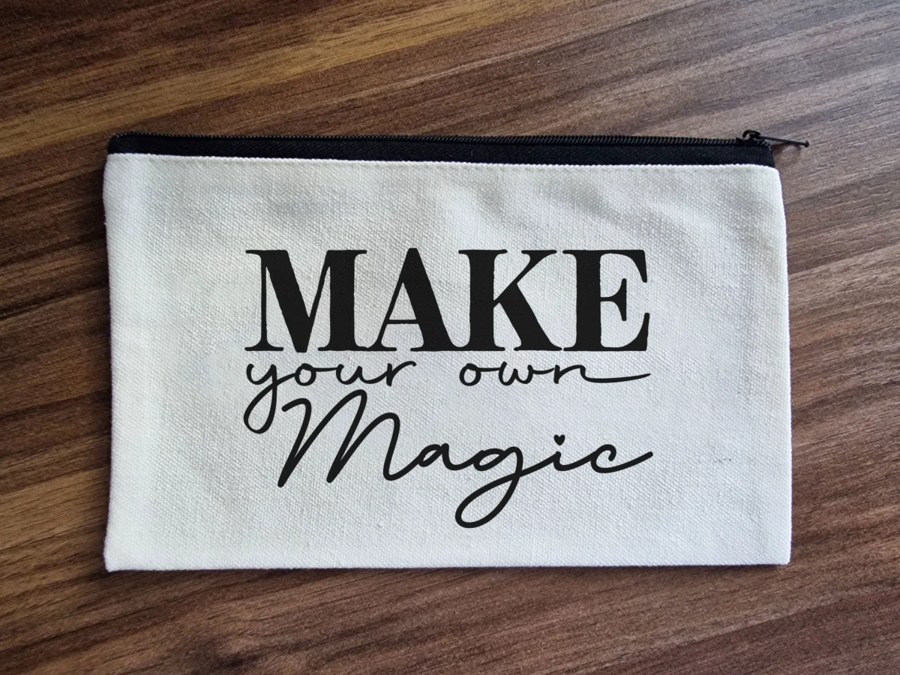
A script and serif design on a canvas makeup pouch. Fine script is where vinyl choice shows: standard vinyl holds these thin strokes, and the same design cut in glitter would break apart during weeding.
Get this design →5. Iron-on Leather patch for a hat
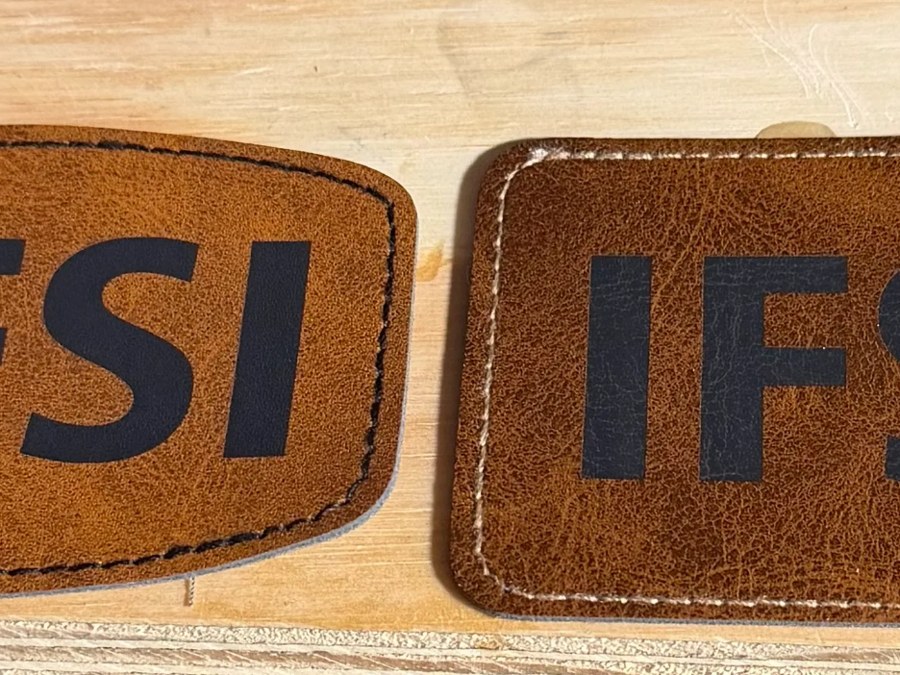
Iron-on lettering applied to leather patches for hats. Leather needs a lower temperature than cotton, which is the general rule with HTV — the garment sets the ceiling, not the vinyl.
Get this design →HTV vs. Sublimation vs. DTF
Three ways to decorate a shirt, and the choice is usually made by the garment rather than by preference.
| HTV | Sublimation | DTF | |
|---|---|---|---|
| What ends up on the fabric | A vinyl layer | Nothing — dye is in the fibres | A thin ink layer |
| Works on cotton | Yes | No | Yes |
| Works on dark garments | Yes | No | Yes |
| Full-colour photographs | Poor | Excellent | Excellent |
| Equipment to start | Cutter and press | Printer and press | Printer, shaker, press |
| Cost to start | Lowest | Medium | Highest |
| Best at | Text, logos, few colours | Photos on white polyester | Anything, any colour |

The honest summary: HTV has the lowest entry cost and wins on solid shapes and lettering. It loses the moment you want a photograph or a design with dozens of colours. For those see sublimation or DTF.
What You Need to Start
The cheapest genuine route into garment decoration, because two of the four items are consumables.
A cutting machine
Any blade cutter or laser that handles vinyl. This is the one real purchase.
HTV
Start with standard vinyl in one or two colours before buying speciality finishes you cannot yet weed.
A weeding tool
A hooked pick. A craft knife works, and a proper weeder costs very little and saves a lot of swearing.
A heat press
A household iron cannot hold temperature or apply even pressure. This is the corner not to cut.
Good HTV Machines
An HTV setup is two machines, not one. A cutter turns the design into a cut sheet; a press bonds it to the garment. They are bought separately and neither substitutes for the other.
The cutter
Any blade cutting machine handles vinyl — the common desktop models from Cricut and Silhouette all do. Blade cutters are the standard tool here because vinyl is thin and the cut only has to reach the carrier.
The press
This is where results are actually decided, and it is the half worth spending on. Two figures matter: whether the plate holds its set temperature across the whole surface, and whether it applies even pressure. An iron fails both.
1. xTool Heat Press
Best starting press for HTV
xTool sells this one explicitly for heat transfer vinyl, and the specification that matters for HTV is the temperature range: 212°F to 400°F covers every vinyl on the market with room at the bottom for heat-sensitive garments.
The Mini Press in the kit is the part people underrate. Sleeves, pockets, caps, and shoes cannot be reached by a full platen, and those are exactly the placements a large press cannot do at all.
Pros
- Covers the full HTV temperature range
- Mini Press reaches sleeves, pockets, and caps
- Rated for puff HTV, not just flat vinyl
- Lowest cost of the two by a wide margin
Cons
- Manual pressure, so consistency is down to technique
- Smart Press plate is small for oversized prints
xTool Heat Press: the sensible first press — enough range and control for any vinyl in this guide.
2. xTool WonderPress
Best for volume and thick garments
Automatic pressure is the upgrade. On a manual press, even pressure depends on how hard you lean on the handle, and a batch of shirts pressed over an hour drifts. A hundred kilos applied by the machine does not.
The 7.5 cm clearance is the other practical difference. Thick hoodies compress badly under a shallow press, and under-pressing on a hoodie is one of the more common reasons a design lifts after washing.
Pros
- Automatic pressure removes the main source of variation
- Clearance handles hoodies and thick garments
- Also does vacuum forming and DTF curing
Cons
- Well over twice the price of the entry press
- More machine than a few shirts a month needs
xTool WonderPress: worth it once you are pressing batches or working on hoodies rather than tees.
Either press covers HTV. The choice is really about volume: manual is fine for a handful of shirts, automatic pressure earns its cost when you are doing runs.
Conclusion
HTV is coloured vinyl with heat-activated glue, held in position by a clear carrier sheet until it is pressed. Everything distinctive about it follows from being a layer added on top rather than a dye soaked in.
That layer is why it works on cotton and on dark garments, and why it can be felt and will eventually crack if the design is large and solid.
For solid shapes, lettering, and small runs on any colour of shirt, it is still the cheapest and fastest route there is.
Frequently Asked Questions about HTV
What does HTV stand for?
Heat transfer vinyl. It is coloured vinyl with a heat-activated adhesive backing and a clear carrier sheet, cut to shape and pressed onto fabric.
What is the difference between HTV and vinyl?
Plain adhesive vinyl sticks by itself and suits hard surfaces like mugs and windows. HTV only bonds under heat and is made for fabric. They are not interchangeable.
Does HTV work on cotton?
Yes, and this is its main advantage over sublimation. It also works on dark garments, because the vinyl supplies its own opaque colour rather than relying on the fabric being white.
Why do I have to mirror HTV?
Because the design is pressed face down, with the clear carrier on top. Cutting it unmirrored produces backwards text once the carrier is peeled away.
Can I use an iron instead of a heat press?
Poorly. An iron cannot hold a steady temperature or apply even pressure, and its steam holes leave unbonded patches. Designs applied with an iron typically start lifting after a few washes.
How long does HTV last?
Properly pressed, many washes. Failures are almost always application faults rather than material faults: too cool, too brief, or peeled at the wrong temperature for that vinyl.
Find an HTV design to press
Browse free community cut files ready to weed and heat press.
