











































![[Laser cut and engrave] Laser Cut Nativity Scene Light Box with A Child is Born Text](https://storage-us.atomm.com/resource/xtool/community/attachment/xtool-community/ba2978bd-fa1e-49c5-80ab-3f2d0e8ecdac.jpg?x-oss-process=image/resize,w_1200,h_900,limit_0/interlace,1/format,webp/auto-orient,1)
![[Laser cut and engrave] Laser Cut Nativity Scene Light Box with A Child is Born Text](data:image/png;base64,iVBORw0KGgoAAAANSUhEUgAAAAoAAAAKCAYAAACNMs+9AAAAAXNSR0IArs4c6QAAABdJREFUKFNjZCASMBKpjmFUId6QIjp4AAppAAuXjCs4AAAAAElFTkSuQmCC)
![[Laser cut and engrave] Laser Cut Nativity Scene Light Box with A Child is Born Text](https://storage-us.atomm.com/resource/xtool/community/attachment/xtool-community/ba2978bd-fa1e-49c5-80ab-3f2d0e8ecdac.jpg?x-oss-process=image/resize,w_200,h_150,limit_0/interlace,1/format,webp/auto-orient,1)
![[Laser cut and engrave] Laser Cut Nativity Scene Light Box with A Child is Born Text](https://storage-us.atomm.com/resource/xtool/community/attachment/xtool-community/d4358d6e-f45d-41f4-abc6-85af595e6858.jpg?x-oss-process=image/resize,w_200,h_150,limit_0/interlace,1/format,webp/auto-orient,1)
![[Laser cut and engrave] Laser Cut Nativity Scene Light Box with A Child is Born Text](https://storage-us.atomm.com/resource/xtool/community/attachment/xtool-community/92f46c8d-b5dc-491b-80d1-25fa6456c3e4.jpg?x-oss-process=image/resize,w_200,h_150,limit_0/interlace,1/format,webp/auto-orient,1)
![[Laser cut and engrave] Laser Cut Nativity Scene Light Box with A Child is Born Text](https://storage-us.atomm.com/resource/xtool/community/attachment/xtool-community/b3463e7a-2d69-491d-aeac-361292c827f7.jpg?x-oss-process=image/resize,w_200,h_150,limit_0/interlace,1/format,webp/auto-orient,1)
![[Laser cut and engrave] Laser Cut Nativity Scene Light Box with A Child is Born Text](https://storage-us.atomm.com/resource/xtool/community/attachment/xtool-community/69ad75f5-2ce5-42a7-afcf-12dd871ee1a0.jpg?x-oss-process=image/resize,w_200,h_150,limit_0/interlace,1/format,webp/auto-orient,1)
![[Laser cut and engrave] Laser Cut Nativity Scene Light Box with A Child is Born Text](https://storage-us.atomm.com/resource/xtool/community/attachment/xtool-community/3158f76d-b8eb-4064-9701-f39b8ab301b1.jpg?x-oss-process=image/resize,w_200,h_150,limit_0/interlace,1/format,webp/auto-orient,1)
A Child Is Born Lantern
 Instruction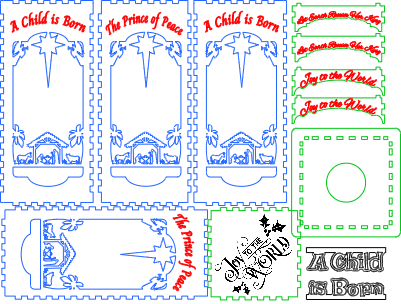


Information
This lantern design was created using a very basic box design. I created the wording with simple cut outs text. my favorite part of this design is the "Light Tower" that I designed to allow for fairy lights to be strung around it and inserted through the bottom, hidden, allowing the on/off switch to be accessible for battery replacement.
Instruction
Step1: The Light Tower


Cut out pieces for light tower and glue all pieces together
Thread the light through the hole and wrap light around the tower (begin at the top).
To allow balanced lighting, turn on the string of lights to see how the lights will look.
Step2: Create your lantern


Once you have created your lantern panels, glue the vellum to the back of each Panel carefully.
NOTE: there are blank panels that will allow you to insert your own designs on the first page. You can also seek your own customized size on the “Boxes” website.
Step3: Insert your light tower


Finally insert your light tower and make sure to glue the light switch securely.
Step4


a great way to celebrate the season and to show off your talents. I ask that the specific elements of this project not be used. This is for personal use and inspiration. Thanks for your time and your vote!
Merry Christmas and Happy Crafting!
Robert
Oui B Cr8f


