![[Laser cut and engrave] From Bean to Earth](https://image-res.atomm.com/resource/xtool/community/attachment/xtool-community/6e1f3e3b-f3be-4cd1-9a5b-97a26146fb49.png?x-oss-process=image/resize,w_1200,h_900,limit_0/interlace,1/format,webp/auto-orient,1)

![[Laser cut and engrave] From Bean to Earth](data:image/png;base64,iVBORw0KGgoAAAANSUhEUgAAAAoAAAAKCAYAAACNMs+9AAAAAXNSR0IArs4c6QAAABdJREFUKFNjZCASMBKpjmFUId6QIjp4AAppAAuXjCs4AAAAAElFTkSuQmCC)
![[Laser cut and engrave] From Bean to Earth](https://image-res.atomm.com/resource/xtool/community/attachment/xtool-community/6e1f3e3b-f3be-4cd1-9a5b-97a26146fb49.png?x-oss-process=image/resize,w_200,h_150,limit_0/interlace,1/format,webp/auto-orient,1)
![[Laser cut and engrave] From Bean to Earth](https://storage-us.atomm.com/resource/xtool/community/attachment/xtool-community/c6bf0951-29f5-43c9-98ef-2cdb6fa9699a.png)
![[Laser cut and engrave] From Bean to Earth](https://image-res.atomm.com/resource/xtool/community/attachment/xtool-community/70fb855d-bebd-46fd-a6ad-ed9bd3f52f76.jpg?x-oss-process=image/resize,w_200,h_150,limit_0/interlace,1/format,webp/auto-orient,1)
![[Laser cut and engrave] From Bean to Earth](https://image-res.atomm.com/resource/xtool/community/attachment/xtool-community/579705fd-f805-4e6f-b05f-ef1f341ac046.jpg?x-oss-process=image/resize,w_200,h_150,limit_0/interlace,1/format,webp/auto-orient,1)
![[Laser cut and engrave] From Bean to Earth](https://image-res.atomm.com/resource/xtool/community/attachment/xtool-community/abdb8827-e0c0-43e2-816b-a0407ca8c444.jpg?x-oss-process=image/resize,w_200,h_150,limit_0/interlace,1/format,webp/auto-orient,1)
![[Laser cut and engrave] From Bean to Earth](https://image-res.atomm.com/resource/xtool/community/attachment/xtool-community/a1392a7e-eed9-43cb-9b1b-c46af656e81e.jpg?x-oss-process=image/resize,w_200,h_150,limit_0/interlace,1/format,webp/auto-orient,1)
From Bean to Earth
 Instruction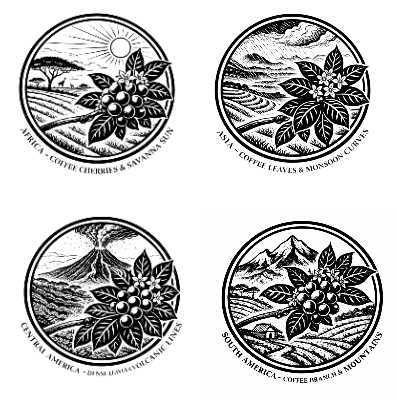


Information
      From Bean to Earth is a curated set of natural slate coasters that tells the story of coffee’s journey across the world.

Each coaster is intricately engraved on real slate and illustrates one of the world’s iconic coffee-growing regions — from sun-washed savannas and monsoon-fed hillsides to volcanic slopes and high mountain farms. Together, the illustrations trace coffee’s origins, shaped by soil, climate, and landscape.

The artwork is laser-engraved directly into stone, allowing the raw texture of slate to become part of the design. No two coasters are exactly alike, making each set a unique expression of coffee’s deep connection to the earth.

From Bean to Earth is more than a coaster set — it is a quiet conversation about origin, craft, and the land that gives coffee its character.
Instruction
Step1

First step is to arrange the slate coasters on the machine bed and take an image while aligning the laser.
Remember Slate being delicate the engraving is not through burning but by breaking, Higher power will crack the fine details. So please be Careful not to push the power too much. Multiple passes also do the same, So if you end up needing multiple pass, Low power and high speed passes still help.
Step2

Add Non-Functional Rectangle Boxes around the slate. This helps in aligning and also help to center any image that is being used for the purpose of engraving.
Step3


Select any one of the image and from here we have three ways to process it. In this step we are trying to trace the image so that when we engrave we can just get the part we need.
Step4

In this image, I was not able to trace so thought of using a mask to do the job
Step5

Once everything is arranged, we need to go with either of the settings below.
- POWER -30%, SPEED-150,MODE- GREYSCALE, LINES/CM - 300
OR - POWER -35%, SPEED-130, MODE- GREYSCALE, LINES/CM - 300
Use whichever produces the best result for you.
Remixes



You may also like

Laser Engraved Cork Coffee Coaster Awaken With Every Sip


Technical Brewing Guide Designs – Barista Gift, Moka Pot, French Press, Pour Over & Espresso


Table coaster


Laser Cut Wooden Coffee Coasters Set with Cup and Bean Designs


Laser Cut Wooden Coffee Bean Coasters for Coffee Cup


Coffee scriptures


Coffee and Tea Themed Wooden Engraved Coasters


"It's 5 OClock Somewhere" Laser Engraved Cork Coaster Set


Laser Cut Wooden Heart-Shaped Coffee Coasters with Storage Box


Sip & Settle: Modern Coffee Coasters in Wood + Acrylic


OutIn Inspired Wooden Coffee Coasters


Laser Engraved Coffee Themed Slate Coasters Set of 4

Laser Engraved Slate Coasters with Coffee Design


Coffee Themed Slate Coaster


Coffee ceramic mug personalised and engraved

Laser Engraved Slate Coffee Coaster with Humorous Quote

Funny Coffee Coasters

Embossed coffee bean pattern on a slate coaster
