
Zoom into an old newspaper photo, a comic book panel, or a band t-shirt and you'll find the same secret everywhere: there are no grays. Just dots — big ones where the image is dark, tiny ones where it's light. That's halftone, and it's quietly one of the most important tricks in the history of images.
The short answer:
- Halftone simulates continuous tones using a pattern of dots in a single ink color.
- Big, tightly packed dots read as shadow; small, sparse dots read as highlight.
- Your eye blends them into shades that aren't actually there.
- Born in printing, it's now a signature style in design, apparel, and laser engraving.

How does halftone work?
A printing press — or a laser, or a screen-printing squeegee — can only do two things at any spot: put ink there, or not. It can't print "50% gray." Halftone solves this with an optical illusion:
- The image is broken into a grid of cells.
- Each cell gets one dot, sized by the brightness underneath — dark areas get fat dots that almost touch; light areas get pinpricks.
- At viewing distance, your eye averages the dots and the paper between them into smooth tones.
The magic number is dot density (traditionally "lines per inch"): newspapers used coarse grids you can see with the naked eye, glossy magazines used grids so fine the dots vanish. Coarse isn't worse — it's a look, and it's exactly the look designers now chase on purpose.
What is halftone printing?
Halftone printing is why photographs could appear in newspapers at all. Before it, printed images had to be hand-engraved lines. With halftone screens (invented in the late 1800s), any photo could be photographed through a screen, broken into dots, and printed with one pass of black ink.
Color printing extends the same trick: CMYK halftones print four dot patterns — cyan, magenta, yellow, and black — each rotated at a different angle so the dots interleave into tiny rosettes instead of clashing. Every magazine page, cereal box, and comic you've ever read is halftone dots pretending to be full color.
What is the halftone effect in design?
Somewhere along the way, the workaround became the style. The halftone effect is when designers use visible, deliberately oversized dots as a graphic statement:
- Comic and pop-art looks — Roy Lichtenstein turned newsprint dots into fine art, and comic shading still means "Ben Day dots" to everyone.
- Retro apparel prints — band tees and streetwear use chunky halftones because they screen-print beautifully in one or two inks.
- Fade and texture effects — a halftone gradient (dots shrinking to nothing) is the cleanest way to fade an image into a background without a smooth gradient's printing headaches.
- Dotwork tattoo and poster styles — stippled shading is halftone's hand-drawn cousin.
Why halftone matters for makers and laser engraving
Here's the part most design articles miss: a laser engraver has the same limitation as a printing press — at any point it either fires or it doesn't. There's no "50% burn." So when you engrave a photo, your software quietly converts it into… a halftone (or its scattered-dot cousin, dithering).
That makes halftone the native language of photo engraving:
- Engraved photos on wood, slate, or metal are dot patterns tuned to the material.
- Bold halftone conversions — done deliberately, with big dots — engrave faster and read more clearly than subtle grayscale attempts, especially on rough materials.
- Screen printing and vinyl benefit the same way: one color, all the shading.
If you make things, halftone isn't retro trivia — it's the difference between a muddy engraving and a crisp one. (Sharper sources engrave sharper, too — a one-minute enhancement pass before converting helps.)
How to make a halftone image (free, in your browser)
You don't need Photoshop. Atomm's free Halftone Maker converts any image into halftone or dotwork textures with a live preview:

- Open the Halftone Maker and click Create New.
- Upload your image — portraits, logos, and high-contrast photos convert best.
- Tweak the dots with live preview: adjust dot size, spacing, and pattern style until the balance of detail and boldness looks right.
- Export a crisp PNG — ready for printing, screen printing, apparel mockups, or your laser software.
Tip: For halftones that will be engraved or screen-printed, err on the side of bigger dots and wider spacing than looks ideal on screen. Physical processes fill dots in slightly — what looks slightly too coarse on your monitor usually comes out perfect on the material.
Halftone vs. dithering vs. grayscale
| Technique | What it is | Dots look like | Best for |
|---|---|---|---|
| Halftone | Ordered grid of variable-size dots | Regular, visible pattern | Print, apparel, bold engraving, retro style |
| Dithering | Scattered same-size dots (e.g. Floyd–Steinberg) | Random "noise" texture | Photo laser engraving, subtle shading |
| Grayscale | True continuous tones | No dots | Screens only — printers and lasers must convert it |
All three describe the same problem — faking smooth tone with on/off marks — with different aesthetics. Halftone is the one you choose when you want the dots to show.
Halftone Design Examples to Try
Halftone shines on apparel and print goods. These community designs show the range — each is a real file you can open and make for free.
1. Vintage Halftone Product Art

Old-label charm comes from coarse halftone shading — this Amalfi lemons tote reads like a century-old crate label. The dot texture is what keeps flat two-color printing from feeling flat.
2. Statement Hoodie Prints

Big halftone portraits print beautifully on garments — the dots carry all the shading in one or two ink colors, which is exactly what screen printing wants. Bold enough to read across a room. New to garments? Designing a shirt end-to-end is easier than it looks.
3. Cinematic T-Shirt Scenes

A full cityscape on a single-color shirt: halftone compresses a detailed, moody scene into printable dots. Dark garments plus light-ink halftones are the classic movie-poster formula.
4. Comic-Style Character Art
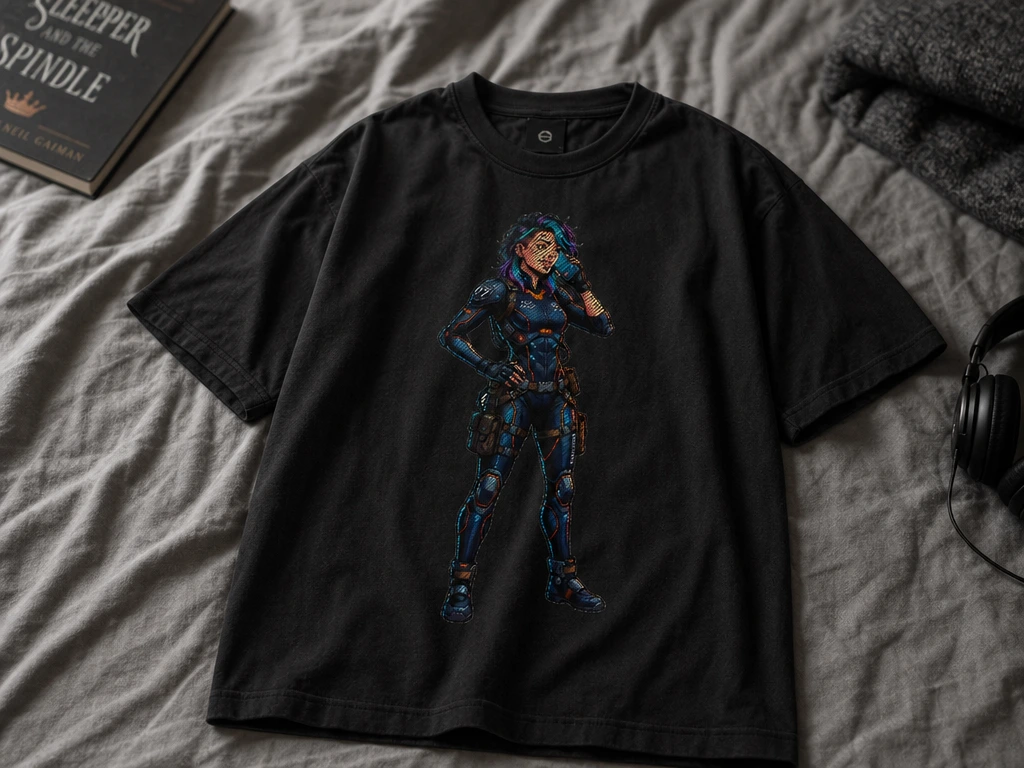
Character art with halftone shading lands straight in comic-book territory — flat colors, dot gradients, bold outlines. The style that made newsprint superheroes still works on streetwear.
5. Pet Portrait Apparel

Pet portraits convert wonderfully to halftone — fur becomes texture instead of mush. Run a photo through a halftone converter and it's ready for a shirt, a tote, or a laser-engraved plaque.
Want more? Browse the halftone collection for community-made halftone projects.
Frequently Asked Questions
What does halftone mean?
Halftone is a technique that simulates smooth tones using dots of a single color. Larger, denser dots create dark areas; smaller, sparser dots create light areas — and at normal viewing distance, the eye blends them into apparent shades of gray (or of any single ink color).
What is a halftone pattern used for?
Originally, for printing photographs with one ink — newspapers, magazines, and comics all rely on it. Today it's also a deliberate design style (pop art, apparel prints, posters) and the underlying method laser engravers and screen printers use to reproduce photos.
What's the difference between halftone and dithering?
Both fake smooth tone with dots. Halftone uses an ordered grid of variable-sized dots, giving a visible, regular pattern. Dithering scatters same-sized dots in a noise-like distribution, giving a subtler texture — it's the default for photo laser engraving.
How do I turn a photo into a halftone?
Use a converter: upload the photo, adjust dot size and spacing with a live preview, and export a PNG. Atomm's free browser-based Halftone Maker does exactly this with no software install — high-contrast photos and portraits give the boldest results. For print-specific screens and settings, we've also covered making halftones for printing.
Why do laser engravers use halftone patterns?
A laser can only fire or not fire at each point — it can't burn a literal 50% gray. Converting a photo to halftone or dithered dots translates its tones into a pattern of marks the laser can actually make, which is why dot conversion is built into every photo-engraving workflow.
The bottom line
Halftone is the 140-year-old hack that never stopped being useful: dots standing in for tones, first out of necessity, now out of style. Whether you're printing a shirt, engraving a photo, or chasing a pop-art look, the dots are the point — so make them deliberately.
Try it yourself: convert any image free with the Atomm Halftone Maker, then send the result to a shirt, a poster, or your laser.