
 Welcome to the latest weekly update!
Last week we have received very constructive feedback from the community. We feel super excited and thankful for your support. Many thanks for pushing us forward!!
Without further delay, let’s see our answers to your questions and suggestions
Q&A
1. When will LightBurn be able to run through XCS instead of Laserbox?
Thanks for mentioning this! We have a tip on How to Use LightBurn on M1? , which is one of the most read posts in the community. We have also been exploring better ways ever since. The good news is XCS 1.0 supports G-code import and I believe that solves your problem!
Stick around because the official version is just about to be released
2. Can I move around the screen without having to switch from the “hand” tool to arrow?
Yes, you can move around the canvas by pressing the spacebar and holding the left mouse button. If you’re interested in XCS hotkeys, check Keyboard Shortcuts for xTool Creative Space
3. SVG related issues
A tip about FAQs on Importing Images will be posted later today. You can check out the post to find out more info about file formats/ maximum image size/ file cannot be opened error/ lengthy parsing time and operation lag/ text in SVG/ SVG parsing errors/ G-code being too large.
If your queries are not answered, please leave a comment or PM me.
Suggestions from community
1. When will XCS support layer management?
This feature is on our to-do list. This function is expected to be released in XCS V1.3. Trust us, for Captain Laser’s sake, we will have it!
2. The ability to open two projects all at once so that I can move canvases between them or at least copy pieces from one project to another?
3. Is it possible to remove or add new anchor points within a shape drawn with the vector function?
4. XCS for Linux
About the 2-4 suggestions, thank you all for the valuable insights! Captain Laser informed product managers about them. We will take careful consideration of them.
Tips for the week
We’re preparing new tips based on your feedback:
1. Make a leather brush case with M1
We’re writing this because some of you have questions about leather processing, such as settings. Please keep a close eye on our community and FB group for updates~
2. How to curve text by using XCS and Inkscape?
We’ve received some requests about this function and we found a way to achieve the curving outcome using XCS and Inkscape. You’ll soon see the post!
3. What is color engraving? [Application]
Color laser engraving is a technique to add different colors to the engraved surface.
The most typical material for color laser engraving is metal(stainless steel, titanium, and aluminum). By adjusting the laser’s frequency, power, and speed, metals can be colored in diverse ways.
We’re working on instructions for color laser engraving on metal, which, hopefully, should help you enhance the beauty of your project and explore other opportunities
4. What is Lines per cm?
It simply means the number of lines in one centimeter. This parameter determines the resolution of the image to be engraved.
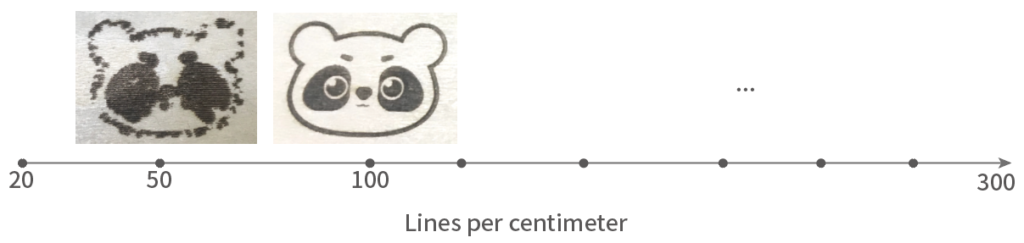
To help you get a better understanding of it, a detailed tip is on the way, too
Once again, thank you so much for your trust and support.
Your feedback is the best motivation for us, so please do not hesitate to let us know your thoughts in the comment section below~