
举报
![[Laser cut and engrave] Arch Earring Holder Stand](https://image-res.atomm.com/resource/xtool/community/attachment/xtool-community/c6188f31-3bf9-4eec-b328-0ae9f624cab6.png?x-oss-process=image/resize,w_1200,h_900,limit_0/interlace,1/format,webp/auto-orient,1)
![[Laser cut and engrave] Arch Earring Holder Stand](data:image/png;base64,iVBORw0KGgoAAAANSUhEUgAAAAoAAAAKCAYAAACNMs+9AAAAAXNSR0IArs4c6QAAABdJREFUKFNjZCASMBKpjmFUId6QIjp4AAppAAuXjCs4AAAAAElFTkSuQmCC)
![[Laser cut and engrave] Arch Earring Holder Stand](https://image-res.atomm.com/resource/xtool/community/attachment/xtool-community/c6188f31-3bf9-4eec-b328-0ae9f624cab6.png?x-oss-process=image/resize,w_200,h_150,limit_0/interlace,1/format,webp/auto-orient,1)
![[Laser cut and engrave] Arch Earring Holder Stand](https://image-res.atomm.com/resource/xtool/community/attachment/xtool-community/ece7a410-3c21-4edc-8b8b-0d5dabb0b6c5.png?x-oss-process=image/resize,w_200,h_150,limit_0/interlace,1/format,webp/auto-orient,1)
![[Laser cut and engrave] Arch Earring Holder Stand](https://image-res.atomm.com/resource/xtool/community/attachment/xtool-community/d56fc4e5-c88d-4619-871a-1d2f7b9ecc74.png?x-oss-process=image/resize,w_200,h_150,limit_0/interlace,1/format,webp/auto-orient,1)
![[Laser cut and engrave] Arch Earring Holder Stand](https://image-res.atomm.com/resource/xtool/community/attachment/xtool-community/09598ee0-6e63-4008-a5c6-e1e263e86142.png?x-oss-process=image/resize,w_200,h_150,limit_0/interlace,1/format,webp/auto-orient,1)
![[Laser cut and engrave] Arch Earring Holder Stand](https://image-res.atomm.com/resource/xtool/community/attachment/xtool-community/bc474fdb-5f54-4072-8935-811822032c2a.png?x-oss-process=image/resize,w_200,h_150,limit_0/interlace,1/format,webp/auto-orient,1)
拱形耳环架
 教程
教程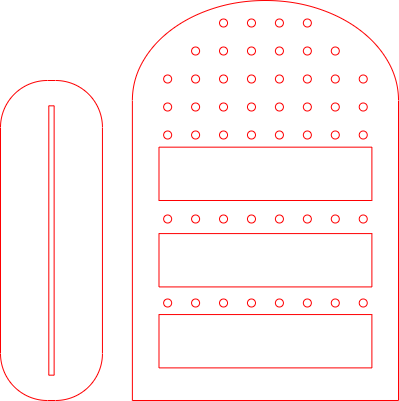
Arch Earring Holder Stand
.xcs
应用场景
激光加工
机器与模块

xTool D1 Pro
20W材料兼容的 xTool 机器
上新
M2
10W, 20WF2 Ultra UV
5WP3
80WF2 Ultra
40WF1 Ultra
20WM1
5W, 10WD1
5W, 10W, 20WD1 Pro
5W, 10W, 40WP2
55WF1
10WS1
10W, 20W, 40WM1 Ultra
10W, 20WP2S
55W使用的材料

3mm椴木胶合板

6mm枫木胶合板

173
1583
教程
1
步骤1
机器
中的物理设置
- li start="1" type="1">材料放置:将木材平放在蜂窝板或木条上。
- 定位激光头:手动将激光头(或使用软件箭头)移动到材料的左上角。
2
步骤2
配置xTool Studio
- li start="1" type="1">连接您的设备:打开XCS,并通过USB、Wi-Fi或IP连接到您的S1或P2。
- 选择模式:
- Capture the Canvas: * 在 P2 上,点击刷新以拍摄你的木材广角照片。
- 导入你的设计:打开你从 Atomm 下载的 xcs 文件。
3
步骤3
设置对焦点
正确的对焦是干净利落的切割与焦黑的区别。
- 自动测量:在右侧面板点击自动测量图标(看起来像一个小尺子/目标)。
- S1:探头会下沉接触木头。
- P2:激光头会通过内置传感器在材料上移动,测量高度。
4
步骤4
调整"切割"参数
在画布上选择你的设计,打开右侧的设置面板。
- 处理类型:将"分数"或"雕刻"改为切割。
- 设置功率/速度:
- 传递:除非木材特别厚(超过10毫米)否则设为1。
5
步骤5
构图与起始
- 构图:点击右下角的"Framing"。激光头会沿矩形移动,准确显示切割位置。确保它不会碰到任何针脚或磁石。
- Process: 点击 Process,然后 Start.
评论
二创



您可能也喜欢

树饰收纳架 3mm |激光切割耳环夹文件(SVG)

2
15

3D分层珠宝架。耳环收纳盒激光切割。波西米亚配饰展示 svg。掉耳环收纳。蝴蝶

46
327

耳环架激光切割文件、SVG、Glowforge、Sieraden支架、sieraden展示

18
111

独立耳环展示架

7
99

虹彩拱形耳环架

0
0

耳环架

2
14

激光雕刻亚克力耳环和展示架

11
33

花卉图案耳环架代表珠宝组织

1
17

'/%3e%3cdefs%3e%3clinearGradient%20id='paint0_linear_1433_15675'%20x1='12'%20y1='3.25'%20x2='16.6891'%20y2='20.75'%20gradientUnits='userSpaceOnUse'%3e%3cstop%20stop-color='%23FF5D80'/%3e%3cstop%20offset='1'%20stop-color='%23FF0035'/%3e%3c/linearGradient%3e%3c/defs%3e%3c/svg%3e)
珠宝摊

99
552

珠宝展示激光切割 |珠宝摊 |耳环架 |珠宝架 |CNC 文件

11
56

激光切割展示架 - 3毫米木材

140
899

$2.10
$2.10
Credits210
3D珠宝展台。耳钉收纳盒激光切割。波西米亚风格配饰展示。配件收纳。掉落耳环架。饰品盘
4

蝴蝶耳环架

19
97

支撑 bijoux arbre / 激光切割木质树饰耳环架

56
289

木制耳环展示架 |激光切割珠宝架 |前台女性剪影组织器 |耳环展示

40
141

木制手机盖激光切割
4
25

耳环展示板
8
37

Xtools 遥控支架——不到一块板,且基于F1 Ultra制造

4
26