
報告する
![[Laser cut and engrave,Screen printing] Bumble Bee Embossed and Cut from 2mm Brass coin](https://image-res.atomm.com/resource/xtool/community/attachment/xtool-community/aacb87eb-5a94-4a99-9441-dc821a74294a.JPG?x-oss-process=image/resize,m_fill,w_1280,h_960,limit_0/interlace,1/format,webp/auto-orient,1)
![[Laser cut and engrave,Screen printing] Bumble Bee Embossed and Cut from 2mm Brass coin](data:image/png;base64,iVBORw0KGgoAAAANSUhEUgAAAAoAAAAKCAYAAACNMs+9AAAAAXNSR0IArs4c6QAAABdJREFUKFNjZCASMBKpjmFUId6QIjp4AAppAAuXjCs4AAAAAElFTkSuQmCC)
![[Laser cut and engrave,Screen printing] Bumble Bee Embossed and Cut from 2mm Brass coin](https://image-res.atomm.com/resource/xtool/community/attachment/xtool-community/aacb87eb-5a94-4a99-9441-dc821a74294a.JPG?x-oss-process=image/resize,m_fill,w_160,h_120,limit_0/interlace,1/format,webp/auto-orient,1)
![[Laser cut and engrave,Screen printing] Bumble Bee Embossed and Cut from 2mm Brass coin](https://storage-us.atomm.com/resource/xtool/community/attachment/xtool-community/4f36bb23-a743-4ae2-a413-1cc4adda6ac9.gif)
![[Laser cut and engrave,Screen printing] Bumble Bee Embossed and Cut from 2mm Brass coin](https://storage-us.atomm.com/resource/xtool/community/attachment/xtool-community/73cc3fe4-f77f-44f1-bbf2-3f7459cca34f.gif)
![[Laser cut and engrave,Screen printing] Bumble Bee Embossed and Cut from 2mm Brass coin](https://storage-us.atomm.com/resource/xtool/community/attachment/xtool-community/48777f2f-e688-4ac9-8890-256ced2cce2a.gif)
![[Laser cut and engrave,Screen printing] Bumble Bee Embossed and Cut from 2mm Brass coin](https://storage-us.atomm.com/resource/xtool/community/attachment/xtool-community/6d3e952d-7898-4b83-9c21-84868ebd224d.gif)
![[Laser cut and engrave,Screen printing] Bumble Bee Embossed and Cut from 2mm Brass coin](https://storage-us.atomm.com/resource/xtool/community/attachment/xtool-community/58ae1c89-e1ed-4f3d-87cd-a945d6abfbe5.gif)
![[Laser cut and engrave,Screen printing] Bumble Bee Embossed and Cut from 2mm Brass coin](https://image-res.atomm.com/resource/xtool/community/attachment/xtool-community/b42a994c-f0e9-4c30-97d2-28299ec8300b.jpg?x-oss-process=image/resize,m_fill,w_160,h_120,limit_0/interlace,1/format,webp/auto-orient,1)
![[Laser cut and engrave,Screen printing] Bumble Bee Embossed and Cut from 2mm Brass coin](https://image-res.atomm.com/resource/xtool/community/attachment/xtool-community/08c98d78-d43c-41b5-81e0-f9d5b4668a4c.jpg?x-oss-process=image/resize,m_fill,w_160,h_120,limit_0/interlace,1/format,webp/auto-orient,1)
![[Laser cut and engrave,Screen printing] Bumble Bee Embossed and Cut from 2mm Brass coin](https://image-res.atomm.com/resource/xtool/community/attachment/xtool-community/076e074a-56d1-45dd-9157-69647c861137.jpg?x-oss-process=image/resize,m_fill,w_160,h_120,limit_0/interlace,1/format,webp/auto-orient,1)
![[Laser cut and engrave,Screen printing] Bumble Bee Embossed and Cut from 2mm Brass coin](https://image-res.atomm.com/resource/xtool/community/attachment/xtool-community/843e2847-ff48-49c6-a002-18b60c63339b.jpg?x-oss-process=image/resize,m_fill,w_160,h_120,limit_0/interlace,1/format,webp/auto-orient,1)
![[Laser cut and engrave,Screen printing] Bumble Bee Embossed and Cut from 2mm Brass coin](https://image-res.atomm.com/resource/xtool/community/attachment/xtool-community/f941b98c-9afe-48fb-88ad-529d138ab678.JPG?x-oss-process=image/resize,m_fill,w_160,h_120,limit_0/interlace,1/format,webp/auto-orient,1)
![[Laser cut and engrave,Screen printing] Bumble Bee Embossed and Cut from 2mm Brass coin](https://image-res.atomm.com/resource/xtool/community/attachment/xtool-community/f80f9218-e843-4bca-a20c-e234e3d0231f.JPG?x-oss-process=image/resize,m_fill,w_160,h_120,limit_0/interlace,1/format,webp/auto-orient,1)
![[Laser cut and engrave,Screen printing] Bumble Bee Embossed and Cut from 2mm Brass coin](https://image-res.atomm.com/resource/xtool/community/attachment/xtool-community/0af783c5-294b-4fc6-96cb-3da207f00edd.JPG?x-oss-process=image/resize,m_fill,w_160,h_120,limit_0/interlace,1/format,webp/auto-orient,1)
![[Laser cut and engrave,Screen printing] Bumble Bee Embossed and Cut from 2mm Brass coin](https://image-res.atomm.com/resource/xtool/community/attachment/xtool-community/d69097fb-e55e-45b4-bac5-cddcbb4339e1.JPG?x-oss-process=image/resize,m_fill,w_160,h_120,limit_0/interlace,1/format,webp/auto-orient,1)
![[Laser cut and engrave,Screen printing] Bumble Bee Embossed and Cut from 2mm Brass coin](https://image-res.atomm.com/resource/xtool/community/attachment/xtool-community/abec3a65-b881-42f3-82be-e9ebdaae2eb9.JPG?x-oss-process=image/resize,m_fill,w_160,h_120,limit_0/interlace,1/format,webp/auto-orient,1)
2mmの真鍮硬貨からエンボス加工・カットされたマルハナバチ
 手順
手順
Untitled
.xcs
アプリケーションシナリオ
レーザー加工、スクリーンプリント
機械とモジュール

xTool F2 Ultra
60W互換性のある xTool マシン
F2
F2 Ultra UV
F2 Ultra(Single)
使用した材料

空白の記念用真鍮コイン

3/64"(1mm) H62真鍮シート

56
1724
手順
1
ステップ1
まず蜂の深度マップをエンボスしてください。
重要:常にユーザー定義の処理を使用:処理の隣にある3つの点をクリックしてください。
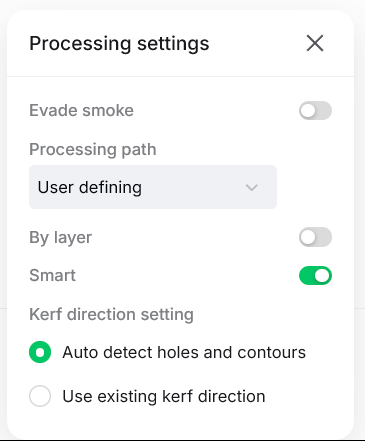
次にエンボスメントモードでInciseを使いましょう。- 自分のマシンの設定を使いましょう。切開設定は私の機械専用ですが、試してみてください。
最後に「平面処理」に切り替えて「研磨設定」を使いましょう。
デザインにはラベルが付いており、デザインAまたはBのいずれかを使うことができます。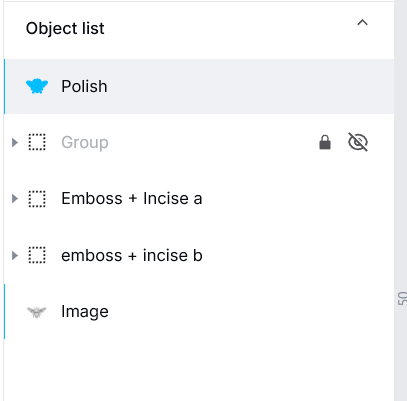
Embossment:より深いエンボスをしたいなら積極的に進めても構いませんが、細かいディテールがあるためデザインにチャットしてしまいます。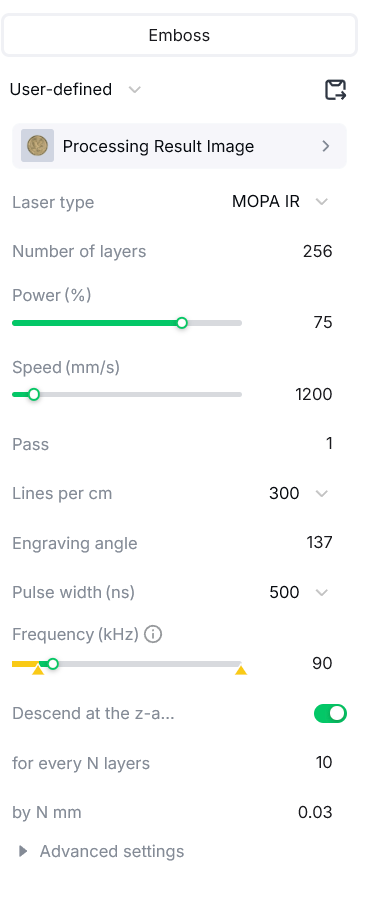
incise:これらの設定はやりすぎですが、265層ではなく180層を試してみるのも良いでしょう。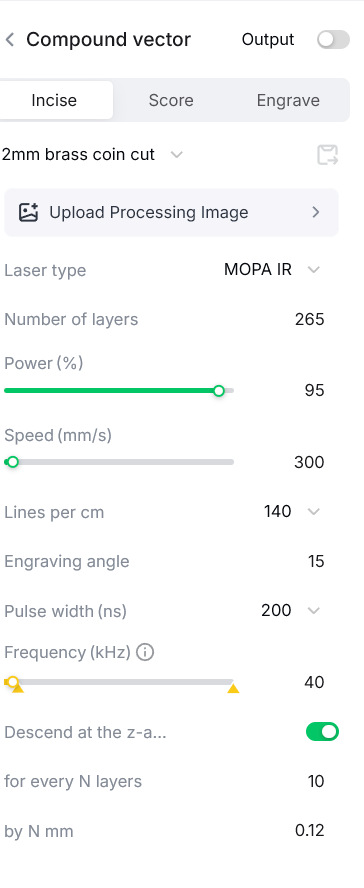
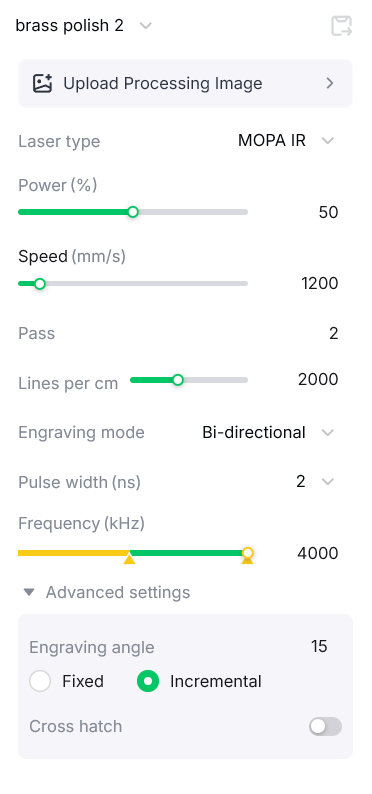
研磨と着色:研磨は真鍮を銀色にすることができます。私の設定を試してみると、うまくいきました。
- これを掃除用に動かせ。
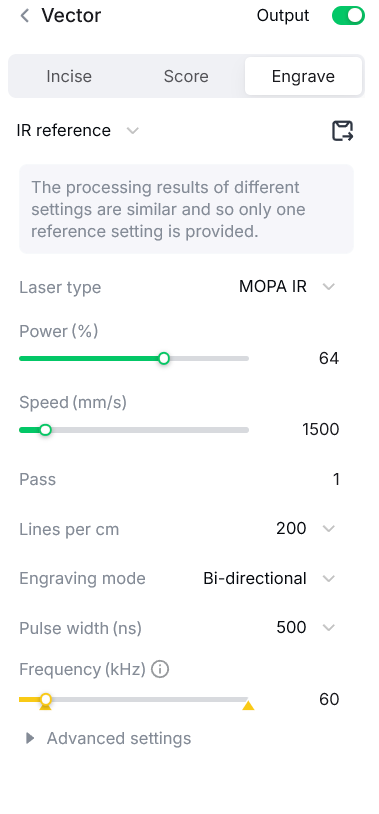
- それからこれを使い、研磨してください。ブルーライトではなく赤外線を使いましょう。
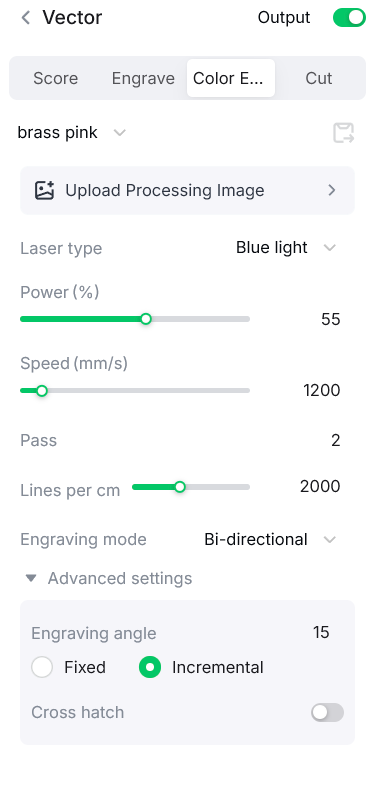
>
この設定で銀色になりました: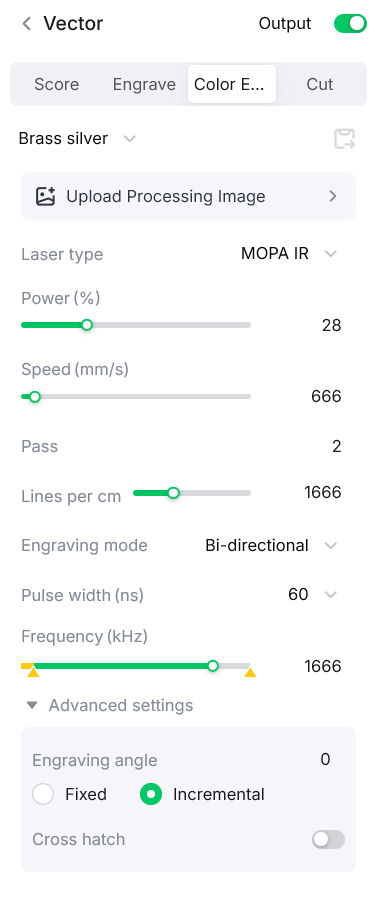
コインケース印刷ファイル:
makeitreal-beta.eufymake.com/userCenter/?project_detail_id=536d916ae498fd935f502331850b1f3f&index=0&type=Published
コメント
リミックス



こちらもおすすめです

木の上の蜂

5
81

ミツバチ

13
99

レーザーカット蜂パズル 3mm DWG ファイル

17
110

Just a Honey Bee - 磨かれたスチール、304ステンレススチールのペダントまたはキーチェーンカラー彫刻に簡単なカラー彫刻

26
191

ファイアフライ/ライトニングバグ シーニックカット&エングレーブ

8
42

蜂

45
343

オークの葉を使った蜂の巣とハニカムの壁掛け
0
3

$0.69
$0.69
クレジット69
レーザーカットの木製ミツバチ壁画で幾何学的なハニカムの翼模様付き

0

ビー・シーニックカット&エングレーブ
23
108

GIF
$2.00
$2.00
クレジット200
銀河と星のあしらいがあしらわれた金属ドッグタグペンダントに刻まれた天蜂の色彫刻
16

ビー・オン・スレートコースター

172
1.2k

テーブル装飾用の蜂の形をした木製のフィギュア

13
43

ミツバチ

28
111

ビー

88
421

レーザー彫刻されたコルクビー&フラワーコースター

34
368
花の蜂の装飾

5
47

ビー

0
1

蜂のモチーフ入り丸木製トークン
20
22