
![[Laser cut and engrave,Screen printing] “Why Not? — A Valentine Written by Faith”](https://image-res.atomm.com/resource/xtool/community/attachment/xtool-community/cabc130c-0066-44a9-ba3e-a888b462b6f4.png?x-oss-process=image/resize,w_1200,h_900,limit_0/interlace,1/format,webp/auto-orient,1)
![[Laser cut and engrave,Screen printing] “Why Not? — A Valentine Written by Faith”](data:image/png;base64,iVBORw0KGgoAAAANSUhEUgAAAAoAAAAKCAYAAACNMs+9AAAAAXNSR0IArs4c6QAAABdJREFUKFNjZCASMBKpjmFUId6QIjp4AAppAAuXjCs4AAAAAElFTkSuQmCC)
![[Laser cut and engrave,Screen printing] “Why Not? — A Valentine Written by Faith”](https://image-res.atomm.com/resource/xtool/community/attachment/xtool-community/cabc130c-0066-44a9-ba3e-a888b462b6f4.png?x-oss-process=image/resize,w_200,h_150,limit_0/interlace,1/format,webp/auto-orient,1)
![[Laser cut and engrave,Screen printing] “Why Not? — A Valentine Written by Faith”](https://image-res.atomm.com/resource/xtool/community/attachment/xtool-community/039e9515-591b-4e49-8520-f85c98becae2.png?x-oss-process=image/resize,w_200,h_150,limit_0/interlace,1/format,webp/auto-orient,1)
![[Laser cut and engrave,Screen printing] “Why Not? — A Valentine Written by Faith”](https://image-res.atomm.com/resource/xtool/community/attachment/xtool-community/811fa757-f3f5-4509-914e-c319c9da1db3.png?x-oss-process=image/resize,w_200,h_150,limit_0/interlace,1/format,webp/auto-orient,1)
“Why Not? — A Valentine Written by Faith”
 Third Prize in 2026 Valentine's Day Contest
 Instruction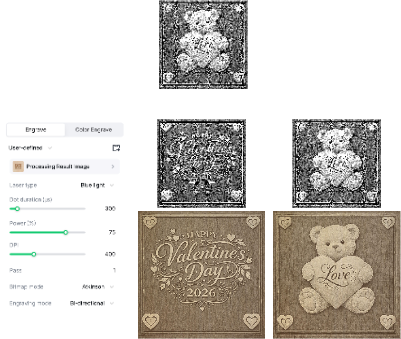


Information
      This piece was created as a reminder that love often arrives when we least expect it—and sometimes in ways we never planned.

After 46 years of life, I believed I had already lived my love story. Like many people, I had experienced a difficult marriage and made peace with the idea that I would never marry again. Christine had reached the same conclusion in her own life. Neither of us was searching. Neither of us had plans. And neither of us expected that a single moment of curiosity would change everything.

One day, I received an email promoting a Christian dating app—Christian Mingle—something I had never intended to use. Out of mild curiosity, I logged in. Within minutes, I saw a woman who caught my attention in a way I couldn’t explain. She lived in another country, so I assumed nothing would ever come of it. When I learned it would cost $52 to send a message, I thought, “No. This isn’t going to happen.” I logged out and moved on.

A few days later, out of nowhere, I received a simple smiley face from that same woman.

I took it as a sign.

At the same time, my mother was hospitalized and critically ill. Christine and I began talking online, and while sitting in a hospital room, we spoke on the phone for the first time. Just days later, my mother passed away. In the midst of grief, uncertainty, and loss, it felt as though God had placed Christine into my life at exactly the moment I needed comfort, strength, and hope.

Christine never had the chance to meet my mom—but I know they would have loved each other.

This Valentine project is more than a decorative piece. It’s a reflection of faith, timing, loss, healing, and the quiet moments when God works behind the scenes. It’s about saying “Why not?” when logic says no… and discovering that love can still surprise us, restore us, and arrive exactly on time.
Instruction
Step1: Select and Prepare your Wood

• Select your size and wood: Cut a 6" x 6" x 1" piece of sugar maple.
• Sand the surface: Hand sand the surface with 400 grit sandpaper to ensure a silky smooth finish.
• Router the edges: Use a 1/8” round over bit to router the edges on the front and back, providing a soft touch when handling the completed project.
Please Note: You can use your own process to select and prepare your wood if desired.
Step2: Prepare Image


- The downloaded file includes a six inch version of both panels. The images are pre-optimized images specifically designed for laser engraving on wood. These images have been processed using Imag-R software to ensure optimal results.
- To get started, one of the 6" high size panels is already placed on the canvas by default. No adjustments are needed—each image is preconfigured with tailored engraving settings for a seamless experience.
IMPORTANT: The engrave settings provided are specific to the wood used in my project. You may need to adjust these settings to achieve the best results for the wood you choose.
Step3: Adjustments and File Run

• Adjust the laser height: Set the laser to the appropriate height for engraving.
• Mark your area: Use xTool's feature to mark your engraving area.
• Load the file: Open the engraving file in xTool’s Creative Space.
• Align the image: Position the images onto the marked areas you intend to engrave.
• Adjust settings: Depending on the type of wood you’ve chosen, you may need to adjust the engraving settings.
• Test engrave: It’s advisable to run a test engrave on a scrap piece of wood before proceeding with the full project.
• Final run: Once you’re satisfied with the image placement and confident that the settings will produce a quality engrave, run the file.
Step4: Finishing Touches
• Remove the project: Once the engraving is complete, carefully take the project out of the laser.
• Spray and lift: Take the project to a sink and spray the engraved areas with a cleaning solution. Allow the a cleaning solution to lift the residue from the engrave.
• Rinse: Rinse the engraved surface with a quick spray of tap water.
• Target specific areas: If you notice areas that you’d like to lighten or remove heavier residue, spray a bit more a cleaning solution onto those sections. Lightly work the bristles of the brush into the engraved area you’re targeting. Do not overdo it! Just apply enough pressure to achieve the desired look.
• Leave some residue: I like to leave some residue in the pockets of the engraving to enhance the 3D effect.
• Dry your project: Once you’re done cleaning, quickly dry the project. I use a heat gun to wick the moisture away, or you can leave it in direct sunlight on a hot, sunny day to achieve the same result.
Step5: Final Prep


• Inspect the surface: Ensure that the engraved surface is free of any marks or residue that you don’t want to show up in the final project.
• Apply a finish: Once you have inspected your project and it meets your standards, apply a light finish to the wood. This step helps preserve and enhance the engraving.
• Display and enjoy: Your project is now complete! Find a special place to display your beautiful work and enjoy the craftsmanship.
Remixes
License



You may also like

3D Valentine's day cards bundle. Valentine shaker card laser cut files. Love quotes svg. Conversation hearts. Puzzles. Kiss


Happy Valentine's Day card AI created


'/%3e%3cdefs%3e%3clinearGradient%20id='paint0_linear_1433_15675'%20x1='12'%20y1='3.25'%20x2='16.6891'%20y2='20.75'%20gradientUnits='userSpaceOnUse'%3e%3cstop%20stop-color='%23FF5D80'/%3e%3cstop%20offset='1'%20stop-color='%23FF0035'/%3e%3c/linearGradient%3e%3c/defs%3e%3c/svg%3e)
Laser Cut Wooden Romantic Love Card with Heart and Couple Silhouettes


Valentines Day Card - Be My Valentine


'/%3e%3cdefs%3e%3clinearGradient%20id='paint0_linear_1433_15726'%20x1='12'%20y1='5.25'%20x2='12'%20y2='18.75'%20gradientUnits='userSpaceOnUse'%3e%3cstop%20stop-color='%23FFC654'/%3e%3cstop%20offset='1'%20stop-color='%23FF8D12'/%3e%3c/linearGradient%3e%3c/defs%3e%3c/svg%3e)
3D Pop-Up Heart Valentine's Day Greeting Card


Valentine’s Day Letter with Seal


Happy Valentine's Day card with money holder


Valentine's Day Card (I Dig You)


Valentine Little D


Valentine's Day SVG


Valentine Spinner Cards with Romantic Messages Laser Cut Bundle. Happy Valentines Day SVG


Valentine's Day Png


Laser Cut Wooden Romantic Love Quote Card with Silhouettes and Heart

Valentines Card with Bicycle and Hearts Design

Valentine's Day SVG


Greeting card with envelope and hearts decoration


Laser Cut Wedding Card with Romantic Couple and Heart Design


Personalized Laser Cut Wedding Card
.jpg?x-oss-process=image/resize,m_fill,w_240,h_240,limit_0/interlace,1/format,webp/auto-orient,1)