Report
![[Laser cut and engrave] Stylish Hexagonal Coaster](https://image-res.atomm.com/resource/xtool/community/attachment/xtool-community/f3e345f5-6680-4a20-a96a-5950f13ff06e?x-oss-process=image/resize,m_fill,w_1280,h_960,limit_0/interlace,1/format,webp/auto-orient,1)
![[Laser cut and engrave] Stylish Hexagonal Coaster](data:image/png;base64,iVBORw0KGgoAAAANSUhEUgAAAAoAAAAKCAYAAACNMs+9AAAAAXNSR0IArs4c6QAAABdJREFUKFNjZCASMBKpjmFUId6QIjp4AAppAAuXjCs4AAAAAElFTkSuQmCC)
![[Laser cut and engrave] Stylish Hexagonal Coaster](https://image-res.atomm.com/resource/xtool/community/attachment/xtool-community/f3e345f5-6680-4a20-a96a-5950f13ff06e?x-oss-process=image/resize,m_fill,w_160,h_120,limit_0/interlace,1/format,webp/auto-orient,1)
![[Laser cut and engrave] Stylish Hexagonal Coaster](https://image-res.atomm.com/resource/xtool/community/attachment/xtool-community/4bff6c20-33c2-408a-a100-6a9e2113ea2f.jpg?x-oss-process=image/resize,m_fill,w_160,h_120,limit_0/interlace,1/format,webp/auto-orient,1)
![[Laser cut and engrave] Stylish Hexagonal Coaster](https://image-res.atomm.com/resource/xtool/community/attachment/xtool-community/c1ab9653-ff61-4c67-87da-7fef48f0da84.jpg?x-oss-process=image/resize,m_fill,w_160,h_120,limit_0/interlace,1/format,webp/auto-orient,1)
![[Laser cut and engrave] Stylish Hexagonal Coaster](https://image-res.atomm.com/resource/xtool/community/attachment/xtool-community/e59a85c7-500e-46e3-8108-825101ae10b5.jpg?x-oss-process=image/resize,m_fill,w_160,h_120,limit_0/interlace,1/format,webp/auto-orient,1)
![[Laser cut and engrave] Stylish Hexagonal Coaster](https://image-res.atomm.com/resource/xtool/community/attachment/xtool-community/1bfef86a-b189-4338-a7fa-08c40c9bb13d.jpg?x-oss-process=image/resize,m_fill,w_160,h_120,limit_0/interlace,1/format,webp/auto-orient,1)
![[Laser cut and engrave] Stylish Hexagonal Coaster](https://image-res.atomm.com/resource/xtool/community/attachment/xtool-community/8a1b7efd-9bf4-47e4-bb0c-fbcc440fe2b0.jpg?x-oss-process=image/resize,m_fill,w_160,h_120,limit_0/interlace,1/format,webp/auto-orient,1)
![[Laser cut and engrave] Stylish Hexagonal Coaster](https://image-res.atomm.com/resource/xtool/community/attachment/xtool-community/0293915b-af67-486a-b76b-d6444e0688f3.jpg?x-oss-process=image/resize,m_fill,w_160,h_120,limit_0/interlace,1/format,webp/auto-orient,1)
![[Laser cut and engrave] Stylish Hexagonal Coaster](https://image-res.atomm.com/resource/xtool/community/attachment/xtool-community/8d590400-2d4d-43a3-be4d-6465c63ca39c.jpg?x-oss-process=image/resize,m_fill,w_160,h_120,limit_0/interlace,1/format,webp/auto-orient,1)
![[Laser cut and engrave] Stylish Hexagonal Coaster](https://image-res.atomm.com/resource/xtool/community/attachment/xtool-community/c3f9d35d-3aec-4c44-822c-3e95721de8cd.jpg?x-oss-process=image/resize,m_fill,w_160,h_120,limit_0/interlace,1/format,webp/auto-orient,1)
Stylish Hexagonal Coaster
 Atomm Featured
 Instruction
StylishCoaster
.xcs
Application scenario
Laser processing (15min)
Machine & module

xTool D1 Pro
10WCompatible xTool Machine
P3
F2
F2 Ultra UV
F2 Ultra(Single)
F2 Ultra
F1 Ultra
F1
F1 Lite
S1
P2S
P2
M1 Ultra
M1
D1 Pro 2.0
D1
Laserbox
M2
Material used

3mm Poplar Plywood

681
4815
Information
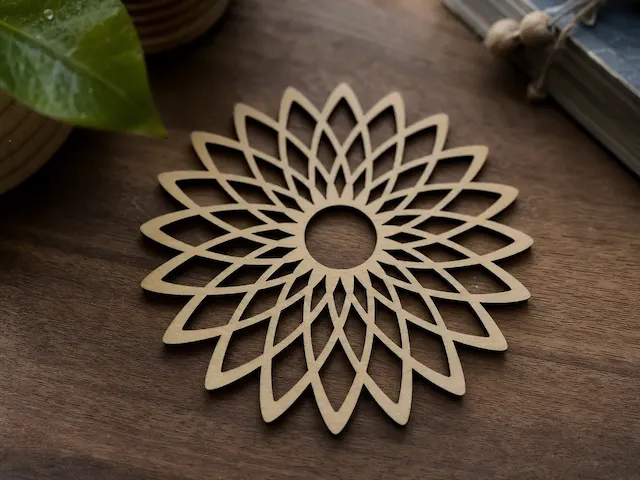
      I know I'm not the first person to make coasters here. There are tons of them. What I personally felt was missing when I looked through them was a stylish, modern approach. I gave it a try.
The pattern isn't my idea. I saw it for a second on Instagram, I think it was about Japanese drinks. I recreated the pattern in InDesign, then rendered it in Photoshop, transferred it to the xTool program, and vectorized it there. Voilà!
I actually wanted to make it with slightly thicker and harder wood, but that would take forever with my 10W laser. Maybe later. Here's the current version with 3mm plywood (poplar). Have fun recreating it!
Instruction
1
Step1: Things to know

Preview

Preview
It's not complicated at all. There are just two important things to remember: First, the final outline of the whole coaster must be cut last, so cut the small pattern first. It is set like that in the project file. Second, the cutting parameters change depending on the thickness of the wood. With my 10W laser, I used between 80 and 100% power and a speed of between 4 and 5. Sometimes the tiny pieces don't fall out on their own, so you can use a scalpel and a small screwdriver to help them along.
Comments
Remixes



You may also like

Stylish Round Coasters

18
213

$0.60
$0.60
Credits60
Hexagonal wooden coaster with intricate geometric lattice pattern

0

Wooden coasters with snowflake pattern

0
1

Geometric Hexagon Wooden Coaster with Star Pattern

1
5

$0.60
$0.60
Credits60
Hexagonal Wooden Coaster with Intricate Geometric Star Pattern
0

10mm basswood coasters

47
187

Louis Cube Coaster (Marquetry/Inlay)
25
135

$1.50
$1.50
Credits150
Round wooden drink coasters with floral and geometric cutouts

0

$1.50
$1.50
Credits150
Geometric Patterned Wooden Coasters Set

0

$1.50
$1.50
Credits150
Hexagonal Spider Web Coasters for Halloween Table Decor

1

Rectangular Wooden Wall Decor with Floral and Botanical Cutouts

4
14

Hexagonal honeycomb bee drink coaster

3
37

Lasergravierte Holzuntersetzer mit Ornamentmuster im Set
.png?x-oss-process=image/resize,m_fill,w_80,h_80,limit_0/interlace,1/format,webp/auto-orient,1)
8
40

Free Kumiko Asanoha Sample Pack - 3 SVG DXF Laser Cut Files

6
52

$1.92
$1.92
$9.60
Credits192
Honeycomb - Decorative Laser Cut Design

0

$1.50
$1.50
Credits150
Set of Four Geometric Patterned Drink Coasters

0
Coaster Project

3
119


Laser Cut Wooden Floral Pattern Coaster

33
179