
![[Laser cut and engrave,Screen printing] Bumble Bee Embossed and Cut from 2mm Brass coin](https://image-res.atomm.com/resource/xtool/community/attachment/xtool-community/aacb87eb-5a94-4a99-9441-dc821a74294a.JPG?x-oss-process=image/resize,m_fill,w_1280,h_960,limit_0/interlace,1/format,webp/auto-orient,1)
![[Laser cut and engrave,Screen printing] Bumble Bee Embossed and Cut from 2mm Brass coin](data:image/png;base64,iVBORw0KGgoAAAANSUhEUgAAAAoAAAAKCAYAAACNMs+9AAAAAXNSR0IArs4c6QAAABdJREFUKFNjZCASMBKpjmFUId6QIjp4AAppAAuXjCs4AAAAAElFTkSuQmCC)
![[Laser cut and engrave,Screen printing] Bumble Bee Embossed and Cut from 2mm Brass coin](https://image-res.atomm.com/resource/xtool/community/attachment/xtool-community/aacb87eb-5a94-4a99-9441-dc821a74294a.JPG?x-oss-process=image/resize,m_fill,w_160,h_120,limit_0/interlace,1/format,webp/auto-orient,1)
![[Laser cut and engrave,Screen printing] Bumble Bee Embossed and Cut from 2mm Brass coin](https://storage-us.atomm.com/resource/xtool/community/attachment/xtool-community/4f36bb23-a743-4ae2-a413-1cc4adda6ac9.gif)
![[Laser cut and engrave,Screen printing] Bumble Bee Embossed and Cut from 2mm Brass coin](https://storage-us.atomm.com/resource/xtool/community/attachment/xtool-community/73cc3fe4-f77f-44f1-bbf2-3f7459cca34f.gif)
![[Laser cut and engrave,Screen printing] Bumble Bee Embossed and Cut from 2mm Brass coin](https://storage-us.atomm.com/resource/xtool/community/attachment/xtool-community/48777f2f-e688-4ac9-8890-256ced2cce2a.gif)
![[Laser cut and engrave,Screen printing] Bumble Bee Embossed and Cut from 2mm Brass coin](https://storage-us.atomm.com/resource/xtool/community/attachment/xtool-community/6d3e952d-7898-4b83-9c21-84868ebd224d.gif)
![[Laser cut and engrave,Screen printing] Bumble Bee Embossed and Cut from 2mm Brass coin](https://storage-us.atomm.com/resource/xtool/community/attachment/xtool-community/58ae1c89-e1ed-4f3d-87cd-a945d6abfbe5.gif)
![[Laser cut and engrave,Screen printing] Bumble Bee Embossed and Cut from 2mm Brass coin](https://image-res.atomm.com/resource/xtool/community/attachment/xtool-community/b42a994c-f0e9-4c30-97d2-28299ec8300b.jpg?x-oss-process=image/resize,m_fill,w_160,h_120,limit_0/interlace,1/format,webp/auto-orient,1)
![[Laser cut and engrave,Screen printing] Bumble Bee Embossed and Cut from 2mm Brass coin](https://image-res.atomm.com/resource/xtool/community/attachment/xtool-community/08c98d78-d43c-41b5-81e0-f9d5b4668a4c.jpg?x-oss-process=image/resize,m_fill,w_160,h_120,limit_0/interlace,1/format,webp/auto-orient,1)
![[Laser cut and engrave,Screen printing] Bumble Bee Embossed and Cut from 2mm Brass coin](https://image-res.atomm.com/resource/xtool/community/attachment/xtool-community/076e074a-56d1-45dd-9157-69647c861137.jpg?x-oss-process=image/resize,m_fill,w_160,h_120,limit_0/interlace,1/format,webp/auto-orient,1)
![[Laser cut and engrave,Screen printing] Bumble Bee Embossed and Cut from 2mm Brass coin](https://image-res.atomm.com/resource/xtool/community/attachment/xtool-community/843e2847-ff48-49c6-a002-18b60c63339b.jpg?x-oss-process=image/resize,m_fill,w_160,h_120,limit_0/interlace,1/format,webp/auto-orient,1)
![[Laser cut and engrave,Screen printing] Bumble Bee Embossed and Cut from 2mm Brass coin](https://image-res.atomm.com/resource/xtool/community/attachment/xtool-community/f941b98c-9afe-48fb-88ad-529d138ab678.JPG?x-oss-process=image/resize,m_fill,w_160,h_120,limit_0/interlace,1/format,webp/auto-orient,1)
![[Laser cut and engrave,Screen printing] Bumble Bee Embossed and Cut from 2mm Brass coin](https://image-res.atomm.com/resource/xtool/community/attachment/xtool-community/f80f9218-e843-4bca-a20c-e234e3d0231f.JPG?x-oss-process=image/resize,m_fill,w_160,h_120,limit_0/interlace,1/format,webp/auto-orient,1)
![[Laser cut and engrave,Screen printing] Bumble Bee Embossed and Cut from 2mm Brass coin](https://image-res.atomm.com/resource/xtool/community/attachment/xtool-community/0af783c5-294b-4fc6-96cb-3da207f00edd.JPG?x-oss-process=image/resize,m_fill,w_160,h_120,limit_0/interlace,1/format,webp/auto-orient,1)
![[Laser cut and engrave,Screen printing] Bumble Bee Embossed and Cut from 2mm Brass coin](https://image-res.atomm.com/resource/xtool/community/attachment/xtool-community/d69097fb-e55e-45b4-bac5-cddcbb4339e1.JPG?x-oss-process=image/resize,m_fill,w_160,h_120,limit_0/interlace,1/format,webp/auto-orient,1)
![[Laser cut and engrave,Screen printing] Bumble Bee Embossed and Cut from 2mm Brass coin](https://image-res.atomm.com/resource/xtool/community/attachment/xtool-community/abec3a65-b881-42f3-82be-e9ebdaae2eb9.JPG?x-oss-process=image/resize,m_fill,w_160,h_120,limit_0/interlace,1/format,webp/auto-orient,1)
大黄蜂浮雕并用2毫米黄铜硬币雕刻
 教程
教程
Untitled
.xcs
应用场景
激光加工、丝网印刷
机器与模块

xTool F2 Ultra
60W材料兼容的 xTool 机器
F2
F2 Ultra UV
F2 Ultra(Single)
使用的材料

空白黄铜纪念币

1mmH62黄铜片

56
1704
教程
1
步骤1
先压印蜜蜂的深度图。
重要提示:始终使用用户自定义处理:点击处理旁边的3个点。
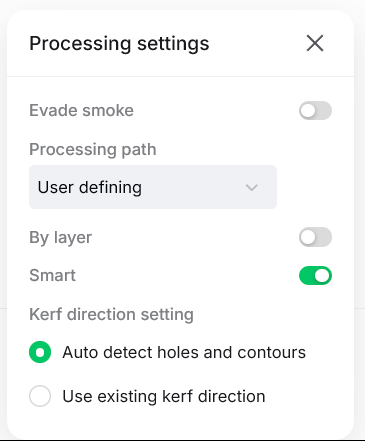
然后用凸起模式的刻痕。- 使用你自己机器的设置。切口设置是我机器特有的,但你可以试试。
最后切换到平面处理,并使用抛光设置。
设计有标签,你可以选择设计A或B。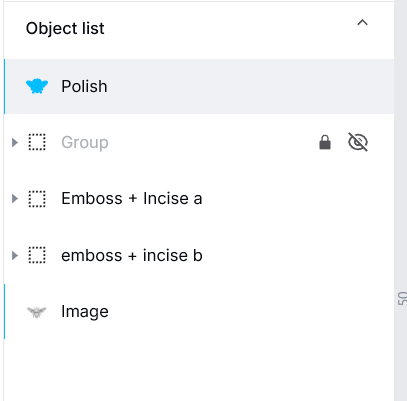
凸起:如果你想要更深的压纹可以更激进,但它也会因为细节精细而与设计对话。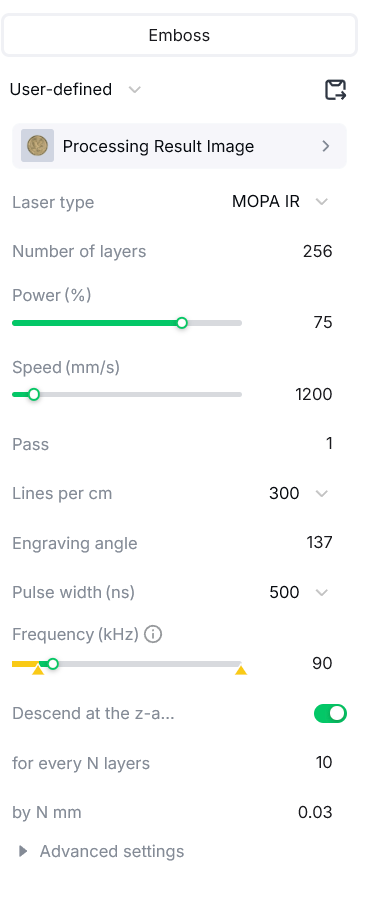
刻痕:这些设置可能有点过头,但你可以试试180层而不是265层。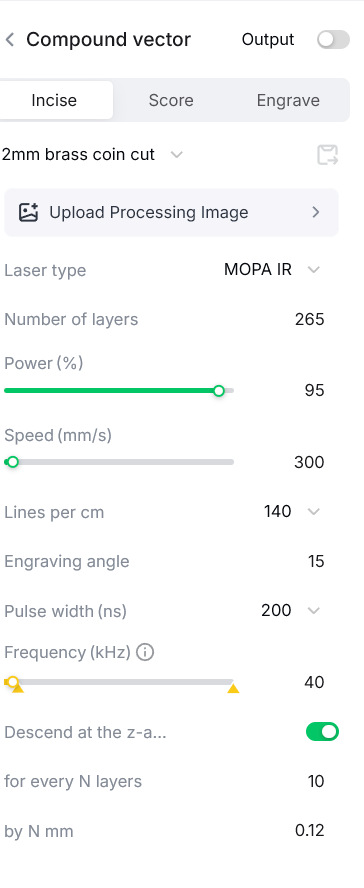
抛光与着色:抛光可以使黄铜变成银色。你可以试试我的设置,效果不错。
- 把它清理一下。
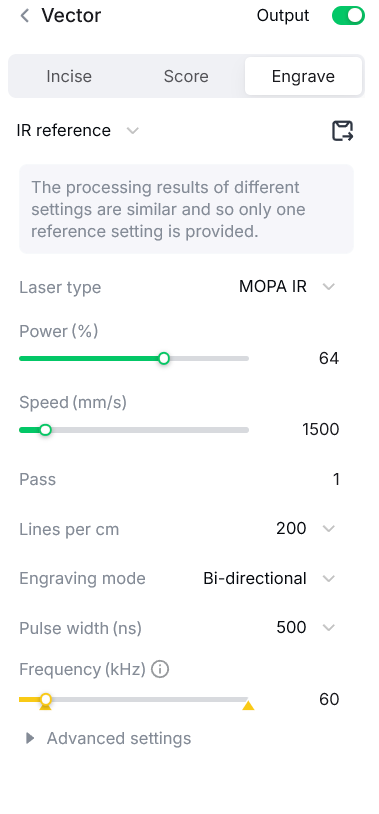
- 然后运行它来抛光。用红外线,不要用蓝光。
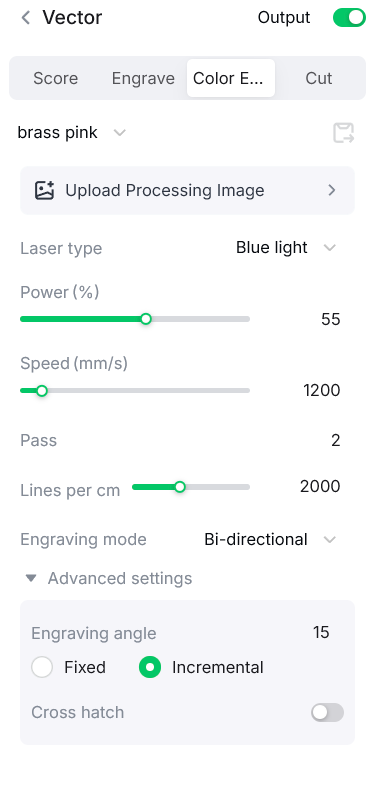
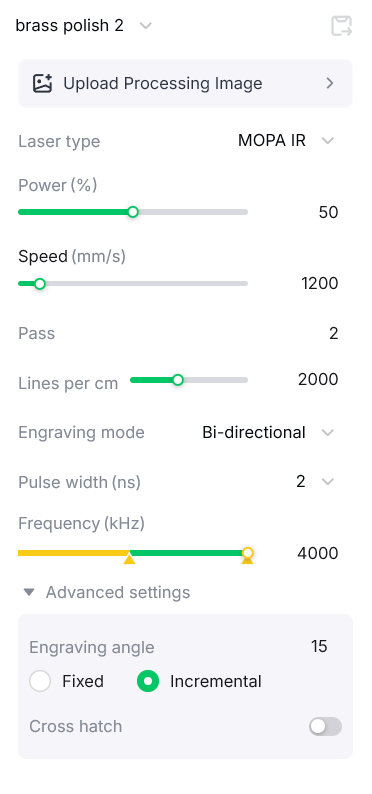
这个设置让它变成了银色: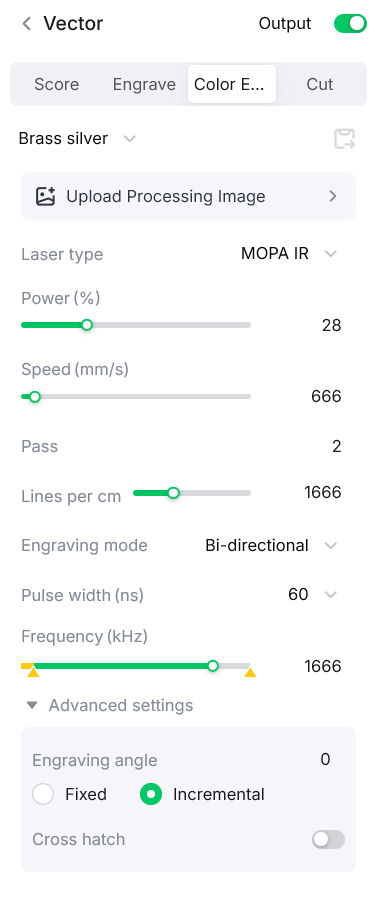
硬币盒印刷文件:
makeitreal-beta.eufymake.com/userCenter/?project_detail_id=536d916ae498fd935f502331850b1f3f&index=0&type=Published
评论
二创



您可能也喜欢

木头上的蜜蜂

5
81

蜜蜂

13
98

只剩一只蜜蜂——在抛光钢、304不锈钢佩丹特或钥匙扣彩色雕刻上进行简易彩色雕刻

26
189

萤火虫/萤火虫风景雕刻与雕刻

8
42

一只蜜蜂

45
343

GIF
$2.00
$2.00
Credits200
天蜂色彩雕刻在带有银河和星星的金属狗牌吊坠上
16

蜜蜂风景雕刻与雕刻
23
107

$0.69
$0.69
Credits69
激光切割木质蜜蜂墙画,带有几何蜂巢翅膀图案

0

板岩过山车上的蜜蜂

171
1.2k

一只蜜蜂形状的木制小雕像,用于桌面装饰

13
43

激光切割蜂拼图 3mm DWG 文件

17
110

激光雕刻软木蜂花杯垫

34
361

蜜蜂

88
421
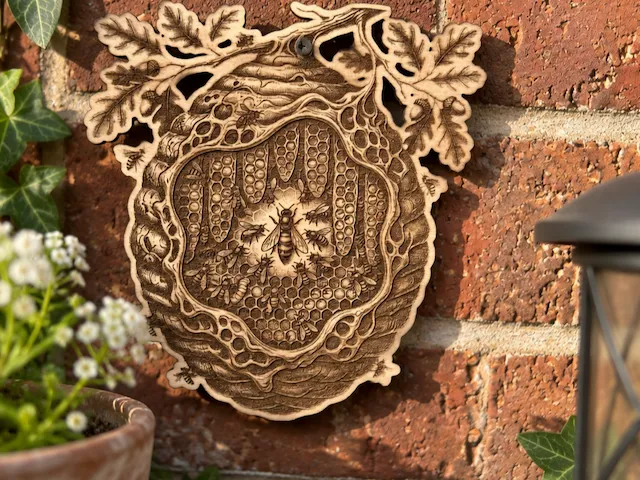
蜂巢与蜂巢挂挂,配有橡树叶
0
3
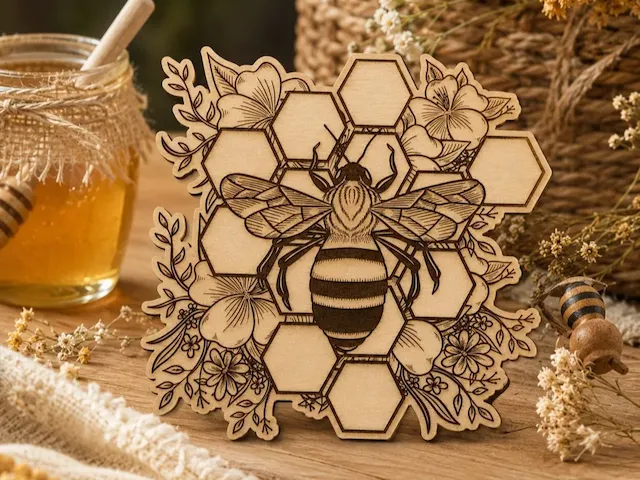
花蜂装饰

5
47

蜜蜂

0
1

大黄蜂模型

36
250

$2.10
$2.10
$3.00
Credits210
分层蜜蜂泪滴耳环

2