Report
![[Other] xTool WonderPress: Chill and Make Coasters](https://storage-us.atomm.com/resource/xtool/community/attachment/xtool-community/b6c21410-6b1c-41b2-bce0-ba8006e591c7.gif)
![[Other] xTool WonderPress: Chill and Make Coasters](data:image/png;base64,iVBORw0KGgoAAAANSUhEUgAAAAoAAAAKCAYAAACNMs+9AAAAAXNSR0IArs4c6QAAABdJREFUKFNjZCASMBKpjmFUId6QIjp4AAppAAuXjCs4AAAAAElFTkSuQmCC)
![[Other] xTool WonderPress: Chill and Make Coasters](https://image-res.atomm.com/resource/xtool/community/attachment/xtool-community/e6e040ac-83b8-4761-b28f-800a91c2ccde.png?x-oss-process=image/resize,w_200,h_150,limit_0/interlace,1/format,webp/auto-orient,1)
![[Other] xTool WonderPress: Chill and Make Coasters](https://i.ytimg.com/vi/5h3l4CYKNzg/hqdefault.jpg)
![[Other] xTool WonderPress: Chill and Make Coasters](/_nuxt/video_icon.B5w3Xr8w.png)
![[Other] xTool WonderPress: Chill and Make Coasters](https://image-res.atomm.com/resource/xtool/community/attachment/xtool-community/1d90cdc4-4f0d-4bec-bc2f-3e8e1307d2f1.png?x-oss-process=image/resize,w_200,h_150,limit_0/interlace,1/format,webp/auto-orient,1)
![[Other] xTool WonderPress: Chill and Make Coasters](https://image-res.atomm.com/resource/xtool/community/attachment/xtool-community/8d9cfa80-0e91-45d5-8a90-07032c14935e.png?x-oss-process=image/resize,w_200,h_150,limit_0/interlace,1/format,webp/auto-orient,1)
xTool WonderPress: Chill and Make Coasters
 Instruction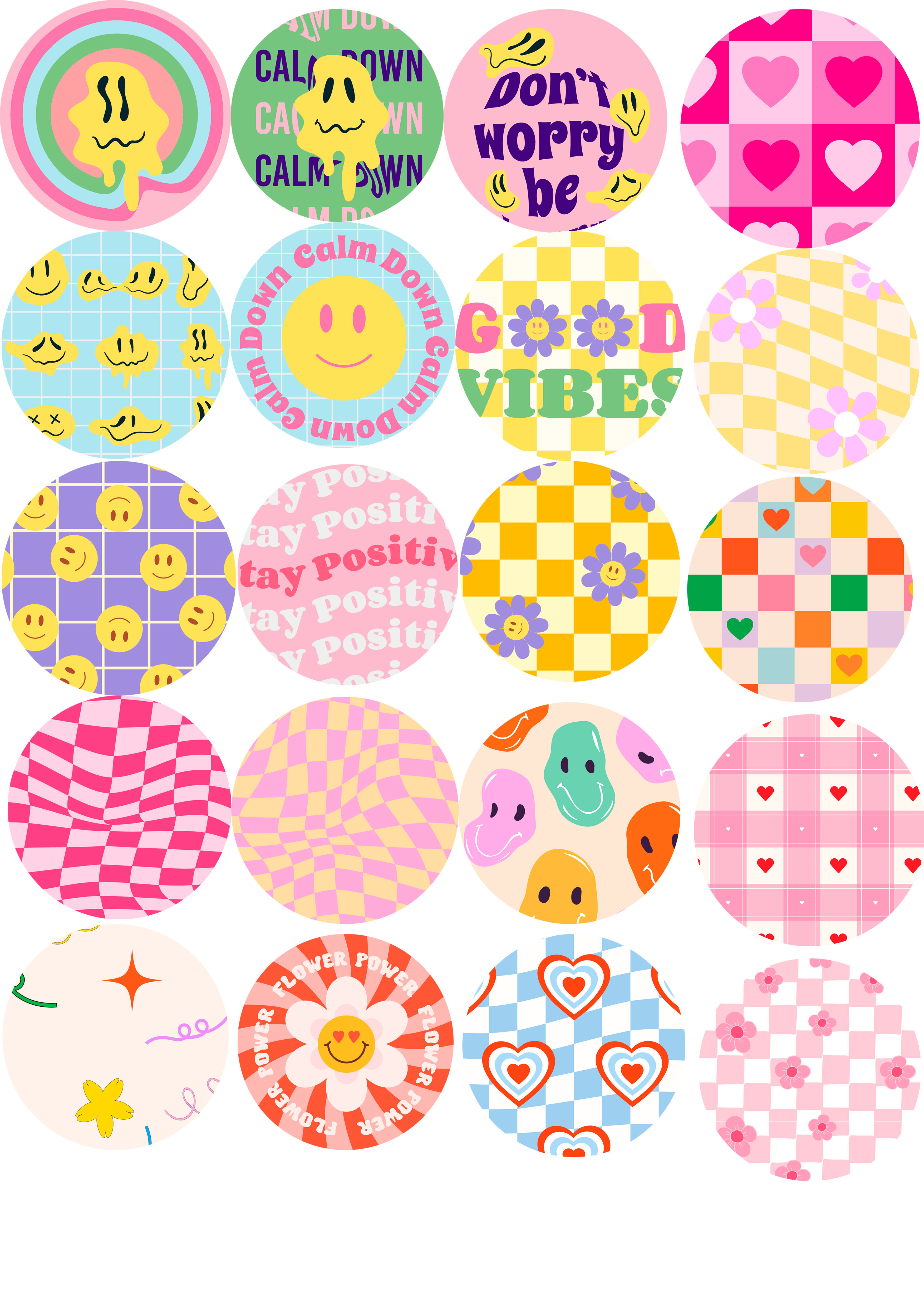
Coasters
.png
Application scenario
Other
Machine & module
New
xTool WonderPress
Heat Press ModuleMaterial used

Sublimation Paper

20
1095
Information
      Reimagine the heat press. Unlock infinite crafting possibilities from 2D to 3D! ✨
Meet xTool WonderPress: Play with Heat. Create beyond Press.

✨ 5 Core Processes in 1 Workstation:
▪️ 2D Heat Transfer
▪️ DTF Curing
▪️ Craft Baking
▪️ 3D Sublimation
▪️ Vacuum Forming
Instruction
1
Step1: Newly launched: xTool WonderPress
2
Step2: Heat Press Module

Preview

Preview

Preview
Unlike traditional presses that rely on guesswork, xTool WonderPress combines industrial power with surgical precision through four core breakthroughs:
- 2X Heat Density: Double the heating tubes for ultra-even distribution. No cold spots—just perfect, edge-to-edge transfers.
- True 100kg Pressure: Intense, consistent force drives adhesive deep into fibers, preventing peeling or fading for long-lasting durability.
- Intuitive Rotary Control: A high-precision knob and 1.8 mm vivid screen replace clunky buttons for smoother, second-perfect settings.
3
Step3: How To Use
Thanks to the automated design, using the Heat Press Module becomes very simple for you!
- First, using the sublimation paper to print out your design. Don't forget to mirror your design!
- Face the printed design on the paper towards the coaster and tape the edges with tape.
- Then put your coasters into xTool WonderPress: Heat Press Module.
- Open xTool App to adjust your settings (there are also preset automatic parameters in the App).
- Just press the button!
- Done!
Comments
Remixes




You may also like

'/%3e%3cdefs%3e%3clinearGradient%20id='paint0_linear_1433_15726'%20x1='12'%20y1='5.25'%20x2='12'%20y2='18.75'%20gradientUnits='userSpaceOnUse'%3e%3cstop%20stop-color='%23FFC654'/%3e%3cstop%20offset='1'%20stop-color='%23FF8D12'/%3e%3c/linearGradient%3e%3c/defs%3e%3c/svg%3e)
Vintage Halftone Design Sublimated onto a Canvas Tote.

21
55

Vintage Space Research Center Illustration with Astronaut and Planet

2
3

DTF Printing Easter Bunny Tote Bag

3
10

Cherished Memories Printed Pillow with Almake Retro Chalk Sketch AI Photo Design

5
3

Tote Bag with Cute Knitted Doll and Yarn Balls Print

0
6

Vintage Michigan Made Clothing Designs

1
6

Custom photo coasters gift set

5
25

Muscular Rooster Action Figure PRINT

1
2

GIF
xTool WonderPress: How to DIY 3 Mugs at Once?

7
20

Canvas and shirts
1
19

Making wall art with the Apparel Printer
0
2

Travel Badges Featuring Kyoto, Giza, Adelaide, and Hong Kong
0
5

DTF Printing Cushions with Colorful Explorer Designs
1
7

MOM CHRISTMAS LIGHTS DTF TRANSFER
2
14

White Backpack with Colorful Cartoon Patches
0
1

Brown Paper Gift Bag with Knitted Christmas Tree Design

7
6

Personalized Couple Plush Pillows with I Love You and I Miss You Text —— DTF Printing

8
11

Street Machine Legends Power & Performance
2
12