
The xTool F1 is a portable desktop laser engraver that packs two lasers into one compact, fully enclosed body. Introduced in 2023, it was the first machine to combine a 2W 1064nm infrared (IR) laser with a 10W 455nm diode laser, letting makers engrave everything from bare metal and plastic to wood, leather, and glass on a single device. If you are weighing the F1 for a small business, a craft studio, or on-the-go engraving, this guide covers exactly what it is, what it costs, what it can make, and how to set it up.
Key takeaways: The xTool F1 is a fast (up to 4000 mm/s), fully enclosed dual-laser (IR + diode) engraver that handles 300+ materials, cuts up to 8 mm wood, and starts around $449 for the F1 Lite. It is best known for engraving shiny metals that most diode-only lasers cannot mark. Explore what F1 owners actually make in the xTool F1 project gallery.
What is the xTool F1?
The xTool F1 is a compact, fully enclosed laser engraver built for speed and portability. Its standout feature is the dual-laser system: an infrared laser for marking metals and plastics, and a blue diode laser for engraving and cutting organic materials. A durable metal handle and a 4.6 kg body make it easy to move between a workbench, a craft fair, or a customer site.
Under the hood, F1 uses an industrial-grade galvanometer instead of a moving gantry, which is how it reaches engraving speeds of up to 4000 mm/s with 0.00199 mm precision. A built-in fan and air-purification path plus the enclosed cover keep smoke and the 1064nm/455nm laser light contained during use.
| Spec | xTool F1 |
|---|---|
| Released | 2023 |
| Lasers | 2W 1064nm infrared + 10W 455nm diode |
| Max engraving speed | 4000 mm/s |
| Accuracy | 0.00199 mm |
| Work area | 115 × 115 mm (up to 115 × 400 mm with the slide extension) |
| Max object height | 113 mm |
| Dimensions / weight | 179 × 235 × 334 mm / 4.6 kg |
| Supported materials | 300+ |
| Enclosure | Fully enclosed with built-in fan & air purifier |
What is the pricing of the xTool F1?
xTool sells the F1 in several configurations, and prices move with regular promotions (mid-year and new-year sales), so treat the figures below as a guide and confirm the live price on the official xTool F1 page. Pricing shown is in USD as of July 2026.
| Configuration | What you get | Price (approx.) |
|---|---|---|
| xTool F1 Lite | Entry-level, diode-only version for wood, acrylic, paper and leather | from $449 |
| xTool F1 (standard) | The full IR + diode dual-laser machine | list ~$1,499 (often on sale near $1,019) |
| xTool F1 Deluxe Bundle | F1 plus accessories that expand the work area and workflow, at a bundled discount | bundle pricing on xtool.com |
| F1 + RA2 Pro Rotary + Desktop Smoke Purifier | Adds cylinder engraving and stronger fume filtration | ~$2,149 |
If you mainly engrave flat wood and acrylic, the F1 Lite is the budget entry point. If you need to mark metal, jewelry, or tumblers, the standard dual-laser F1 (or a bundle with the RA2 Pro rotary) is the version to look at.
What can the xTool F1 engrave and cut?
Because the F1 carries two different lasers, it covers a much wider range than a single-laser engraver. The two beams split the work like this:
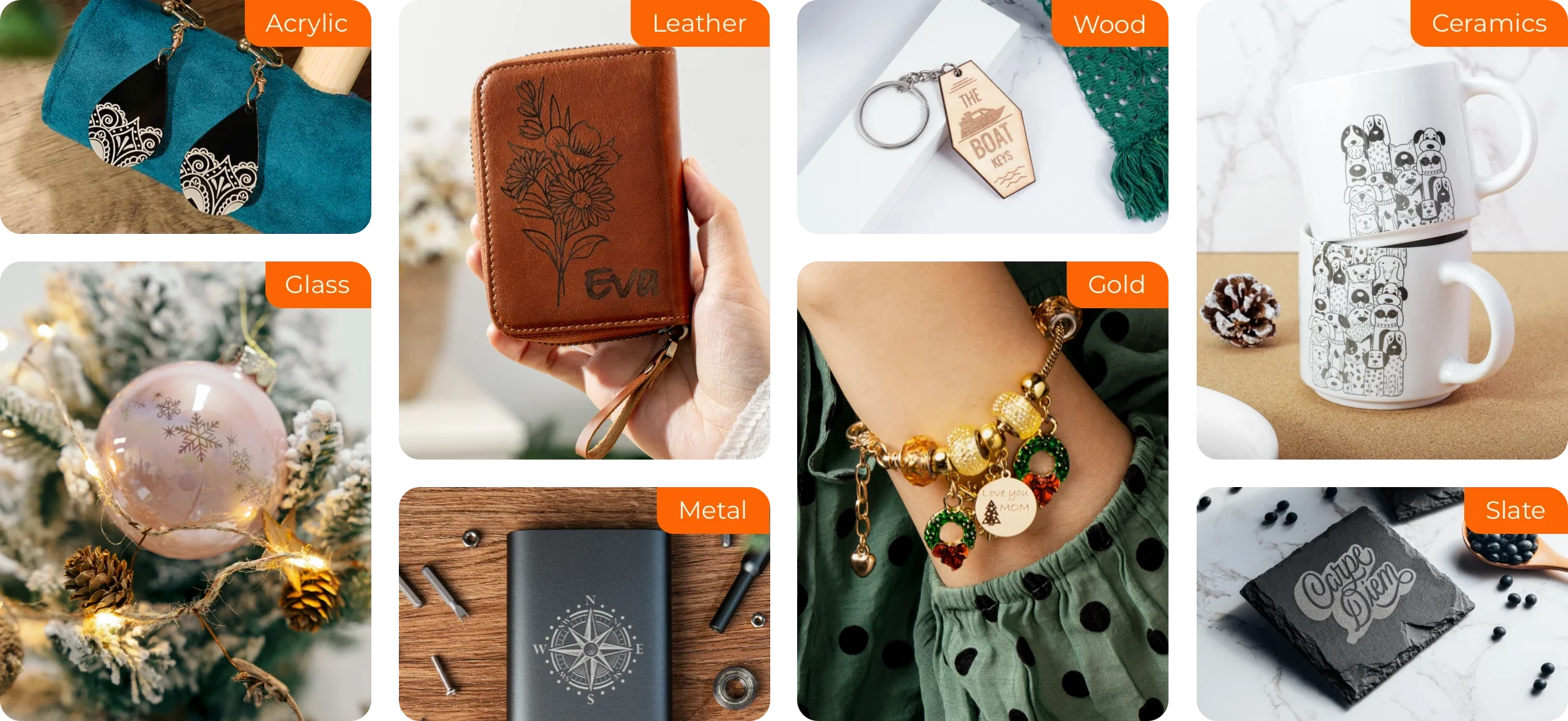
- 10W diode laser (blue) — engraves & cuts: wood, MDF, bamboo, leather, paper, cardstock, dark acrylic, fabric, slate/rock, ceramic, jade, marble, dark/coated glass, and stainless steel.
- 2W infrared laser — engraves: bare and shiny metals (gold, silver, brass, aluminum, stainless steel), most plastics, and clear/black acrylic. This IR beam is the reason F1 can mark precious metals and slick surfaces that diode-only lasers struggle with.
- Cutting: the diode laser cuts up to 8 mm wood and 5 mm acrylic.
All told, xTool lists 300+ compatible materials, which is what makes the F1 popular for mixed product lines — jewelry, tumblers, coasters, signage, and keepsakes from one machine. For step-by-step material presets, see the F1 project gallery.
Where can you buy the xTool F1?
- xTool official store (xtool.com) — best place for the latest bundles, warranty, and sale pricing.
- Amazon — the F1 is listed on Amazon (Arts, Crafts & Sewing) for fast shipping.
- Authorized resellers — retailers such as MatterHackers, Swing Design, and other maker stores carry the F1 and its bundles.
Buying direct from xTool usually gets you the newest bundle deals and the full accessory ecosystem (rotary, riser, smoke purifier, honeycomb panel).
Real projects people make with the xTool F1
The best way to understand the F1 is to see what real owners create with it. Here are a few community projects made on the F1, straight from the xTool F1 project gallery:
1. German Shepherd Dog Coaster
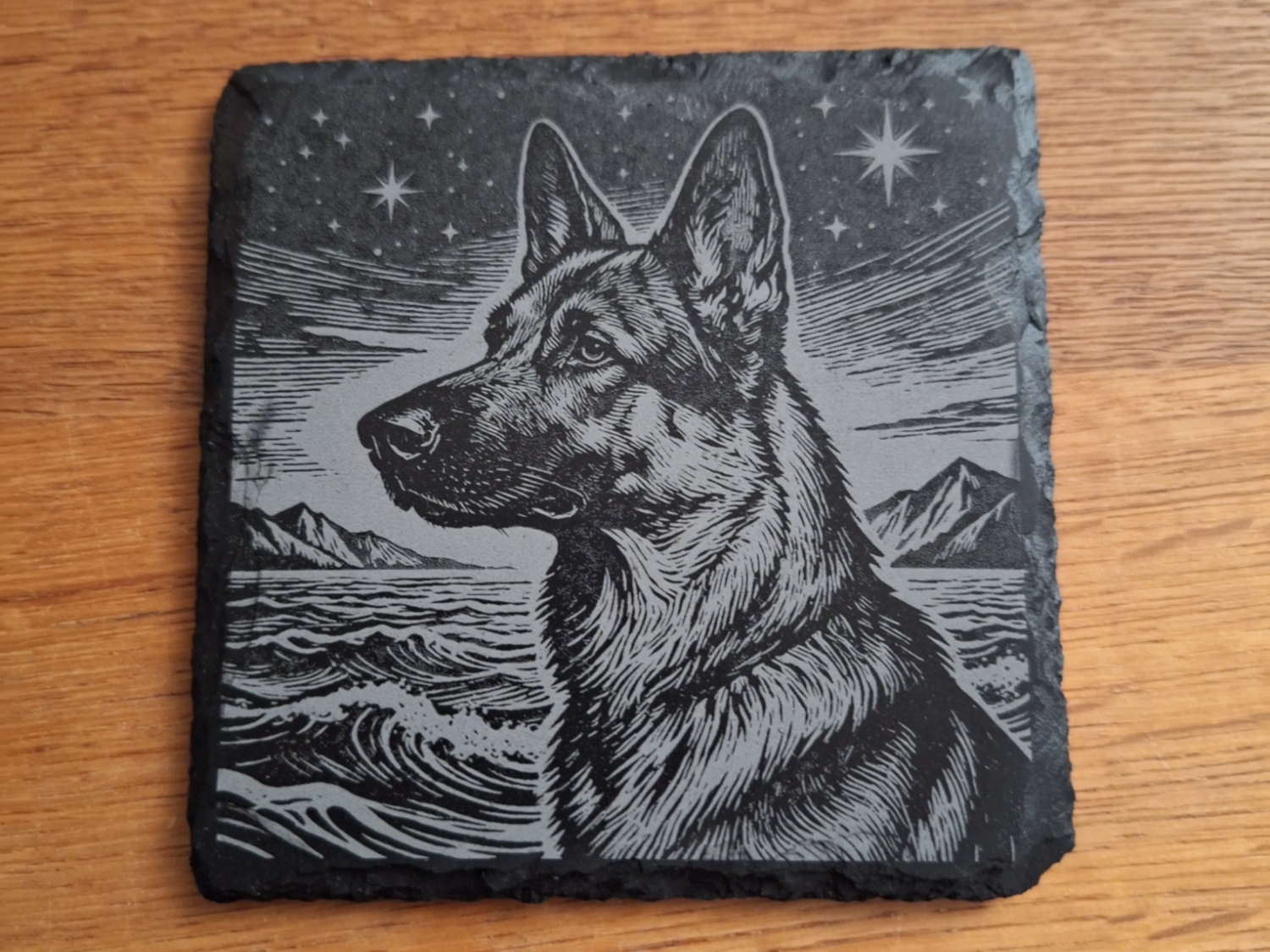
A detailed German shepherd portrait engraved onto a round wooden coaster. It shows off the F1 diode laser’s grayscale depth — fine fur texture and soft shading that make pet-portrait coasters a popular, quick-selling F1 product.
Get this design →2. Couple Matching Engraved Pendant Set
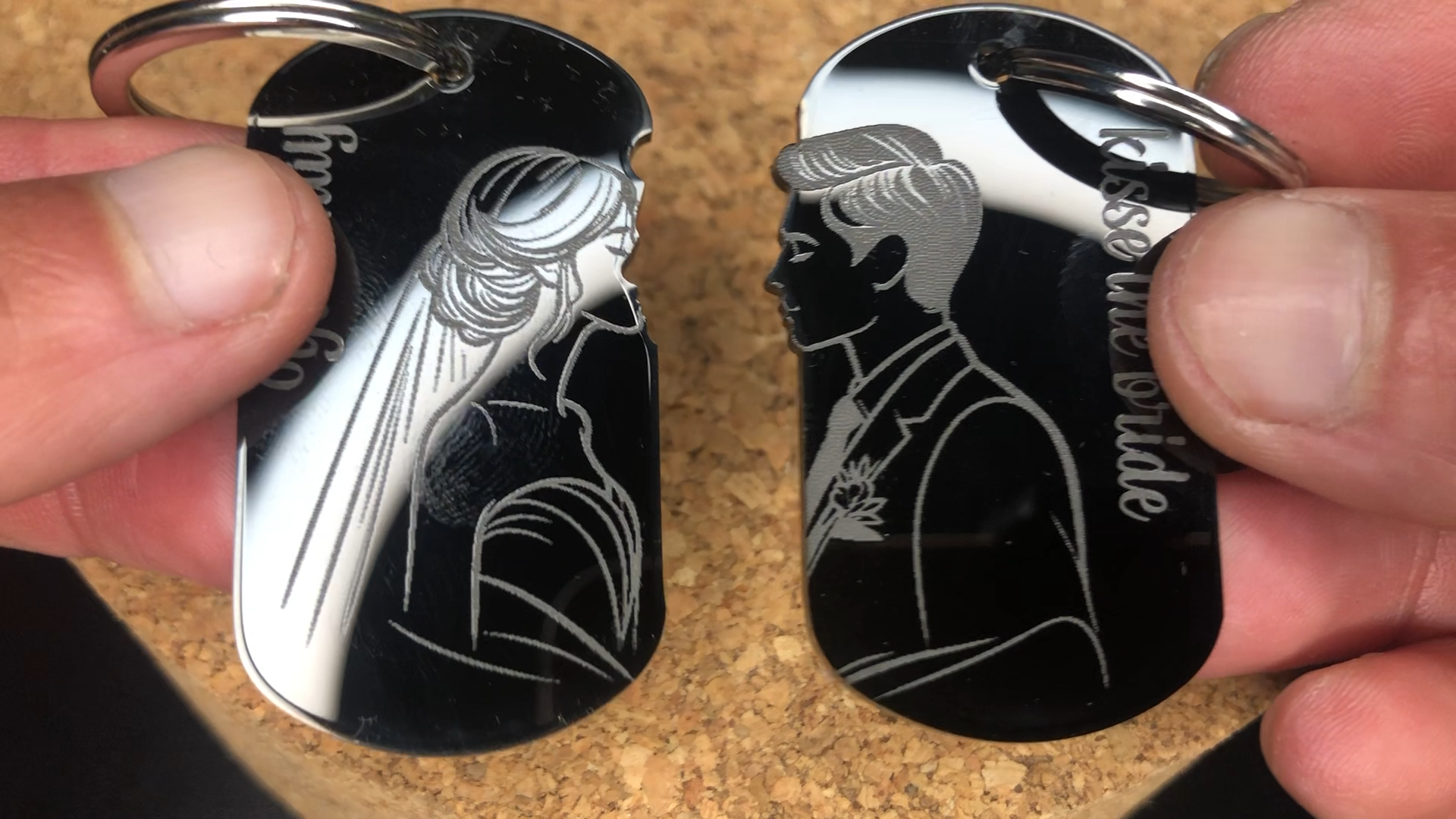
A pair of matching metal pendants marked with the F1’s infrared laser. Engraving shiny, bare metal like this is exactly the job diode-only machines cannot handle — making personalized jewelry one of the F1’s signature use cases.
Get this design →3. “Merry and Bright” Glass Christmas Ornament

A holiday greeting engraved onto a glass ornament, leaving a frosted, light-catching finish. The crisp lettering here highlights the F1’s 0.00199 mm accuracy — ideal for small, giftable seasonal keepsakes.
Get this design →4. Jack Daniel’s Engraved Whiskey Glass
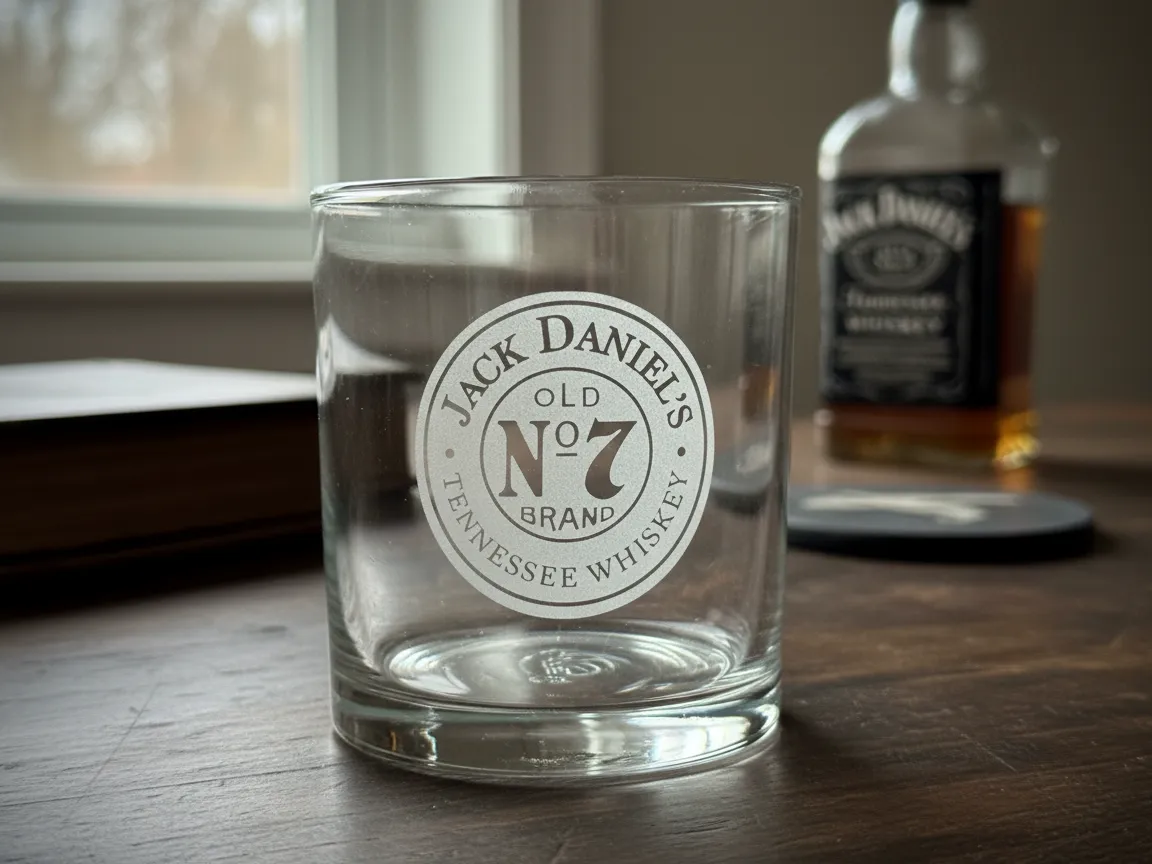
A logo engraved around a curved whiskey glass using the F1 with the RA2 Pro rotary attachment. Personalized barware like this is a high-margin favorite for makers, and the rotary lets the F1 wrap artwork cleanly around cylinders.
Get this design →5. “Not All Who Wander Are Lost” Leather Keychain
A quote engraved into a leather keychain fob — a fast, low-cost F1 product that shows the diode laser’s clean text on leather. Keychains like this are ideal market-stall impulse buys and easy to personalize per customer.
Get this design →6. Lighthouse & Ship Wooden Coaster
A detailed lighthouse-and-ship scene engraved on a round wooden coaster. The fine linework and shading here highlight how the F1 renders intricate illustrations on wood at speed — a staple coaster style for gift sets.
Get this design →How to set up the xTool F1
The F1 is designed for a fast, out-of-the-box setup — most users are engraving their first piece within 15–20 minutes. Here is the full process:
- Unbox and check contents. The box includes the F1 machine, power adapter, USB-C cable, a focus accessory (spacer/ruler), test materials, and an exhaust hose. Inspect everything before powering on.
- Choose a stable spot. Place the F1 on a flat, hard surface with a few centimeters of clearance around the vent and handle. Position it near a window or the desktop smoke purifier so fumes can be exhausted.
- Connect power and data. Plug in the adapter, then link the F1 to your computer with the USB-C cable, or connect it to your Wi-Fi network for wireless jobs.
- Install xTool Creative Space (XCS). Download the free XCS software for Mac or Windows (a mobile app is also available), then open it and let it detect the F1. Run any prompted firmware update.
- Set the focus. Use auto-focus by entering your material’s thickness in XCS, or set it manually with the focus knob and the included spacer for precise distance.
- Add accessories if needed. Attach the slide extension to reach the 115 × 400 mm work area, the RA2 Pro rotary for tumblers and rings, a riser for taller objects, or the honeycomb panel for cutting.
- Run a test. Load a scrap piece, use the framing preview to check placement, and run a quick test engraving to confirm your settings.
How to use the xTool F1
Once the F1 is set up, the day-to-day workflow all happens inside XCS. A typical job looks like this:
- Design or import your artwork. Add text, upload an SVG or image (PNG/JPG), or import a DXF in XCS. Built-in tools let you trace photos, outline shapes, and arrange multiple pieces on one sheet.
- Choose the laser source. Select the infrared laser for metal, plastic, and shiny surfaces, or the diode laser for wood, leather, acrylic, slate, and glass.
- Pick the processing type and material. Choose engrave (fill), score (outline), or cut, then select the matching material preset — or set power, speed, and passes manually.
- Position with Live Preview. The F1 projects a harmless blue-light outline of your design directly onto the material, so you can see the exact size and placement and nudge it before committing — no wasted material.
- Close the lid and run. Confirm focus, close the enclosed cover (the machine will not fire while open), and start the job. The built-in fan and air purifier pull smoke away as it works.
- Unload and finish. When the job ends, remove your piece, wipe off any residue, and repeat. For acrylic or wood, a layer of masking tape can reduce scorch marks.
What materials does the xTool F1 support?
The F1 supports 300+ materials across its two lasers. A quick reference:
| Category | Examples | Laser |
|---|---|---|
| Wood & paper | Basswood, plywood, MDF, bamboo, cardstock, kraft paper | Diode (engrave + cut) |
| Leather & fabric | Genuine & faux leather, felt, denim, canvas | Diode |
| Acrylic | Dark acrylic (diode), clear & black acrylic (IR) | Diode + IR |
| Stone & ceramic | Slate, marble, jade, ceramic tile | Diode |
| Glass | Dark/coated glass, tumblers (with rotary) | Diode |
| Metal | Stainless steel, gold, silver, brass, aluminum, coated metal | Infrared |
| Plastic | Most plastics, anodized surfaces | Infrared |
Always test on a scrap first and follow xTool’s material settings; reflective metals and certain plastics (like PVC, which should never be lasered) have specific safety guidance.
Frequently asked questions about the xTool F1
Can the xTool F1 engrave metal?
Yes. The F1’s 2W infrared laser is designed to mark bare and shiny metals — stainless steel, gold, silver, brass, and aluminum — which most diode-only engravers cannot do.
Can the xTool F1 cut, not just engrave?
Yes. Its 10W diode laser cuts up to 8 mm wood and 5 mm acrylic, in addition to engraving.
Is the xTool F1 good for beginners?
It is beginner-friendly: it is fully enclosed for safety, uses the free XCS software with material presets, and offers auto-focus plus a Live Preview so you can see placement before engraving.
What is the difference between the F1 and F1 Ultra?
The original F1 pairs a 2W IR laser with a 10W diode laser. The newer F1 Ultra steps up to a 20W fiber laser and 20W diode laser for faster, deeper work — at a higher price. See the F1 Ultra project gallery.
Is the xTool F1 portable?
Yes. At 4.6 kg with a metal carry handle and an enclosed body, it is one of the more portable desktop laser engravers available.
Final thoughts
The xTool F1 earns its reputation as a fast, truly portable engraver that punches above its size — largely because the dual IR + diode setup lets one small machine mark shiny metal and engrave or cut wood, leather, acrylic, and glass. For makers who want to sell personalized metal jewelry, tumblers, and mixed-material gifts without buying two machines, it is a strong pick. Browse real builds in the F1 project gallery, then check current bundles on the official xTool F1 page. If you want more speed and full-color metal marking, the newer xTool F2 builds on the same portable format.
