
Report
![[Laser cut and engrave] Laser Engraved Coffee Definition Slate Coaster with Cookies](https://storage-us.atomm.com/resource/xtool/community/attachment/xtool-community/ea5949e0-8277-4ca7-80a4-75f2ff09b6a5.jpg?x-oss-process=image/resize,w_1200,h_900,limit_0/interlace,1/format,webp/auto-orient,1)
![[Laser cut and engrave] Laser Engraved Coffee Definition Slate Coaster with Cookies](data:image/png;base64,iVBORw0KGgoAAAANSUhEUgAAAAoAAAAKCAYAAACNMs+9AAAAAXNSR0IArs4c6QAAABdJREFUKFNjZCASMBKpjmFUId6QIjp4AAppAAuXjCs4AAAAAElFTkSuQmCC)
![[Laser cut and engrave] Laser Engraved Coffee Definition Slate Coaster with Cookies](https://storage-us.atomm.com/resource/xtool/community/attachment/xtool-community/ea5949e0-8277-4ca7-80a4-75f2ff09b6a5.jpg?x-oss-process=image/resize,w_200,h_150,limit_0/interlace,1/format,webp/auto-orient,1)
![[Laser cut and engrave] Laser Engraved Coffee Definition Slate Coaster with Cookies](https://storage-us.atomm.com/resource/xtool/community/attachment/xtool-community/fbe97160-a9a7-4814-83b7-75be4b942144.jpg?x-oss-process=image/resize,w_200,h_150,limit_0/interlace,1/format,webp/auto-orient,1)
Coffee Definition - Coffee and Biscuit Platter
 Instruction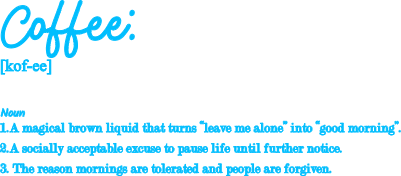
Coffee
.xcs
Application scenario
Laser processing
Machine & module

xTool F1 Ultra
20WCompatible xTool Machine
New
M2
3W, 10W, 20WF2 Ultra UV
5WF2
5W, 15WP3
5W, 80WF2 Ultra
40W, 60WM1
5W, 10WD1
2W, 5W, 10W, 20WD1 Pro
2W, 5W, 10W, 20W, 40WP2
55WF1
2W, 10WS1
2W, 10W, 20W, 40WM1 Ultra
10W, 20WP2S
55WF2 Ultra (Single)
60WMaterial used

Rectangular Blank Rock Slate

5
672
Information
The engraved definition adds humour and personality, making this piece perfect for home coffee stations, cafés, gifts for coffee lovers, or market stock. The design engraves cleanly on natural slate, allowing the light engraving to contrast beautifully against the dark stone surface.
Instruction
1
Step1
Place your slate within the working area of the laser.
Use the “Refresh Background” button to take a snapshot of the material placement.
Move the design to the desired area.
Press the “Framing” button to double check design is in the desired location.
Once you are happy with alignment Click the “Process” button
Check your estimated processing time is acceptable and that all design assets are in the processed job.
Click "Start"
Head over to your laser and start the job process!
Enjoy your Slate Statement!
Comments
Remixes



You may also like

Coffee Makes Your Moment – Engraved Slate Coaster

4
11

Laser Engraved Slate Coffee Coaster with Humorous Quote

7
35

OutIn Inspired Wooden Coffee Coasters

11
22

Laser Cut Wooden Coffee Coasters with Storage Box and Engraved Designs

21
141

Laser Cut Wooden Coffee Themed Round Coasters Set
.png?x-oss-process=image/resize,m_fill,w_240,h_240,limit_0/interlace,1/format,webp/auto-orient,1)
2
15

Laser Engraved Slate Coasters with Coffee Design

2
2

Laser Engraved "Artistry in a cup" Slate Coaster / or Art Plaque

5
18

Coffee Time on wood coaster

40
420

Laser Engraved Slate Coffee Coaster with Outin No Boundaries Design

7
10

Laser Engraved Slate Coffee Coaster Caffeine Loading Please Wait

4
41

Laser Engraved Wooden Coffee Quote Coasters Set
5
37

Wooden Coaster SVG Bundle | Laser Cut Funny Coffee Quotes (Digital Download)

1
17

Coffee and Tea Themed Wooden Engraved Coasters

4
27

Laser Engraved Wooden Coffee Coaster with Cute Highland Cow Design

4
34

Laser Engraved Slate Coaster with Coffee Mug Quote

3
23

Laser Cut Wooden Heart-Shaped Coffee Coasters with Storage Box
10
102

Sleek Coffee Coaster Gift

2
2

Laser Cut & Engraved Wooden Coaster with Dream Quote

0
2