
xTool Screen Printer è il primo sistema serigrafico che usa un laser per incidere gli stencil. Invece del disordinato processo emulsione-e-luce che dura un giorno intero, incidi uno schermo pre-rivestito su un laser xTool e inizi a stampare in circa un'ora.
Questa guida spiega cos'è lo Screen Printer, quanto costa, come funziona, cosa puoi realizzare e come configurarlo e usarlo.
Punti chiave
- xTool Screen Printer è la prima soluzione serigrafica che crea gli stencil con un laser invece che con emulsione ed esposizione UV.
- Riduce la creazione dello stencil da circa 24 ore a circa un'ora, con una precisione laser fino a 0,01 mm.
- Richiede un laser xTool compatibile (S1, P2 o D1 Pro) per incidere gli schermi pre-rivestiti: il laser è venduto separatamente.
- Parte da circa 349-399$ ed è un modo economico per iniziare la serigrafia domestica su magliette, poster e altro.

Cos'è xTool Screen Printer?
xTool Screen Printer è un kit serigrafico compatto costruito attorno a un'idea sola: usare un laser per creare lo stencil. Posizioni uno schermo pre-rivestito su un laser xTool compatibile, il laser incide il tuo design nell'emulsione in pochi minuti e stampi con inchiostro e racla, senza camera oscura, prodotti chimici o unità di esposizione UV.
Il suo telaio EasyStretch tende uno schermo in circa 30 secondi, e funzioni come la separazione colori a un clic e la mezzatinta rendono le stampe multicolore e stile foto accessibili anche ai principianti.
| Tipo | Kit serigrafico assistito da laser |
|---|---|
| Metodo stencil | Schermi pre-rivestiti incisi al laser (niente emulsione/UV) |
| Precisione laser | Dettaglio stencil fino a 0,01 mm |
| Tempo stencil | ~1 ora (contro ~24 ore col metodo tradizionale) |
| Schermi | Acciaio inox a maglia 100; oltre 100 stampe per schermo |
| Telaio | EasyStretch: tende uno schermo in ~30 secondi |
| Richiede | Un laser xTool compatibile (S1, P2 o D1 Pro), venduto separatamente |
Quali sono i prezzi di xTool Screen Printer?
Lo Screen Printer è uno degli accessori più economici di xTool. Le cifre sono in USD a luglio 2026 e variano con le promozioni; il laser per incidere gli schermi è un acquisto separato.
| Opzione | Cosa ottieni | Prezzo (circa) |
|---|---|---|
| Kit monocolore | Telaio, schermi pre-rivestiti e strumenti di stampa | da ~349$ |
| Kit multicolore | Aggiunge strumenti di registro per stampe multicolore a strati | ~399$ |
| Richiesto separatamente | Un laser xTool compatibile (S1, P2 o D1 Pro) | vedi il prezzo della macchina |
Se possiedi già un laser xTool, lo Screen Printer è un modo economico per aggiungere una linea di prodotti del tutto nuova; in caso contrario, metti in conto anche una macchina compatibile.
Come funziona xTool Screen Printer?
Il flusso di lavoro sostituisce il tradizionale processo da camera oscura con un rapido passaggio laser:
- Progetta il tuo artwork in xTool Creative Space, usando se necessario la separazione colori a un clic o la mezzatinta.
- Incidi uno schermo pre-rivestito sul tuo laser xTool: il fascio brucia via l'emulsione formando lo stencil in pochi minuti.
- Tendi lo schermo sul telaio EasyStretch (circa 30 secondi).
- Stampa facendo scorrere l'inchiostro sullo schermo con una racla, sulla tua maglietta, carta o altra superficie.
Dove puoi acquistare xTool Screen Printer?
- Negozio ufficiale xTool (xtool.com): kit monocolore e multicolore, schermi e bundle.
- Amazon e negozi di hobbistica: il kit è venduto anche tramite Michaels e altri negozi.
- Rivenditori autorizzati: fornitori di serigrafia e per maker che trattano xTool.
Cosa puoi realizzare con xTool Screen Printer?
La serigrafia è veloce ed economica per unità una volta creato lo schermo, quindi si adatta a piccoli lotti e design ripetuti:
- Abbigliamento: t-shirt, felpe, borse tote e merchandising per team o eventi.
- Poster e stampe artistiche: design decisi e a strati su carta e cartoncino.
- Packaging e insegne: etichette stampate, cartellini e piccoli cartelli.
- Mixed media: aggiungi colore stampato a legno, acrilico e altri progetti laser.
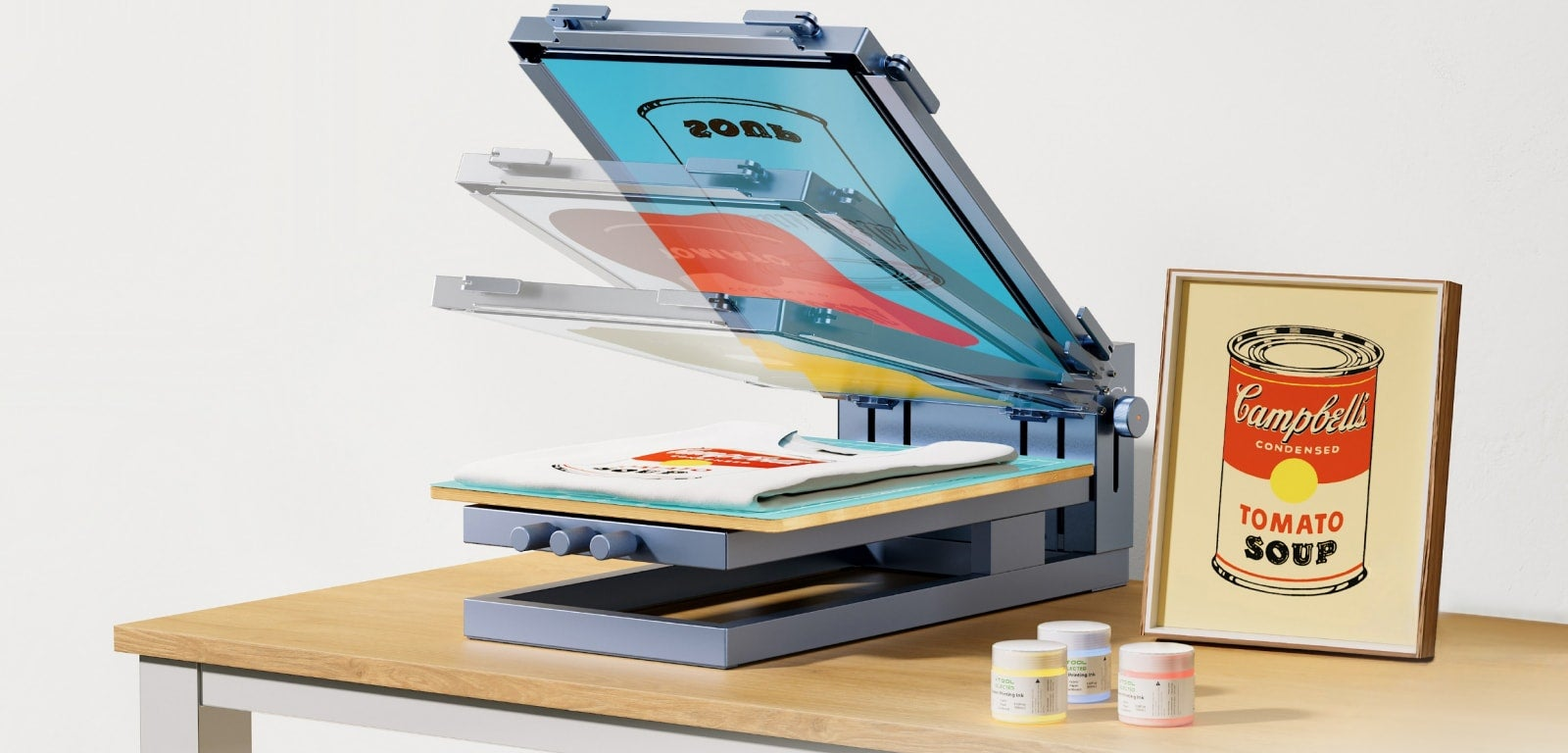
Come configurare xTool Screen Printer
- Monta il telaio e la base su una superficie piana; il kit arriva già in gran parte pre-assemblato.
- Carica uno schermo pre-rivestito e tendilo con le strisce e le chiavi EasyStretch.
- Tieni pronto un laser xTool compatibile (S1, P2 o D1 Pro) con xTool Creative Space installato.
- Prepara inchiostro, racla e supporti, e fai una stampa di prova per calibrare la copertura.
Come usare xTool Screen Printer
- Incidi il tuo design su uno schermo pre-rivestito con il laser xTool.
- Monta lo schermo sul telaio EasyStretch e allinealo sopra il tuo supporto.
- Applica l'inchiostro lungo la parte superiore dello schermo.
- Fai scorrere la racla verso il basso con forza e uniformità per spingere l'inchiostro attraverso lo stencil.
- Solleva, fai asciugare l'inchiostro secondo le istruzioni e ripeti per la prossima stampa o colore.
Su cosa può stampare xTool Screen Printer?
Con l'inchiostro giusto, la serigrafia funziona su un'ampia gamma di superfici:
| Superficie | Esempi | Tipo di inchiostro |
|---|---|---|
| Tessuto | Magliette in cotone e misti, felpe, borse tote | Inchiostro tessile a base d'acqua o plastisol |
| Carta e cartoncino | Poster, stampe artistiche, biglietti | Inchiostro a base d'acqua |
| Legno | Cartelli, targhe, pezzi tagliati al laser | Inchiostro acrilico/a base d'acqua |
| Altro | Alcune plastiche e superfici rivestite | Inchiostro speciale compatibile |
Abbina l'inchiostro alla superficie e falla asciugare come indicato, così le stampe restano durature nei lavaggi e nell'uso.
Alternative a xTool Screen Printer
La serigrafia è uno dei tanti modi per decorare l'abbigliamento. Se non è la scelta giusta per te, ecco le principali alternative e dove ognuna eccelle.
xTool Apparel Printer
DTF a colori pieni
La stampante DTF di xTool gestisce sfumature e dettagli fotografici che la serigrafia piana non può riprodurre, su qualsiasi colore di tessuto. Molto più costosa e più adatta a tirature variate a colori pieni che a lotti monocolore.
Procolored P13 DTF Printer
DTF desktop economica
Una stampante DTF desktop più economica per transfer a colori pieni. È una strada più economica verso stampe dettagliate per abbigliamento rispetto a una macchina DTF professionale, anche se il DTF ha costi per film e polvere a ogni stampa.
xTool Heat Press
Applica i transfer
Non è una stampante di per sé: applica transfer che tagli o acquisti sui capi. Il modo più semplice ed economico per decorare pezzi singoli, ma non per stampare i tuoi schermi.
Come scegliere un metodo per stampare magliette
Abbina il metodo ai tuoi design e ai volumi:
| Se vuoi... | Metodo migliore | Opzione |
|---|---|---|
| Costo unitario basso ad alto volume, pochi colori | Serigrafia | xTool Screen Printer |
| Design a colori pieni, stile foto | Stampa DTF | xTool Apparel Printer, Procolored |
| Pezzi singoli veloci e piccole tirature | Transfer a caldo | xTool Heat Press + HTV/DTF |
| Costo di avvio più basso | HTV o un kit manuale | Pressa a caldo, kit serigrafico tradizionale |
xTool Screen Printer vince in velocità e costo quando stampi lo stesso design deciso molte volte. Scegli il DTF (l'xTool Apparel Printer o una Procolored) per artwork dettagliati e multicolore, oppure una pressa a caldo per pezzi singoli occasionali. I kit completamente manuali come Speedball o una pressa Riley Hopkins costano meno all'inizio ma richiedono molto più tempo per schermo.
Uno schermo inciso al laser ha comunque bisogno di inchiostro, rete e racla. Le forniture per serigrafia per macchine xTool sono scelte per adattarsi agli schermi prodotti da questa stampante.
Considerazioni finali
xTool Screen Printer rende accessibile la vera serigrafia sostituendo la camera oscura con un laser. Per chi possiede già una macchina xTool compatibile, è un modo economico per aggiungere stampe durature e adatte ai lotti a una linea di abbigliamento o merchandising.
Si integra naturalmente nel resto dell'ecosistema: scopri come si inserisce accanto ai laser e alle stampanti nella nostra panoramica delle macchine xTool.
Dove si colloca questa macchina
Se stai confrontando le opzioni, i paragoni più vicini sono la Heat Press e la WonderPress.
Per una visione più ampia delle macchine per hobbistica a confronto, vedi Cricut vs xTool.
Qualunque macchina tu scelga, il lato progettazione è lo stesso compito: opere che la macchina può seguire. L'Atomm AI di Atomm genera file pronti per l'hobbistica creativa, e i progetti della community sono liberi da aprire e adattare.
Per un confronto con gli altri modi di decorare una maglietta, vedi come realizzare magliette personalizzate.
Domande frequenti su xTool Screen Printer
Serve un laser per usare xTool Screen Printer?
Sì. Gli schermi si creano incidendoli su un laser xTool compatibile (S1, P2 o D1 Pro). Se non ne possiedi uno, dovrai acquistare il laser separatamente.
In cosa differisce dalla serigrafia tradizionale?
Sostituisce il disordinato passaggio di emulsione ed esposizione UV con una rapida incisione laser, riducendo la creazione dello stencil da circa un giorno a circa un'ora, con un dettaglio più nitido.
Quante stampe dura uno schermo?
Ogni schermo a maglia 100 inciso al laser resiste ad almeno un centinaio di stampe, quindi un singolo design si ripaga su un intero lotto.
Può stampare più di un colore?
Sì: il kit multicolore aggiunge strumenti di registro, e la separazione colori a un clic e la mezzatinta aiutano a sovrapporre colori e stampare artwork in stile foto.
xTool Screen Printer è adatto ai principianti?
È uno dei modi più semplici per iniziare con la serigrafia: già in gran parte pre-assemblato, tensionamento dello schermo in 30 secondi, software adatto ai principianti e migliaia di design pronti da stampare.
Prepara i retini per la serigrafia
Regola dimensione del punto, angolo e spaziatura, poi esporta un file pronto per la pellicola — gratis.
