Report
![[Laser cut and engrave] Engraved Glass Tumbler with Dog Portrait and Name Kelly](https://image-res.atomm.com/resource/xtool/community/attachment/xtool-community/f44d10d7-90cd-447b-b347-7c55bd83765f.JPG?x-oss-process=image/resize,m_fill,w_1280,h_960,limit_0/interlace,1/format,webp/auto-orient,1)
![[Laser cut and engrave] Engraved Glass Tumbler with Dog Portrait and Name Kelly](data:image/png;base64,iVBORw0KGgoAAAANSUhEUgAAAAoAAAAKCAYAAACNMs+9AAAAAXNSR0IArs4c6QAAABdJREFUKFNjZCASMBKpjmFUId6QIjp4AAppAAuXjCs4AAAAAElFTkSuQmCC)
![[Laser cut and engrave] Engraved Glass Tumbler with Dog Portrait and Name Kelly](https://image-res.atomm.com/resource/xtool/community/attachment/xtool-community/f44d10d7-90cd-447b-b347-7c55bd83765f.JPG?x-oss-process=image/resize,m_fill,w_160,h_120,limit_0/interlace,1/format,webp/auto-orient,1)
![[Laser cut and engrave] Engraved Glass Tumbler with Dog Portrait and Name Kelly](https://image-res.atomm.com/resource/xtool/community/attachment/xtool-community/cec0bbd9-8b8c-4f81-823a-a3a3b1d91fcc.PNG?x-oss-process=image/resize,m_fill,w_160,h_120,limit_0/interlace,1/format,webp/auto-orient,1)
![[Laser cut and engrave] Engraved Glass Tumbler with Dog Portrait and Name Kelly](https://image-res.atomm.com/resource/xtool/community/attachment/xtool-community/eac1750c-3f55-4664-a2e9-4c5a3313dc4b.JPG?x-oss-process=image/resize,m_fill,w_160,h_120,limit_0/interlace,1/format,webp/auto-orient,1)
![[Laser cut and engrave] Engraved Glass Tumbler with Dog Portrait and Name Kelly](https://image-res.atomm.com/resource/xtool/community/attachment/xtool-community/40d5efba-8897-4450-bdd0-e51a3929784b.JPG?x-oss-process=image/resize,m_fill,w_160,h_120,limit_0/interlace,1/format,webp/auto-orient,1)
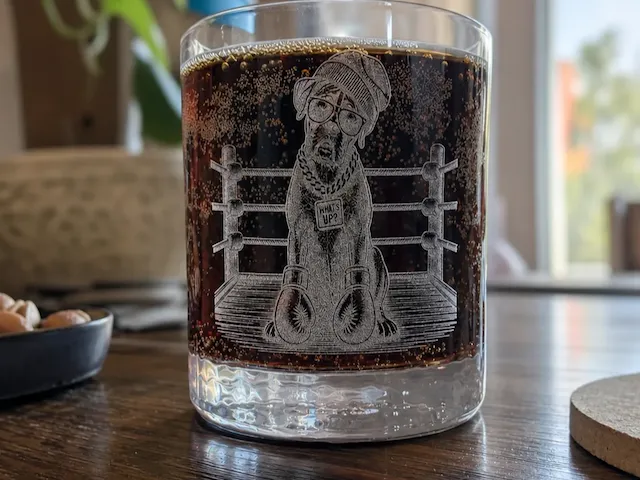
Engraved Glass Tumbler with Dog Portrait and Name Kelly
 Instruction
Kelly Glasgravur
.xcs
Application scenario
Laser processing (15min)
Machine & module

xTool F2
15WMaterial used

Glass

68
1557
Information
      Personalized Laser Engraved Glass – Unique & High Quality

This personalized glass is refined using modern laser engraving technology, making it a unique keepsake or gift. The precise engraving process creates a permanent, detailed design that will not fade or wear over time.

The glass is first coated with acrylic paint and then engraved using a rotary laser system. After engraving, the paint is washed off, revealing a clean and elegant design directly in the glass.
The result is a high-quality, sharp engraving with a premium appearance.

Whether customized with a personal image, name, text, or unique design, each glass is truly one of a kind.

Product Features:

High-quality laser engraving on glass

Customizable with your own image and text

Permanent and durable engraving

Ideal as a gift, memorial piece, or decorative item

Precision-crafted using rotary laser technology

Note:
Designs and text can be fully customized.

If you likethe project, give me a thumbs up.
Instruction
1
Step1: Prepare the glass
Paint the glass completely with acrylic paint, preferably black.
Allow the paint to dry thoroughly
2
Step2: Mount the glass in the laser
Set up the laser with the rotary attachment and secure the glass.
Make sure the glass is perfectly aligned using the small spirit level.
3
Step3: Set measurements and focus
Measure the circumference or diameter of the glass and enter the correct values in the software.
Then focus the laser using the autofocus function.
4
Step4: Start the engraving
Use the recommended settings and press Start.
After approximately 13–15 minutes, the engraving will be finished.
5
Step5: Finishing
Remove the glass and wash off the acrylic paint with warm water.
Your engraving is now complete!
Have fun with it!
Tip:
Of course, you can also use your own image or customize the text.
Comments
Remixes



You may also like

Jack Daniel's Engraved Whiskey Glass with Old No 7 Logo

62
711

I just want to sip coffee and pet my dog tumbler

6
37

Set of 14 Laser Engraved Glasses with Custom Christmas Tree Designs

83
420

Laser Engraved Glass Wine Tumbler with Festive Christmas Tree Design / Weinglas mit Weihnachtsbaum, Wunsch und Name

7
39

'/%3e%3cdefs%3e%3clinearGradient%20id='paint0_linear_1433_15675'%20x1='12'%20y1='3.25'%20x2='16.6891'%20y2='20.75'%20gradientUnits='userSpaceOnUse'%3e%3cstop%20stop-color='%23FF5D80'/%3e%3cstop%20offset='1'%20stop-color='%23FF0035'/%3e%3c/linearGradient%3e%3c/defs%3e%3c/svg%3e)
Almake Line Art from a Photo Shar Pei In Memory Engraved Personalised Steel Tumbler

33
69

Wisky Glass
11
49

LOVE HEART TUMBLER OR GLASS CAN WRAP

2
9

Pink tumbler featuring a dog portrait with sunflowers and butterflies

1
0

Engraved Glass with perfect results
22
185

Custom green tumbler with dog illustration

1
28

Laser Engraved Lion Owl Geometric Tumbler with Name

5
20

Laser Engraved Glass Tumbler with Dragon Design

11
152

Corgi Valentines day 20oz Tumbler

5
12

Mason Jar Glass Engraved with a Summer Lemon Design.

8
42

Glass tumbler featuring a detailed skull motif

3
34

Etched Glass Tumbler with Sea Turtle Design on Beach
17
129

Laser Engraved Glass Can Set with Floral Designs

11
36

Life Is Better With Dogs White Water Bottle

2
6