









































![[Laser cut and engrave,Screen printing] Brass Color Calibration Chart](https://storage-us.atomm.com/resource/xtool/community/attachment/xtool-community/9cd6a315-f67c-4558-b238-0a60a89d6b2b.jpg?x-oss-process=image/resize,w_1200,h_900,limit_0/interlace,1/format,webp/auto-orient,1)
Brass Color Calibration Chart
 Instruction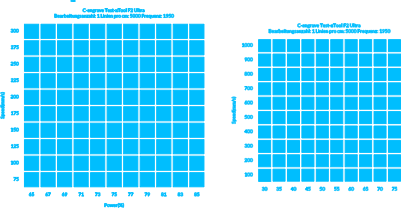

.png?x-oss-process=image/resize,m_mfit,w_32,h_32,limit_0/interlace,1/format,webp/auto-orient,1)
Information
      Unlock the full color potential of your xTool F2 Ultra on brass. This project is a precision parameter test grid designed to achieve vibrant annealing colors—ranging from deep oranges to rare purples—on uncoated brass. By pushing the 60W MOPA module to its limits (2ns pulse width, 1950 kHz frequency, and 5000 lines/cm density), this chart demonstrates the "micro-polishing" effect possible with the F2 Ultra.

Note: These specific results were achieved in a cool environment (approx. 10°C/50°F), which aids in heat dissipation and stabilizes the oxidation layers. Use this file to calibrate your own machine for high-end color engraving.
Instruction
Step1
1. Material Preparation
Use raw, uncoated brass plate. It is crucial to clean the surface thoroughly with alcohol or acetone before engraving. Any oil, fingerprints, or lacquer will interfere with the oxidation process and ruin the colors.
Step2
2. Machine Setup (xTool F2 Ultra)
60W MOPA
Precise focus is mandatory. Use the auto-measure feature. Since the spot size is utilized at ~0.01mm, even a 1mm deviation can turn vibrant colors into dull brown marks.
Ensure the brass plate is perfectly flat and secured.
Step3
3. The Parameters
This file uses a unique "Micro-Polishing" technique:
Pulse Width: Locked to 2 ns (to minimize thermal penetration).
Frequency: Set to 1950 kHz (to create a continuous heating effect).
Density: 5000 lines/cm (0.002mm interval). This extremely high overlap builds the color layer by layer.
Step4
4. The "Temperature Factor" (Crucial Tip!)
These results were calibrated in a cool workshop environment (approx. 10°C / 50°F). The cold brass dissipates heat faster, allowing for sharper colors ("quenching effect").
If your workshop is warm (>25°C): You may notice heat accumulation causing the colors to burn. In this case, try reducing the line density to 3000-4000 lines/cm or slightly increasing the speed to compensate.
Step5
5. Enjoy the Engraving
Run the grid test. Examine the results under bright, direct light. The "sweet spot" for purple/pink tones is narrow—use the grid coordinates that look best on your specific plate to apply to your designs.
.png)


