











































![[Laser cut and engrave] Commemorative event medallions](https://storage-us.atomm.com/resource/xtool/community/attachment/xtool-community/dab381ec-962d-4591-9391-a890d675d588.jpg?x-oss-process=image/resize,w_1200,h_900,limit_0/interlace,1/format,webp/auto-orient,1)
![[Laser cut and engrave] Commemorative event medallions](data:image/png;base64,iVBORw0KGgoAAAANSUhEUgAAAAoAAAAKCAYAAACNMs+9AAAAAXNSR0IArs4c6QAAABdJREFUKFNjZCASMBKpjmFUId6QIjp4AAppAAuXjCs4AAAAAElFTkSuQmCC)
![[Laser cut and engrave] Commemorative event medallions](https://storage-us.atomm.com/resource/xtool/community/attachment/xtool-community/dab381ec-962d-4591-9391-a890d675d588.jpg?x-oss-process=image/resize,w_200,h_150,limit_0/interlace,1/format,webp/auto-orient,1)
![[Laser cut and engrave] Commemorative event medallions](https://storage-us.atomm.com/resource/xtool/community/attachment/xtool-community/ad646899-0ae8-474d-befb-5c9a786fce0f.jpg?x-oss-process=image/resize,w_200,h_150,limit_0/interlace,1/format,webp/auto-orient,1)
![[Laser cut and engrave] Commemorative event medallions](https://storage-us.atomm.com/resource/xtool/community/attachment/xtool-community/c765600b-ec85-499a-a3ff-d8409a4041f8.jpg?x-oss-process=image/resize,w_200,h_150,limit_0/interlace,1/format,webp/auto-orient,1)
Commemorative event medallions
 Instruction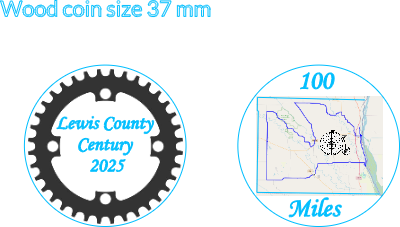


Information
Wooden coin medallions to commemorate small, local events. These examples include a bike ride and a kayak float. The coins were handed out to all participants.
Instruction
Step1: Collect graphics
I used one side of the coin for the title of the event and the other for a map. I downloaded free graphics of the chainring, bicycle and kayaker. For the kayak trip map, I zoomed into the appropriate area with Google maps, took a screenshot, and cropped down the desired portion. For the bicycle map (sorry, this gets complicated), I downloaded the gpx file of the route from Strava (having recorded the ride using a Garmin bicycle computer), and uploaded it to the website gpx.studio. I zoomed into a view of the whole county and took a screenshot of it.
Step2: Design and layout
I opened a file in Xtool Studio and crated a 37-mm circle. I made 3 more copies of the circle for each side of two coins. I cropped the graphics down to exclude extraneous material and used manual cutout to make the backgrounds transparent. The outlines of the county for the bicycle map were faint, so I redrew them using straight lines. I used manual cutout with the eraser to eliminate the parts of the map outside of the county lines, except that I left all of the Mississippi River in there because it's kind of cool. I imported the graphics, sized and placed them. I typed in the text, sized and placed it as desired.
Step3: Burn it!


The 37-mm circle is set at 1% power and 80 mm/s speed. I didn't want to burn it, but use it to define the work area and properly frame it. I do this type of thing for almost all my projects. The other elements are set at 100%, 70 mm/s. Your results may vary. Maps can be faint, so you may have to use slower speed to darken them. Fortunately, these coins are cheap, so you can practice on a few to get the settings just right. I marked the center of the coin and used that as a reference point for the engraving. I engraved one side of, for example, 10 coins, then turned them over and engraved the other side. When I turn them over, I try to use the same orientation. In other words the bottom of one side is the bottom of the other side.
Blank coins: https://www.amazon.com/dp/B01DWK4GUE?th=1


