![[Laser cut and engrave] Laser Cut Wooden Desk Organizer with Drawers and Decorative Pattern](https://storage-us.atomm.com/resource/xtool/community/attachment/xtool-community/998adcfc-aeea-4bf8-92d5-bcf3caf97cf4.png?x-oss-process=image/resize,w_1200,h_900,limit_0/interlace,1/format,webp/auto-orient,1)

![[Laser cut and engrave] Laser Cut Wooden Desk Organizer with Drawers and Decorative Pattern](https://storage-us.atomm.com/resource/xtool/community/attachment/xtool-community/998adcfc-aeea-4bf8-92d5-bcf3caf97cf4.png?x-oss-process=image/resize,w_200,h_150,limit_0/interlace,1/format,webp/auto-orient,1)
![[Laser cut and engrave] Laser Cut Wooden Desk Organizer with Drawers and Decorative Pattern](https://storage-us.atomm.com/resource/xtool/community/attachment/xtool-community/1baddd7b-f3c9-4403-90a6-f642359b9781.png)
![[Laser cut and engrave] Laser Cut Wooden Desk Organizer with Drawers and Decorative Pattern](https://storage-us.atomm.com/resource/xtool/community/attachment/xtool-community/a9f1d050-877d-474a-aec7-7c4a66fd4727.png?x-oss-process=image/resize,w_200,h_150,limit_0/interlace,1/format,webp/auto-orient,1)
![[Laser cut and engrave] Laser Cut Wooden Desk Organizer with Drawers and Decorative Pattern](https://storage-us.atomm.com/resource/xtool/community/attachment/xtool-community/410ef1fb-818a-4e90-a4ee-3b283e1d72c3.png?x-oss-process=image/resize,w_200,h_150,limit_0/interlace,1/format,webp/auto-orient,1)
![[Laser cut and engrave] Laser Cut Wooden Desk Organizer with Drawers and Decorative Pattern](https://storage-us.atomm.com/resource/xtool/community/attachment/xtool-community/ef13525c-2647-4d13-9ae1-f4db13302a65.png?x-oss-process=image/resize,w_200,h_150,limit_0/interlace,1/format,webp/auto-orient,1)
![[Laser cut and engrave] Laser Cut Wooden Desk Organizer with Drawers and Decorative Pattern](https://storage-us.atomm.com/resource/xtool/community/attachment/xtool-community/4a0fcc39-63bb-4d4e-b0d5-85463f1c6615.png?x-oss-process=image/resize,w_200,h_150,limit_0/interlace,1/format,webp/auto-orient,1)
![[Laser cut and engrave] Laser Cut Wooden Desk Organizer with Drawers and Decorative Pattern](https://storage-us.atomm.com/resource/xtool/community/attachment/xtool-community/64cc1674-d5e7-41f1-aad6-49cd1e273a68.png?x-oss-process=image/resize,w_200,h_150,limit_0/interlace,1/format,webp/auto-orient,1)
![[Laser cut and engrave] Laser Cut Wooden Desk Organizer with Drawers and Decorative Pattern](https://storage-us.atomm.com/resource/xtool/community/attachment/xtool-community/88191296-4e26-44ae-b428-1229dc97497e.png?x-oss-process=image/resize,w_200,h_150,limit_0/interlace,1/format,webp/auto-orient,1)
Laser Cut Wooden Desk Organiser Makeup Holder with Floral Pattern and Drawers and Customisable Text
 Instruction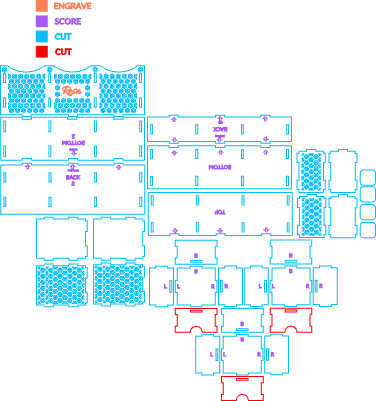


Information
      I designed this piece to be both practical and beautiful. It’s laser-cut from 3 mm basswood or MDF, with the option of acrylic drawer fronts for a little extra character. Compact but surprisingly spacious, it fits perfectly on a desk or vanity, helping keep everyday items neat and easy to reach.

It works beautifully as a desk organiser or a makeup holder, keeping brushes, cosmetics, and small essentials tidy. The front panel can be customised with a name, making it feel truly personal and also a thoughtful, unique gift for someone special.
Instruction
Step1
Step 1 – Assemble the drawers section
Please refer to steps 5-6-7-8 in the Template Instructions for a step-by-step guide to assembling the drawers section.
Note: in this version, the top panel is solid and does not include the extra cut-out used to hold items. Also, the panels labeled “Back 2” and “Bottom 2” are not used for the drawers section, for this step, use only the Back, Bottom, and Top panels without any numbers.
In that tutorial the front panels of the drawers are made by 3mm black acrylic but you can absolutely choose any material you like.
In the referenced tutorial, the drawer front panels are made from 3 mm black acrylic, but you are absolutely free to use any material you prefer.
Step2


Step 2 – Assemble the upper section
To assemble the upper part of the product, use the panels labeled Back 2 and Bottom 2.
Start by placing Bottom 2 flat on your work surface. Insert the side panels and the inner divider panels into their matching slots, making sure they are fully seated and standing upright.
Next, attach Back 2 by aligning its slots with the tabs on the side and divider panels, and press gently until secure.
Finally, attach the patterned front panel by aligning its tabs with the front slots of the side and divider panels. Press carefully until it fits snugly into place.
This upper section has no top panel. When assembled correctly, it will form three open compartments and is ready to be placed onto the drawers section.
Step3


Step 3 – Attach the drawers section to the upper part
Carefully place the drawers section underneath the upper section, making sure all edges are properly aligned. Gently press the two sections together until they sit securely and evenly.
Take a moment to check that everything is straight and stable.
IT’S DONE — THANK YOU.
Enjoy your handcrafted desk organiser 🤍