
![[Laser cut and engrave] Laser Cut Nativity Scene Christmas Countdown Ornament](https://storage-us.atomm.com/resource/xart/result/4697/bd7ab849-f721-4ff1-8d49-8a1925bcad65.png?x-oss-process=image/resize,w_1200,h_900,limit_0/interlace,1/format,webp/auto-orient,1)
![[Laser cut and engrave] Laser Cut Nativity Scene Christmas Countdown Ornament](data:image/png;base64,iVBORw0KGgoAAAANSUhEUgAAAAoAAAAKCAYAAACNMs+9AAAAAXNSR0IArs4c6QAAABdJREFUKFNjZCASMBKpjmFUId6QIjp4AAppAAuXjCs4AAAAAElFTkSuQmCC)
![[Laser cut and engrave] Laser Cut Nativity Scene Christmas Countdown Ornament](https://storage-us.atomm.com/resource/xart/result/4697/bd7ab849-f721-4ff1-8d49-8a1925bcad65.png?x-oss-process=image/resize,w_200,h_150,limit_0/interlace,1/format,webp/auto-orient,1)
![[Laser cut and engrave] Laser Cut Nativity Scene Christmas Countdown Ornament](https://storage-us.atomm.com/resource/xtool/community/attachment/xtool-community/88bbd22a-e838-4694-bfa0-c7b902289d5b.jpg?x-oss-process=image/resize,w_200,h_150,limit_0/interlace,1/format,webp/auto-orient,1)
![[Laser cut and engrave] Laser Cut Nativity Scene Christmas Countdown Ornament](https://storage-us.atomm.com/resource/xtool/community/attachment/xtool-community/dcc8acdc-7509-436a-a683-9581fccfda4d.jpg?x-oss-process=image/resize,w_200,h_150,limit_0/interlace,1/format,webp/auto-orient,1)
![[Laser cut and engrave] Laser Cut Nativity Scene Christmas Countdown Ornament](https://storage-us.atomm.com/resource/xtool/community/attachment/xtool-community/bc230eeb-2043-4b71-b72d-7dd329931667.jpg?x-oss-process=image/resize,w_200,h_150,limit_0/interlace,1/format,webp/auto-orient,1)
Nativity Christmas Countdown
 Instruction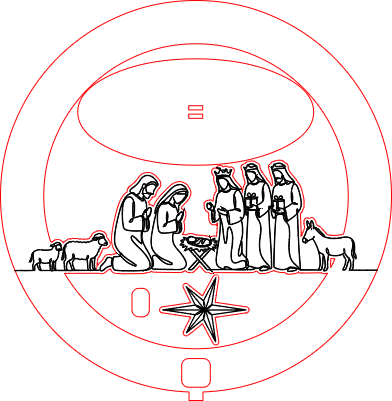


Information
A nativity Christmas Count down. All images were created with AImake!
Instruction
Step1: Getting Ready

Download and prep your materials.
I used 3 sheets of 12x12 Basswood Plywood at 3mm.
Step2: Process Canvas 1

Place a single sheet of ply into your laser and mark the processing area to ensure that your project will be aligned properly on the sheet.
Once you are happy with alignment, process the job. This should take about 21 minutes.
Step3: Process Canvas 2

Place a single sheet of ply into your laser and again, mark the processing area to ensure that your project will be aligned properly on the sheet.
Once you are happy with alignment, process the job. Canvas 2 took about 43 minutes (you may be able to speed up the time w/ processing changes).
Step4: Process Canvas 3

One last time, place a single sheet of ply into your laser and mark the processing area to ensure that your project will be aligned properly on the sheet.
Once you are happy with alignment, process the job. Canvas 3 took about 7 minutes.
Step5: Cleanup and Glue


Once you are completed with all cuts, take a high grit sand paper and sand the inner ring with the numbers (this will allow it to spin more freely). You'll want to do the same with the outer ring of the center ply (nativity with the manger and ribbon scroll).
After cleaning those two pieces up, you'll want to start gluing. I started with the front piece, and glued the center into it, leaving the ring with the numbers off to the side (you don't want to glue this piece) once the glue was dried a bit, I added the ring with the numbers and then glued the back piece to the center ring (again, no glue on the ring with the numbers).
Once that was set to dry, we can add the star to the handle. To do this, we first glue the small popsicle piece onto the handle and then the star. This helps make it pop a bit more.
The last part is the stand. There are two pieces, the smaller gets glued to the top of the larger. You can also glue the calendar down into the stand if you like, or leave it unglued for easy storage.
