
![[Laser cut and engrave] Color Guard Tumbler Wrap | Spin Toss Catch Repeat](https://storage-public.atomm.com/xtool/community/attachment/xtool-community/c7ece74b-0c0d-4b86-a1b9-d821b776e672.png?x-oss-process=image/resize,w_1200,h_900,limit_0/interlace,1/format,webp/auto-orient,1)
![[Laser cut and engrave] Color Guard Tumbler Wrap | Spin Toss Catch Repeat](https://storage-public.atomm.com/xtool/community/attachment/xtool-community/c7ece74b-0c0d-4b86-a1b9-d821b776e672.png?x-oss-process=image/resize,w_200,h_150,limit_0/interlace,1/format,webp/auto-orient,1)
![[Laser cut and engrave] Color Guard Tumbler Wrap | Spin Toss Catch Repeat](https://i.ytimg.com/vi/SB8XRD_h2dA/hq2.jpg)
![[Laser cut and engrave] Color Guard Tumbler Wrap | Spin Toss Catch Repeat](/_nuxt/video_icon.B5w3Xr8w.png)
Color Guard Tumbler Wrap | Spin Toss Catch Repeat
 Instruction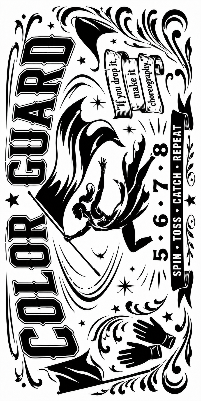


Information
A bold 2-tone Color Guard tumbler design made for high school performers, featuring a dynamic flag spinner, flowing motion lines, gloves, count marks, and the phrase “Spin • Toss • Catch • Repeat.” This laser-ready wrap captures the energy, grace, and choreography of color guard without rifle or sabre elements, making it perfect for school teams, guard moms, performers, coaches, and marching arts fans.
Instruction
Step1
Suggested Laser Engraving Settings
These settings were used successfully on an xTool M1 Ultra with the 20W laser module. Results may vary depending on tumbler coating, color, material, rotary setup, and focus, so always run a small test before engraving the final product.
Machine: xTool M1 Ultra
Laser Module: 20W Laser
Bitmap Mode: Jarvis
Power: 30% (Too much power will burn thru the color coating)
Speed: 80 mm/s
Passes: 1
Lines per cm: 120
Setup Notes:
Measure your tumbler and confirm the design size before engraving.
Use a rotary attachment or tumbler roller and make sure the cup is level.
Focus the laser according to your xTool setup.
Align the design carefully before starting.
Run a small test mark when possible, especially on new tumbler brands or colors.
Clean the tumbler after engraving to remove residue.
These settings are intended as a starting point. Adjust power, speed, or line density as needed for your specific tumbler and desired engraving depth or contrast.
Remixes
License


You may also like

Divine Intervention – The Path of the Righteous Edition - Pulp Fiction Tumbler

Music Cupcake Topper SVG Bundle | Rock Party Cake Topper SVG | Guitar Music Notes Treble Clef SVG | Laser Cut Party Decor | Cupcake Picks


Colorful Paper Butterfly Confetti for Scrapbooking and Crafting


Set of 6 Camping Crew Adventure Themed Vinyl Stickers Bundle


UTV Off Road Digital Design – CNC & Laser Ready

Witchy Halloween SVG Bundle - 20 Mystical Magic, Spooky Design


Laser Cut Aquarium Аквариум Russian Rock Band Vinyl Record Wall Clock Free Vector


Black and White Comic Style Coloring Page Featuring Three Different Cars


20 Baby Dragon Watercolor Clipart Bundle PNG 300 DPI


Fan Mesh Guard - Hexagons - 120mm


Jellyfish Ocean Tumbler Wrap | 2-Tone Laser Engraving Design

fishing 40oz tumbler wrap


We The People Metal RFID Wallet


Set of 3 Colorful Dinosaur Stickers for Kids Craft Projects

1st Armored Division Union SVG DXF EPS AI Old Ironsides CNC Laser File

Laser Engraved Custom Headphones with Designs


Color Chart for Yarn


Blue Backpack Illustration with Number 67 Design