
Report
![[Laser cut and engrave] Acrylic heart wall decoration](https://image-res.atomm.com/resource/xtool/community/attachment/xtool-community/a6cf21c1-848d-46ee-9531-7289a9375d33?x-oss-process=image/resize,m_fill,w_1280,h_960,limit_0/interlace,1/format,webp/auto-orient,1)
![[Laser cut and engrave] Acrylic heart wall decoration](data:image/png;base64,iVBORw0KGgoAAAANSUhEUgAAAAoAAAAKCAYAAACNMs+9AAAAAXNSR0IArs4c6QAAABdJREFUKFNjZCASMBKpjmFUId6QIjp4AAppAAuXjCs4AAAAAElFTkSuQmCC)
![[Laser cut and engrave] Acrylic heart wall decoration](https://image-res.atomm.com/resource/xtool/community/attachment/xtool-community/a6cf21c1-848d-46ee-9531-7289a9375d33?x-oss-process=image/resize,m_fill,w_160,h_120,limit_0/interlace,1/format,webp/auto-orient,1)
![[Laser cut and engrave] Acrylic heart wall decoration](https://image-res.atomm.com/resource/xtool/community/attachment/xtool-community/49be3e7d-30cd-47bf-93e5-79019b90bd03/IMG_2264.jpeg?x-oss-process=image/resize,m_fill,w_160,h_120,limit_0/interlace,1/format,webp/auto-orient,1)
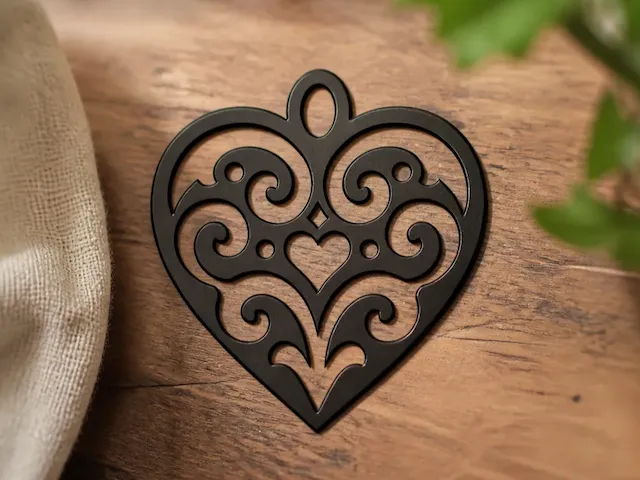
Acrylic heart wall decoration
 Instruction
SD heart
.xcs
Application scenario
Laser processing (40min)
Machine & module

xTool D1 Pro
5WCompatible xTool Machine
P3
F2
F2 Ultra UV
F2 Ultra(Single)
F2 Ultra
F1 Ultra
F1
F1 Lite
S1
P2S
P2
M1 Ultra
M1
D1 Pro 2.0
D1
Laserbox
M2
Material used

1/8"(3mm) Frosted Black Acrylic

84
1847
Information
This heart is cut in two parts from 3mm frosted black acrylic and then I mounted it on 1.6mm matte white acrylic to give a contrast before mounting it on the wall.
Instruction
1
Step1: Design

Preview
The black heart was drawn on an iPad then imported into xTool Creative Space.
Once in XCS I used the trace image feature to create vector lines for cutting.
After this I made a duplicate of the heart and used the outline and node editing tools to create the outline to cutout the white background.
2
Step2: Cutting

Preview
These are the settings used to cut 3mm frosted black acrylic and 1.6mm white on black laminated acrylic. I used the xTool D1 Pro 5w to cut both of these materials.
3
Step3: Glueing
Once all parts are cut you should use a super glue that is suitable for bonding acrylic to stick the black parts to the white background.
Comments
Remixes
License

Related Project


You may also like

$2.00
$2.00
Credits200
S Elegant Heart Monogram – Graceful Romantic Wedding Initial for Laser Cut Signs, Invitations, Cake Toppers & Engraving

0

Halloween SVG | Halloween SVG Cut Files | Heart SVG

3
44

Laser Cut Black Heart with Woman Silhouette Wall Art

13
59

Heart 3 Colors Aluminum Medallion F2 IR

2
14

Christmas deco

0
1

tree
0
1

Laser Cut Squirrel Wall Lamp Kids Room Decor

2
11

Multi Hearts Aluminum Medallion F2 IR
4
13

hiasan gantung bentuk hati ganda berwarna hitam

1
3

Valentine's Day SVG | Heart SVG

26
460

Black coffee cup with heart shaped steam

1
3

Lead Engraving - Shadow Casting

0
2

2 Hearts Colors Aluminum Medallion F2 IR
4
12

Text Png | Font Png | Custom Text

21
131

$0.85
$0.85
$1.70
Credits85
Key to my heart, Heart-shaped wooden key with cutout heart design
.png?x-oss-process=image/resize,m_fill,w_80,h_80,limit_0/interlace,1/format,webp/auto-orient,1)
2
Filigree Heart Ornament with Swirl Patterns
2
1

Animal SVG | Doodle SVG | Butterfly SVG | Animal Clipart
12
105

Black Filigree Heart Ornament with Ornate Cutout Details
2
2