Report
![[Laser cut and engrave] United States Military Commemorative Challenge Coin](https://image-res.atomm.com/resource/xtool/community/attachment/xtool-community/400b5f76-f353-4eb7-a085-c337ce9f2e7d.png?x-oss-process=image/resize,w_1200,h_900,limit_0/interlace,1/format,webp/auto-orient,1)
![[Laser cut and engrave] United States Military Commemorative Challenge Coin](data:image/png;base64,iVBORw0KGgoAAAANSUhEUgAAAAoAAAAKCAYAAACNMs+9AAAAAXNSR0IArs4c6QAAABdJREFUKFNjZCASMBKpjmFUId6QIjp4AAppAAuXjCs4AAAAAElFTkSuQmCC)
![[Laser cut and engrave] United States Military Commemorative Challenge Coin](https://image-res.atomm.com/resource/xtool/community/attachment/xtool-community/400b5f76-f353-4eb7-a085-c337ce9f2e7d.png?x-oss-process=image/resize,w_200,h_150,limit_0/interlace,1/format,webp/auto-orient,1)
![[Laser cut and engrave] United States Military Commemorative Challenge Coin](https://image-res.atomm.com/resource/xtool/community/attachment/xtool-community/10e9dd3a-423b-47ab-8d42-01ce4d150d57.png?x-oss-process=image/resize,w_200,h_150,limit_0/interlace,1/format,webp/auto-orient,1)
![[Laser cut and engrave] United States Military Commemorative Challenge Coin](https://image-res.atomm.com/resource/xtool/community/attachment/xtool-community/a696d72e-4160-4e6c-9804-0dfd9d19e8bb.jpg?x-oss-process=image/resize,w_200,h_150,limit_0/interlace,1/format,webp/auto-orient,1)
![[Laser cut and engrave] United States Military Commemorative Challenge Coin](https://image-res.atomm.com/resource/xtool/community/attachment/xtool-community/c98e8447-3f12-49db-920c-6d369737d97c.jpg?x-oss-process=image/resize,w_200,h_150,limit_0/interlace,1/format,webp/auto-orient,1)
Memorial Day Brass Challenge Coin
 Instruction
This project is empowered by AImake
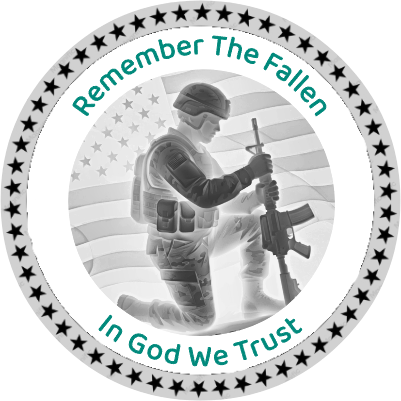
Memorial Day Coin
.xcs
Application scenario
Laser processing
Machine & module

xTool F2
5W, 15WCompatible xTool Machine
New
M2
3WF2 Ultra UV
5WP3
5WF2 Ultra
60WF1 Ultra
20WD1
2WD1 Pro
2WF1
2WS1
2WF2 Ultra (Single)
60WMaterial used

Blank Commemorative Brass Coins

23
657
Source Image Generated with AImake
Tap to View Prompt and Remix It!

view prompt
Information
Created the Brass Challenge Coin with my F2 5w IR to Honor the Fallen.
Instruction
1
Step1: Download & Size Image

Preview
- Once you download the file, you will need to size it to the coin you are using
- I used a Brass Coin purchased from xtool.
- Your setting may change
- Note: I allowed for 6 passes
2
Step2: Back Side Engraving

Preview
- I used the same setting for back of the Coin
- Again I did 6 passes
- This is not a deep engrave
Have Fun
Comments
Remixes
License

This work contains AI-generated content.


'/%3e%3cdefs%3e%3clinearGradient%20id='paint0_linear_1433_15675'%20x1='12'%20y1='3.25'%20x2='16.6891'%20y2='20.75'%20gradientUnits='userSpaceOnUse'%3e%3cstop%20stop-color='%23FF5D80'/%3e%3cstop%20offset='1'%20stop-color='%23FF0035'/%3e%3c/linearGradient%3e%3c/defs%3e%3c/svg%3e)

You may also like

2026 World Cup Commemorative Coin

2
5

GIF
BWE/Books Commemorative/Challenge Coin

7
37

AC/DC "Rock and Roll" Brass Challenge Coin

19
64

Blackbeard Commerative Challenge Coin

6
41

Andreas Mogensen Huginn Mission commemorative space coin

1
7

American Legion Post 211 Riders Challenge Coin with Inspirational Quote

0
0

I Found It Raven and Skull Challenge Coin

0
4

Final Transmission 2026 Commemorative Challenge Coins
0
4

Challenge Coin
6
24

Fallout Brotherhood of Steel Challenge Coin

1
15

250 Years 1776-2026 Commemorative Coin with Fighter Jet Formation

0
4

GIF
The Superhero Commemorative/Challenge Coin
1
32

Brass coin featuring a Native American chief in traditional headdress

1
6

Nostromo Alien Challenge Coin
0
12

U.S. Navy Security Forces Gold Metal Badge

1
1

Brass Coin Featuring a Detailed Horned Skull Motif
1
3

Shadow Boxes and Flag Boxes for military, first responders etc.
1
1

Brass Coin - Aztec Owl - F2 Ultra UV or F2 Ultra

7
73