![[Laser cut and engrave] xTool Hat](https://image-res.atomm.com/ali-res/community/making/3cdbff62-3b13-48f8-8bf4-e1c51d8e2ed4.JPEG?x-oss-process=image/resize,m_fill,w_1280,h_960,limit_0/interlace,1/format,webp/auto-orient,1)
xTool Hat
 Instruction


Information
Instruction
Step1
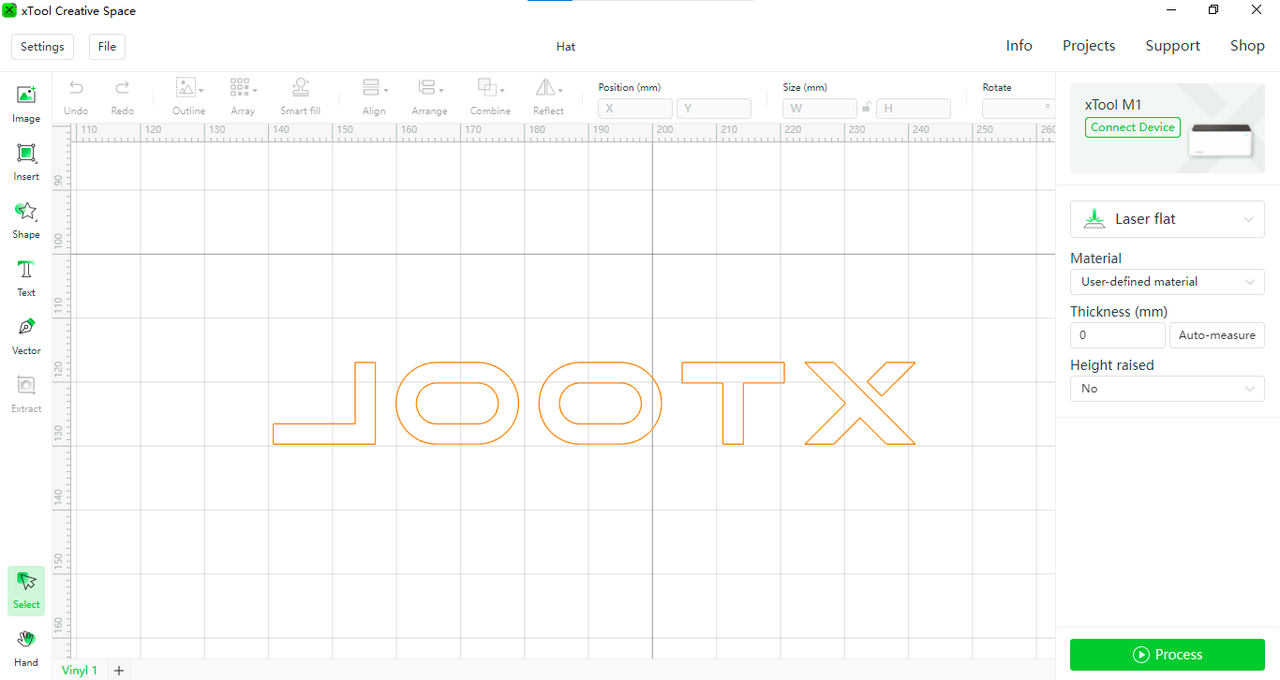 Install the pink cutting mat,paste the PU Heat Transfer Vinyl and install the point blade.Import the file into the XCS software, connect the device and cut Glow in the Dark PU Heat Transfer Vinyl.
Step2
 You can get a unique hat after cutting the pattern and heat stamped on the hat.
Notes
1.Glow in the Dark PU Heat Transfer Vinyl is cut from the back and then transferred print to the front, so remember choose the 【reflect】 when you cutting graphics such as text.
2.Pay attention to the cutting range, the cutting area can not exceed the scope of Glow in the Dark PU Heat Transfer Vinyl. Otherwise, it is easy to damage the bottom of the cutting mat.
3. While cutting two different colors of Glow in the Dark PU Heat Transfer Vinyl, you can put two smaller different colors Glow in the Dark PU Heat Transfer Vinyl in the machine at the same time.Then put the pattern on the Glow in the Dark PU Heat Transfer Vinyl for cutting.
Remixes
.PNG?x-oss-process=image/resize,m_fill,w_640,h_480,limit_0/interlace,1/format,webp/auto-orient,1)


You may also like

Black Plastic Xtool Cover lens


Official Xtool Maker Shop Sign


'/%3e%3c/g%3e%3cdefs%3e%3clinearGradient%20id='paint0_linear_1737_57170'%20x1='16.5097'%20y1='8.87061'%20x2='16.5097'%20y2='23.3945'%20gradientUnits='userSpaceOnUse'%3e%3cstop%20stop-color='%232E9AFF'/%3e%3cstop%20offset='1'%20stop-color='%233378FF'/%3e%3c/linearGradient%3e%3c/defs%3e%3c/svg%3e)
Wanduhr Xtool Squad


Boite module xTool S1


Black metal card with X logo and XTOOL S1 40W lettering


XTOOL S1 40W LASER BOX FOR STORAGE


Hat Patch


Xtool Multi-Layer Lettering

F1 and F2 Ultra Screen Support

Paint Shaker for Testors 1/4oz square glass bottles


TBP


Envelope laser only


'/%3e%3cpath%20d='M15.9997%2019.3335L11.833%2014.3335H14.333L15.9997%2017.6668L17.6663%2014.3335H20.1663L15.9997%2019.3335Z'%20fill='white'/%3e%3c/g%3e%3cdefs%3e%3clinearGradient%20id='paint0_linear_1412_57140'%20x1='16'%20y1='7.6665'%20x2='16'%20y2='24.3332'%20gradientUnits='userSpaceOnUse'%3e%3cstop%20stop-color='%23FFA15F'/%3e%3cstop%20offset='1'%20stop-color='%23E37C32'/%3e%3c/linearGradient%3e%3c/defs%3e%3c/svg%3e)
Dogtag blank metalfab f2ultra

Yellow lemon and green leaf shaped hoop earrings

Pine wood column


Support de rangement pour modules laser Wonderpress
.jpg?x-oss-process=image/resize,m_fill,w_80,h_80,limit_0/interlace,1/format,webp/auto-orient,1)

Stationary Holder

xTool Print Screen Sleeve Accessory