
Key Takeaways
- A DTG (direct-to-garment) printer is a specialized inkjet that prints ink straight onto a garment — most often a cotton T-shirt.
- The print soaks into the fabric for a soft, photographic, no-feel finish — best for full-color designs on cotton, and great for one-offs.
- Unlike DTF (which prints on film first), DTG needs no transfer — but it's slower per shirt and works best on cotton.
- It decorates fabric; to engrave or cut wood, leather, or metal, you'd use a laser engraver instead.
If you've ordered a soft, full-color custom T-shirt online, there's a good chance a DTG printer made it. It's become the go-to method for detailed, on-demand apparel — but it works very differently from screen printing or transfers. This guide covers what a DTG printer is, how it works, what you can make, the types, how to choose, and the best models in 2026 — plus how it compares to DTF and to a laser engraver.
What is a DTG printer?
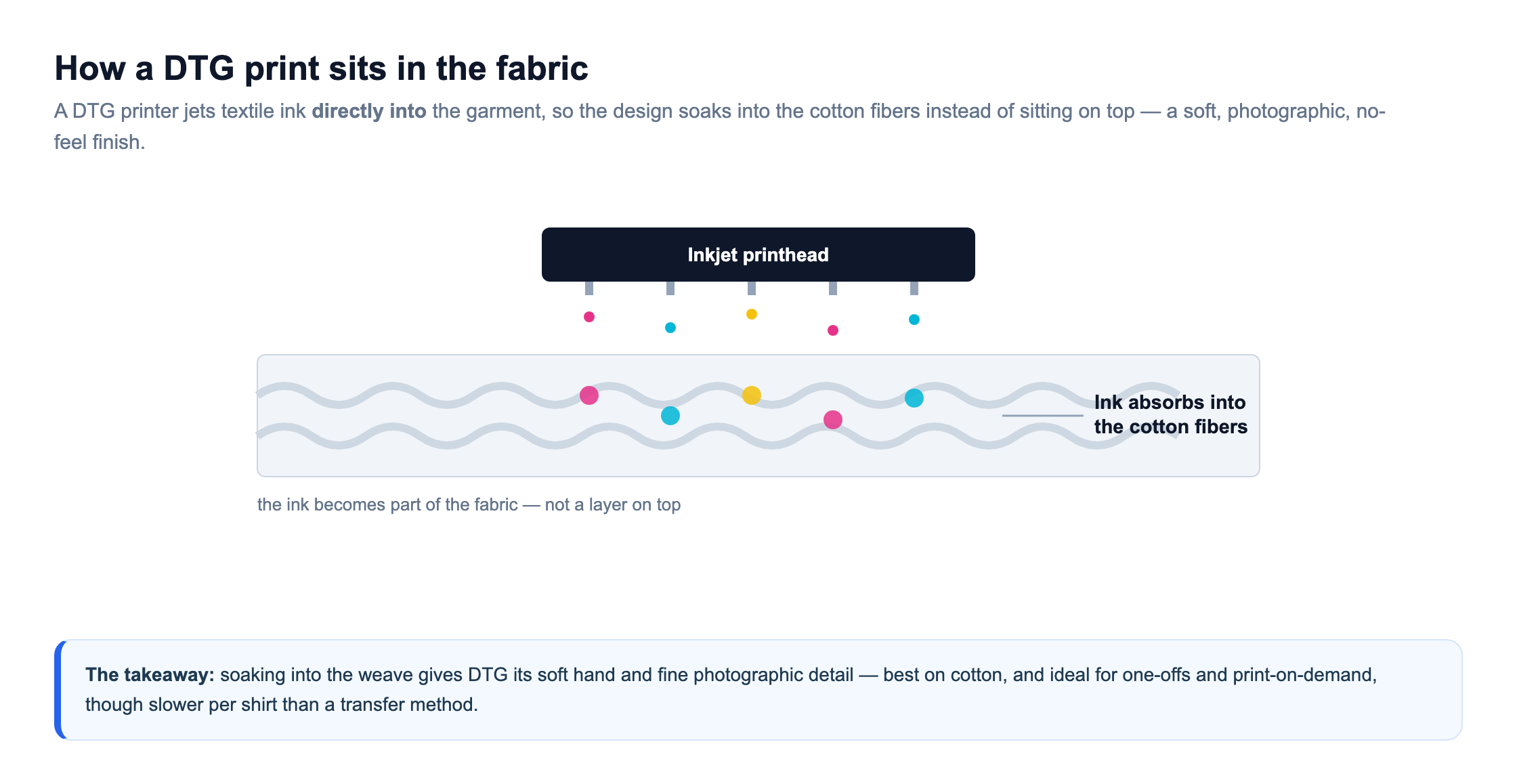
A DTG (direct-to-garment) printer is a specialized inkjet printer that prints a design directly onto fabric — usually a cotton T-shirt. Instead of pressing on a transfer, it jets textile ink straight into the garment, so the design becomes part of the fabric rather than a layer sitting on top.
The result is a soft, detailed, photographic print with almost no hand-feel, which is why DTG is prized for full-color and complex artwork. Because each shirt prints on demand with no screens to set up, it's ideal for one-offs and small batches — the technology behind much of the print-on-demand world.
How does DTG printing work?
DTG runs in a few steps. First the garment is pre-treated — sprayed with a solution and pressed dry — so the ink bonds well and colors stay vivid (especially on dark shirts). The shirt is then laid flat on a platen, and the printer's inkjet heads jet ink — a white underbase plus color — directly onto the fabric. Finally the print is cured with heat so it's permanent and washable.

Because the ink goes into the fibers, a DTG print feels soft and looks photographic. The trade-off is speed and material: each shirt takes real time to pre-treat, print, and cure, and results are best on cotton. It's brilliant for detailed, low-volume work rather than fast bulk runs.
What can you make with a DTG printer?
DTG is built for full-color, detailed designs on cotton apparel and soft goods:
- Custom cotton T-shirts — photographic and full-color artwork with a soft feel.
- Print-on-demand apparel — one-at-a-time orders with no minimums or screens.
- Small-batch merch — band, event, and small-brand shirts in short runs.
- Hoodies & sweatshirts — cotton or high-cotton blends.
- Tote bags & cotton goods — soft prints on natural fabrics.
- Samples & prototypes — test a design on a real shirt before a bulk order.
The common thread is cotton fabric. DTG is one of several apparel-decoration methods — alongside DTF, sublimation, and HTV. To personalize hard materials like wood, leather, or metal, a laser is the tool, as we cover below.
Types of DTG printers
DTG machines fall into a few groups by scale and flexibility.
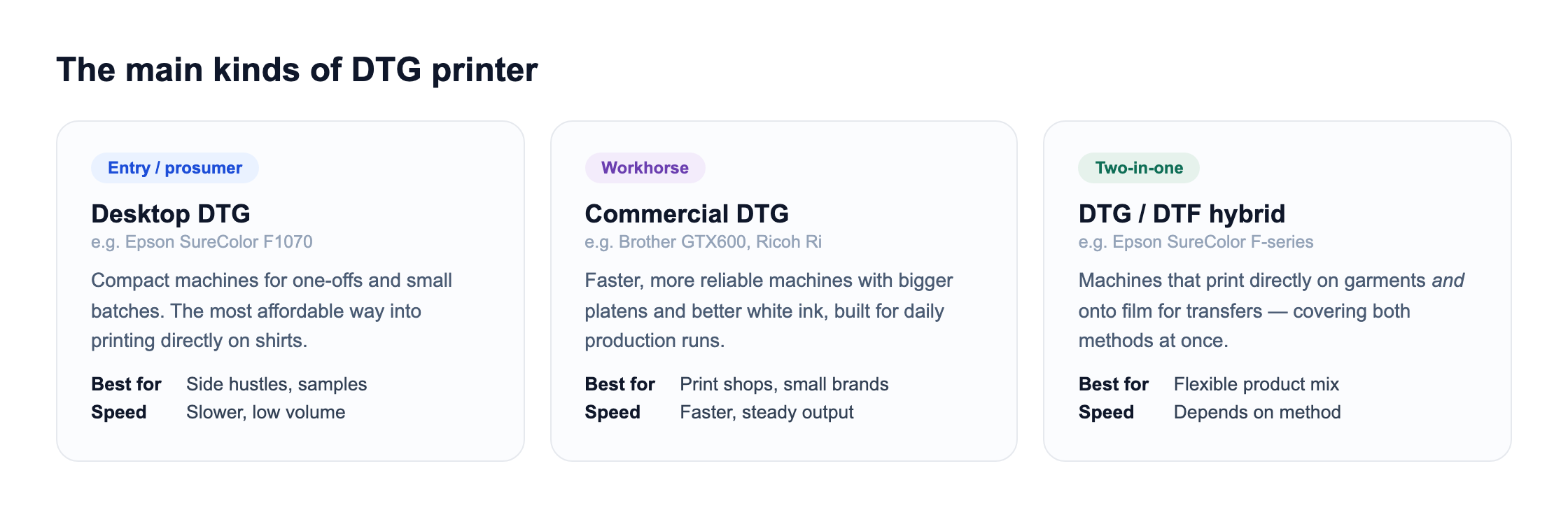
Desktop/prosumer units (like the Epson SureColor F1070) are the affordable entry, best for one-offs and small batches. Commercial machines (Brother GTX, Ricoh Ri) are faster and more reliable for daily production. DTG/DTF hybrids (Epson SureColor F-series) print directly on garments and onto film, covering both methods from one machine.
How to choose a DTG printer
Match the machine to your volume and how hands-on you want to be. Five things matter most:
- Volume. Desktop units suit samples and small batches; commercial machines are built for daily production runs.
- White ink handling. White ink is the maintenance-heavy part of DTG — look at how a machine manages circulation and cleaning.
- Pre-treatment workflow. Factor in a pre-treatment sprayer and a heat press or cure unit — they're part of the real setup.
- Fabric focus. DTG is best on cotton; if you print lots of polyester or dark blends, weigh DTF instead.
- Support & running cost. Ink, pre-treatment, and maintenance add up — brand support matters on a machine you rely on.
The best DTG printers of 2026
A shortlist of garment printers — including xTool's DTF-based apparel machine — from accessible desktop units to industrial production. Prices are approximate and move with promotions, so confirm before buying.
| Model | Best for | Type | Price |
|---|---|---|---|
| xTool O1 Omni | xTool pick (does DTG) | 4-in-1 (UV/UV DTF/DTG/DTF) | From ~$1,699 |
| xTool Apparel Printer | xTool's DTF apparel pick | All-in-one DTF (not DTG) | From ~$5,199 |
| Epson SureColor F1070 | entry / prosumer | Desktop DTG + DTF | ~$4,995 |
| Brother GTX600 | all-around commercial | Commercial DTG | ~$16,000 |
| Ricoh Ri 1000 | for small business | Commercial DTG | ~$18,000 |
| Epson SureColor F2270 | for high volume | Industrial DTG + DTF | ~$18,000 |
xTool O1 Omni
Best xTool pick (does DTG)
xTool's O1 Omni is a 4-in-1 printer that includes genuine DTG — so unlike xTool's DTF-only Apparel Printer, this one really does print directly onto cotton garments. It also handles UV, UV DTF, and DTF, covering both fabric and rigid materials from one machine.
That versatility is the draw: one printer for DTG shirts, DTF transfers, and UV printing on hard goods, with auto white-ink circulation and entry pricing from around $1,699 — far below traditional commercial DTG units.
Pros
- Real DTG on cotton
- Also UV, UV DTF & DTF
- Affordable entry for DTG
Cons
- Smaller than commercial DTG
- White-ink upkeep
- Newer platform
xTool O1 Omni: xTool's do-it-all pick if you want DTG plus UV and DTF from one machine.
xTool Apparel Printer
xTool's apparel pick (DTF)
A note on the Apparel Printer: it is xTool's dedicated DTF machine (the O1 Omni above is the one that does true DTG). That's worth knowing, because DTF increasingly outpaces DTG for versatility: it prints full color on any fabric and color — cotton, polyester, blends, and dark garments — not just cotton. If you want xTool's take on garment printing, this is it.
It automates the whole print-powder-cure cycle when paired with the xTool OS1 Shaker Oven, uses dual Epson i1600 printheads with CMYK plus white ink at 720 × 1800 dpi, and runs from xTool Creative Space. The standalone printer is around $5,199, with bundles that add the oven for a hands-off, all-in-one line.
Pros
- Any fabric & dark garments
- Automated all-in-one
- Fits the xTool ecosystem
Cons
- DTF, not true DTG
- Premium price
- Large footprint
xTool Apparel Printer: xTool's automated DTF answer to garment printing — more versatile than DTG, though not the same technology.
Epson SureColor F1070
Best entry / prosumer
The F1070 is one of the most accessible ways into direct-to-garment printing. It prints straight onto cotton shirts with genuine Epson ink and simple software, and doubles as a DTF printer — useful flexibility for a new shop.
It's a desktop-scale machine, so it's slower than commercial units, but for samples, one-offs, and small batches it's a dependable, name-brand starting point.
Pros
- Approachable price for DTG
- Also does DTF
- Genuine Epson support
Cons
- Slower, low volume
- Small platen
- White ink maintenance
Epson SureColor F1070: the friendliest, most flexible way to start DTG.
Brother GTX600
Best all-around commercial
The GTX600 is a workhorse built for daily production. It lays down bright, durable prints with strong white ink, handles cotton and blends, and is engineered for the reliability a shop needs when orders are stacking up.
It's a real capital investment, but the speed, consistency, and Brother support make it a mainstay for established custom-apparel businesses.
Pros
- Fast, reliable production
- Excellent white ink
- Trusted brand support
Cons
- Expensive
- Large footprint
- Routine maintenance
Brother GTX600: the dependable production DTG for a busy print shop.
Ricoh Ri 1000
Best for small business
The Ri 1000 targets small businesses that want commercial output without a huge footprint. It has user-friendly controls, quick-swap ink packs, and a design aimed at reducing downtime and maintenance headaches.
It bridges the gap between a desktop unit and a full production machine, making it a popular step-up for brands outgrowing an entry printer.
Pros
- Easy to operate
- Quick-swap ink
- Lower maintenance
Cons
- Commercial price
- Cotton-focused
- Still needs curing
Ricoh Ri 1000: the approachable commercial DTG for a scaling brand.
Epson SureColor F2270
Best for high volume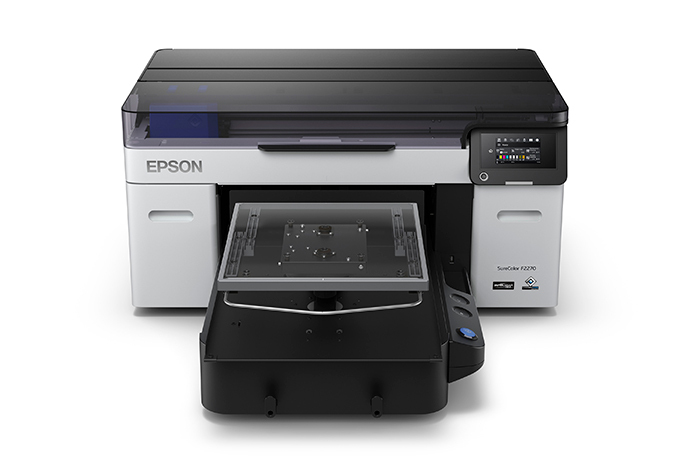
The F2270 is Epson's industrial hybrid: it prints directly onto garments and onto film, with the speed, color consistency, and reliability a high-volume shop depends on day after day.
It's a serious machine for established businesses running real quantities, offering both DTG and DTF from one supported platform.
Pros
- Industrial reliability
- DTG + DTF in one
- Production-grade color
Cons
- Very expensive
- Large and heavy
- Overkill for hobbyists
Epson SureColor F2270: the high-volume hybrid for a production apparel business.
How much does a DTG printer cost?
DTG is a bigger investment than most apparel methods. Entry/prosumer machines like the Epson F1070 start around $5,000, and commercial units (Brother GTX, Ricoh Ri, Epson F2270) run roughly $15,000–$20,000+. There's no cheap converted route the way sublimation has — DTG needs genuine textile ink systems.
Running costs include textile ink (with pricey white ink), pre-treatment solution, and a heat press for curing. White ink also demands regular use and maintenance to avoid clogging. Per-shirt cost is reasonable, but the up-front and upkeep make DTG a commitment aimed at businesses.
DTG vs. DTF vs. laser engraving
Three methods often get compared for custom products. DTG prints ink directly into a cotton garment for a soft, photographic finish. DTF prints onto film that's heat-pressed on, so it works on more fabrics and dark colors and is faster for batches, but sits on top as a thin layer. A laser engraver is a different world entirely — it burns permanent designs into hard materials like wood, leather, and metal.

Put simply: DTG for soft, detailed cotton shirts; DTF for versatile, all-fabric transfers; and a laser for hard-goods personalization — engraved boards, tumblers, signs, and custom gifts. A merch business might run a garment printer for apparel and a laser for wood and leather add-ons.
Want to personalize wood, leather, and metal too?See our tested picks for laser cutters and engravers that mark hard materials a garment printer can't.See the best picksDTG vs. DTF: how they compare
Since DTG and DTF are the two closest rivals for custom shirts, here's the side-by-side.
| DTG | DTF | |
|---|---|---|
| How it works | Prints ink directly into the garment | Prints film, heat-presses it on |
| Best fabric | Cotton (soft, into fibers) | Cotton, poly, blends, dark |
| Feel | Soft, no-feel print | Thin layer on the surface |
| Speed | Slower per shirt | Faster, batch-friendly |
| Extra steps | Pre-treat + cure | Powder + cure + press |
| Both need | A heat press to cure | A heat press to apply |
Many shops run both: DTG for premium soft cotton prints, DTF for versatility across fabrics and dark garments. Note both rely on a heat press to finish. Worth knowing: xTool's own apparel hardware, the xTool Apparel Printer, takes the DTF route rather than DTG.
Which should you choose?
- Choose DTG if you want soft, photographic prints on cotton, especially for one-offs and print-on-demand where a premium hand-feel matters.
- Choose DTF if you print across many fabrics and dark colors, or need faster, batch-friendly production — often at a lower entry cost.
- Choose a laser engraver if you want to personalize hard materials — engraved wood, leather, and metal — rather than fabric.
DTG is the premium choice for cotton apparel, but it's a business-level investment. If you're starting out or want fabric flexibility, DTF or HTV is a cheaper entry; if your ideas lean to wood and engraved keepsakes, a laser is the companion machine.
The bottom line
A DTG printer is a specialized inkjet that prints designs directly onto cotton garments, giving a soft, full-color, photographic finish that's perfect for on-demand and small-batch shirts. It's a business-level investment starting around $5,000, plus a heat press and pre-treatment. It decorates fabric; for engraving wood, leather, or metal, a laser cutter or engraver is the right tool — and the two cover apparel and hard goods together. And when you want a raised, stitched finish instead of a printed one, an embroidery machine is the classic alternative.
Frequently asked questions about DTG printers
What's the difference between DTG and DTF?
DTG prints ink directly into a cotton garment, so the design feels soft and looks photographic — but it works best on cotton and is slower per shirt. DTF prints the design onto a film first, then heat-presses it onto the fabric, which lets it work on cotton, polyester, blends, and dark garments, and is faster for batches, though the print sits as a thin layer on top. DTG suits soft cotton shirts; DTF suits versatility across fabrics.
Does DTG only work on cotton?
DTG works best on 100% cotton, where the ink bonds into the fibers for a soft, durable print. It can handle high-cotton blends with some drop in vibrancy, but it performs poorly on polyester and other synthetics, which don't absorb the water-based ink well. If you need to print on polyester, blends, or dark synthetic garments, DTF or sublimation is usually the better method for those materials.
Do I need to pre-treat shirts for DTG?
Yes, especially for colored or dark garments. Pre-treatment is a liquid sprayed onto the shirt and pressed dry before printing; it helps the white ink underbase sit correctly and keeps colors bright and durable through washing. Skipping it — or applying it unevenly — is a common cause of dull or cracking prints. Some light garments with no white ink need less, but pre-treatment is a core part of the DTG workflow.
Is DTG worth it for a small business?
It can be, if you sell detailed, full-color designs on cotton and value soft prints and print-on-demand with no minimums. The catch is cost: entry machines start around $5,000 and commercial units run $15,000–$20,000+, plus ink, pre-treatment, and white-ink maintenance. Many small brands start with DTF or HTV (much cheaper) and move to DTG once volume and demand for premium cotton prints justify the investment.
Do you need a heat press for DTG?
Yes. After printing, DTG ink must be cured with heat to become permanent and machine-washable, and a heat press (or a conveyor dryer) does that. A heat press is also used to press shirts dry after pre-treatment. So a complete DTG setup is the printer, pre-treatment supplies and sprayer, textile ink, and a heat press — not just the printer alone.
