
Key Takeaways
- A sublimation printer prints designs in special ink that turns to gas under heat and dyes the material — the color becomes part of the surface, not a layer on top.
- It only works on polyester fabric and specially coated blanks (mugs, tumblers, phone cases) — not cotton, wood, or bare metal.
- You also need a heat press to transfer the print. Dedicated printers start near $500; converted EcoTanks cost far less.
- For hard materials like wood, leather, and metal, you'd use a laser engraver instead of sublimation.
Those vivid, full-color photo mugs and all-over-print shirts you see online are usually made with sublimation — and it starts with a sublimation printer. But it's a genuinely different kind of printing from the inkjet on your desk, with its own rules about ink and materials. This guide explains what a sublimation printer is, how sublimation works, what you can make, the types, how to choose, and the best models in 2026 — plus how it compares to a laser engraver.
What is a sublimation printer?
A sublimation printer is a printer that uses special sublimation ink to create designs that are transferred onto a surface with heat. Under high heat, the ink skips the liquid stage and turns straight into a gas, which permanently dyes the fibers of polyester fabric or a coated blank. The result is a smooth, vivid, full-color image that won't crack, peel, or fade like a surface print.
The catch is that it's a two-machine process: the printer makes the transfer, and a heat press applies it. It's also material-specific — sublimation only bonds to polyester or specially coated items, which is why sublimation blanks (mugs, tumblers, poly shirts) exist.
How does sublimation printing work?
Sublimation turns solid ink into gas and back again. You print your design (reversed) onto sublimation paper, lay it on a polyester or coated blank, and apply heat and pressure with a heat press. The heat converts the ink to a gas that penetrates the surface; as it cools, it solidifies inside the material — dyeing it rather than coating it.
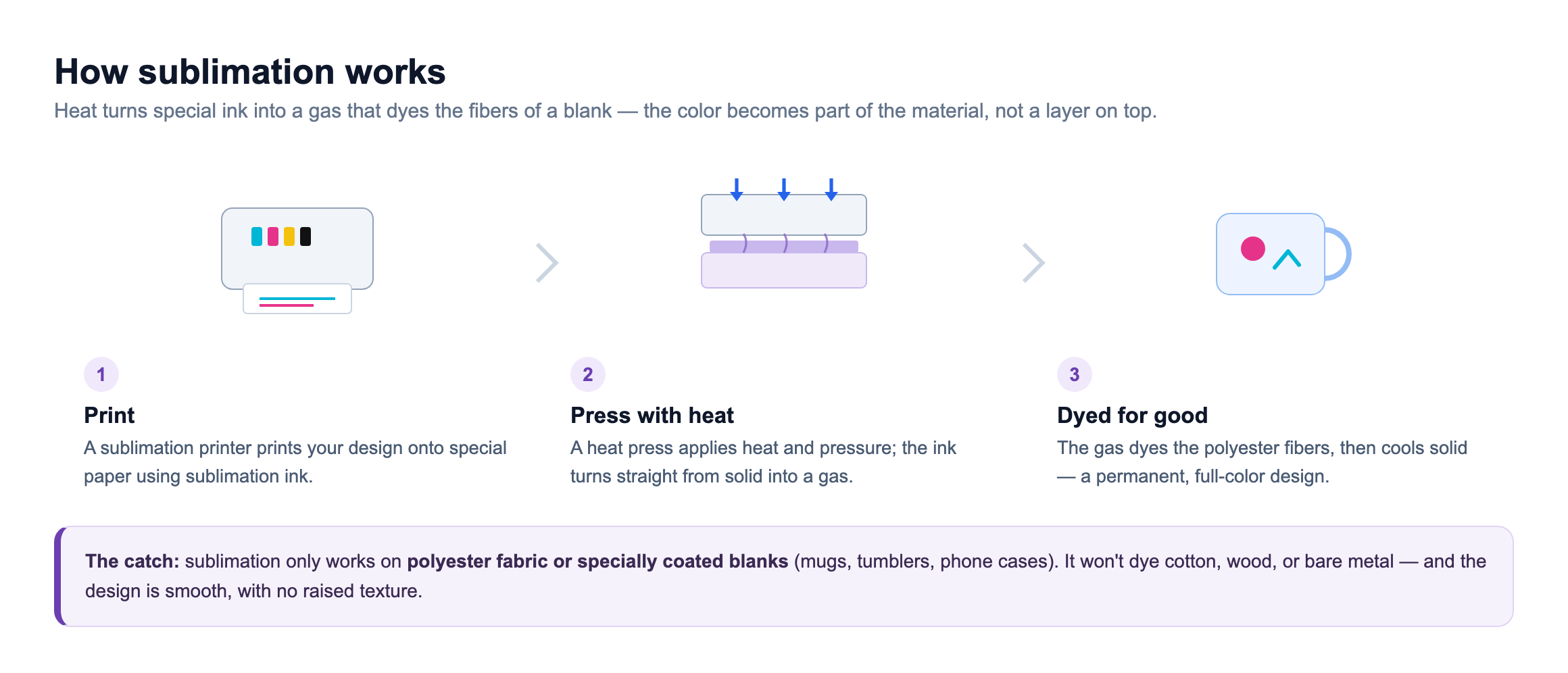
Because the color bonds into the fibers, a sublimated design feels completely smooth — there's no raised layer to peel — and it stays vibrant through repeated washing. That permanence and full-color detail is what makes sublimation so popular for photo gifts and apparel.
What can you make with sublimation?
Sublimation shines for full-color, photographic designs on the right blanks:
- Mugs & tumblers — full-wrap photos and patterns on coated drinkware.
- Polyester apparel — performance tees, jerseys, and all-over-print shirts.
- Phone cases & accessories — coated cases, keychains, and luggage tags.
- Home & photo gifts — mousepads, coasters, puzzles, and photo panels.
- Signs & name badges — coated aluminum signs and ID badges.
- Fabric goods — poly tote bags, pillowcases, and lanyards.
The limit is the material: sublimation needs polyester or a special coating. For cotton apparel you'd use HTV with a heat press, and for hard, uncoated materials like wood, leather, or metal, a laser engraver is the tool — more on that below.
Types of sublimation printers
There are three common routes into sublimation, from budget conversions to wide-format machines.

Dedicated printers (Sawgrass, Epson SureColor F-series) are purpose-built and the most reliable. Converted inkjets — usually an Epson EcoTank filled with sublimation ink — are the cheapest entry, at the cost of DIY setup and a voided warranty. Wide-format models print tabloid-size and larger for all-over designs and big blanks.
How to choose a sublimation printer
Match the printer to what you'll make and how seriously. Five things matter most:
- Dedicated vs. converted. Dedicated printers are reliable and supported; a converted EcoTank is cheaper but DIY and voids its warranty.
- Print size. Letter/legal covers mugs and small apparel; wide-format is for all-over shirts and big blanks.
- Color consistency. Color-managed software and profiles (a strength of dedicated systems) make repeatable results far easier.
- Running costs. Compare ink price per page and paper — not just the sticker price of the printer.
- The rest of the kit. Remember you also need a heat press, sublimation paper, and coated blanks to actually make anything.
The best sublimation printers of 2026
A shortlist across budgets and needs, from a budget conversion to a wide-format workhorse. Prices are approximate and move with promotions, so confirm before buying.
Does xTool make a sublimation printer? Not exactly. xTool's printer, the O1 Omni, does UV, UV DTF, DTG, and DTF printing rather than sublimation — a different route to personalizing garments and hard goods. If you specifically want sublimation's soft, all-over color on polyester and coated blanks, stick with the dedicated printers below; if you want an xTool machine that covers apparel and rigid materials another way, the O1 Omni is worth a look.
| Model | Best for | Type | Max print | Price |
|---|---|---|---|---|
| Sawgrass SG500 | dedicated printer | Dedicated sublimation | 8.5 x 14 in | ~$599 |
| Epson SureColor F170 | value dedicated | Dedicated sublimation | 8.5 x 14 in | ~$499 |
| Epson EcoTank ET-2800 | Cheapest way to start | Inkjet (converted) | 8.5 x 14 in | ~$199 + sub ink |
| Sawgrass SG1000 | for large blanks | Wide-format sublimation | 11 x 17 in (13 x 51 bypass) | ~$1,499 |
Sawgrass SG500
Best dedicated printer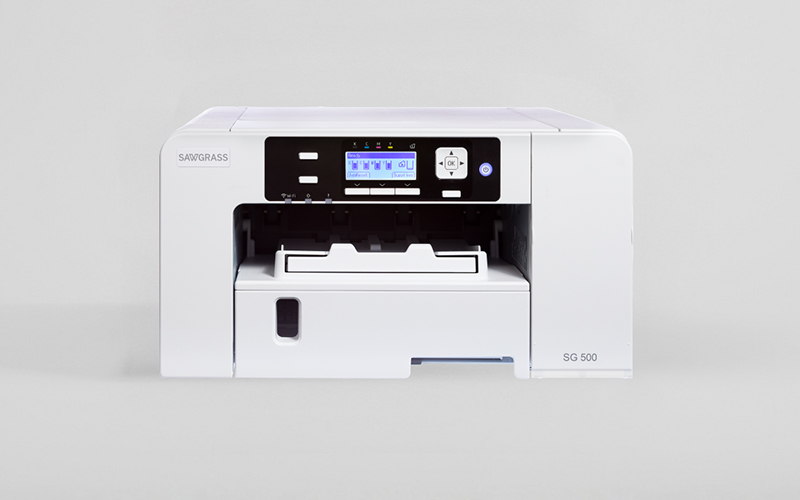
The SG500 is built for sublimation and nothing else, which is exactly why it's so popular. It ships ready to go with color-managed software and dependable inks, so you get accurate, repeatable results without fiddling with profiles.
It handles blanks up to legal size — mugs, shirts, coasters, and more — and Sawgrass support and tutorials make it a favorite for people starting a personalization business.
Pros
- Made for sublimation
- Reliable, accurate color
- Great support + software
Cons
- Higher up-front cost
- Legal-size max
- Proprietary inks
Sawgrass SG500: the dependable, business-ready dedicated sublimation printer.
Epson SureColor F170
Best value dedicated
The F170 is Epson's compact, purpose-built sublimation printer. It's a true plug-and-play machine with genuine sublimation ink and low running costs, at a friendlier price than most dedicated units.
Print sizes top out at legal, so it's aimed at mugs, small apparel graphics, and gift blanks rather than oversized work — a clean, no-hassle entry into real sublimation.
Pros
- Dedicated, no conversion
- Low running cost
- Compact and simple
Cons
- Letter/legal size only
- Slower on big jobs
- Epson ink only
Epson SureColor F170: the easiest dedicated printer to start with on a budget.
Epson EcoTank ET-2800
Cheapest way to start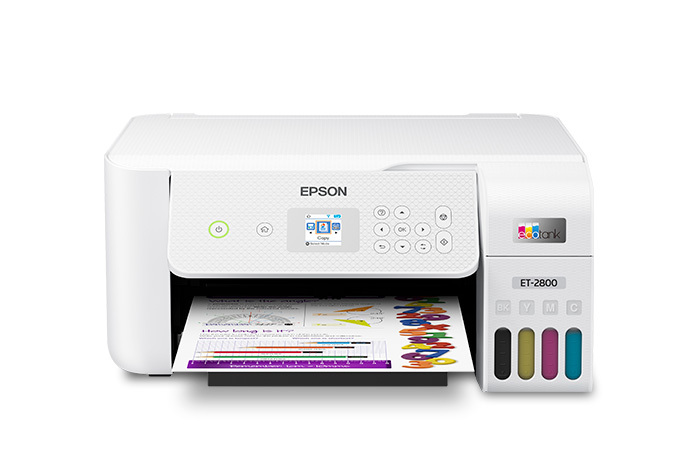
The ET-2800 isn't a sublimation printer out of the box — it's an inexpensive EcoTank that hobbyists fill with third-party sublimation ink to get started for very little money. It's the go-to budget hack in craft circles.
The trade-offs: converting it is DIY, color is less predictable than a dedicated machine, and using non-Epson ink voids the warranty. But for testing the waters, it's hard to beat on price.
Pros
- Very low entry cost
- Refillable tanks
- Widely used for sublimation
Cons
- Not sublimation out of box
- Voids warranty when converted
- Less consistent color
Epson EcoTank ET-2800: the cheapest way to try sublimation — with DIY caveats.
Sawgrass SG1000
Best for large blanks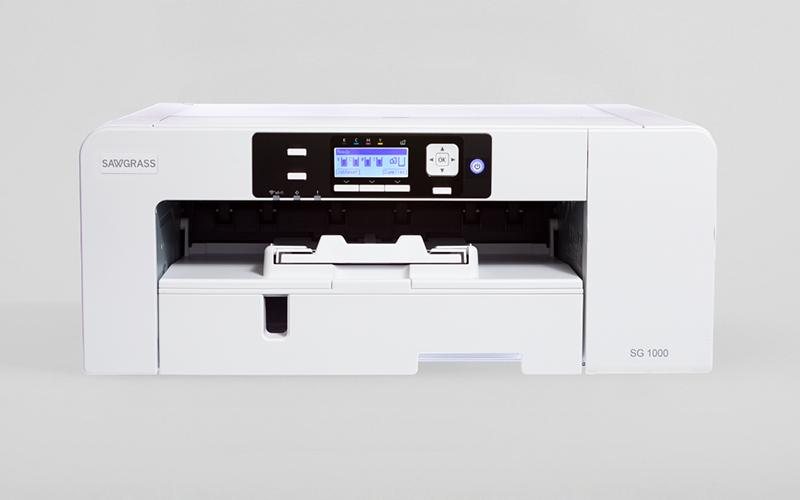
The SG1000 is the wide-format step up: it prints tabloid-size sheets and, with the bypass tray, long banners — enough for all-over shirt designs, large signs, and oversized blanks a desktop printer can't handle.
It's a serious investment aimed at growing businesses, but for anyone selling big or all-over sublimated products, the extra print area pays for itself.
Pros
- Large 11 x 17 print area
- Long bypass printing
- Business-grade output
Cons
- Expensive
- Large footprint
- Overkill for small items
Sawgrass SG1000: the pick for all-over designs and oversized sublimation blanks.
How much does sublimation cost?
It depends on the route. A converted EcoTank setup can start under $250 (printer plus third-party ink), dedicated desktop printers like the Epson F170 and Sawgrass SG500 run $500–$600, and wide-format machines climb past $1,400. Remember to add a heat press, which starts around $150.
Ongoing costs are moderate: sublimation ink, paper, and coated blanks. Blanks are the biggest variable — mugs and coasters are cheap, while quality tumblers and larger items cost more. Sublimation ink lasts a long time, keeping the per-print cost low once you're set up.
Bonus: sublimation vs. DTF
Sublimation and DTF (direct-to-film) are the two most popular ways to make full-color custom apparel at home — and the choice between them usually comes down to what you want to print on. Sublimation dyes color into the material itself, so it's vivid and has zero feel — but it only works on polyester and poly-coated blanks, and only on white or light surfaces. DTF prints your design onto a film, adds a powder adhesive, and heat-presses it onto the garment, so it works on almost any fabric — cotton, blends, and dark shirts included.
So they don't really overlap: reach for sublimation when you're decorating polyester and hard coated blanks like mugs and tumblers, and reach for DTF when you want to put full-color designs on cotton tees and dark garments. Both need a heat press to finish the job.
Want to print on cotton and dark shirts too?See how a DTF printer works and everything it can decorate that sublimation can't touch.Explore DTF printingSublimation vs. DTF: how they compare
Here's the quick side-by-side.
| Sublimation | DTF | |
|---|---|---|
| How it works | Dyes ink into the surface with heat | Prints a film transfer, then heat-presses it on |
| Works on | Polyester & poly-coated blanks only | Almost any fabric — cotton, poly, blends |
| Dark garments? | No — needs white/light surface | Yes — prints a white underbase |
| Feel on fabric | None — dyed into the fibers | A thin, flexible layer on top |
| Color | Full color, photographic | Full color, photographic |
| Durability | Permanent — won't crack or peel | Very durable; strong wash resistance |
| Equipment | Sublimation printer + heat press | DTF printer + powder/curing + heat press (or buy ready-made transfers) |
They're complementary rather than competing: sublimation owns polyester and coated goods, DTF owns cotton and dark apparel. Note both always pair with a heat press to bond the design.
Which should you choose?
- Choose sublimation if you're decorating polyester and poly-coated blanks — mugs, tumblers, phone cases, mousepads, and light polyester apparel — and want vivid, zero-feel color that lasts.
- Choose DTF if you want to print full-color designs on cotton and dark garments, or one process that handles nearly every fabric — ideal if t-shirts are your main product.
- Choose both if you sell a range of personalized products; DTF covers cotton and dark tees while sublimation covers mugs, tumblers, and poly blanks — together they cover most of the apparel-and-gift market.
For photo mugs and colorful polyester goods, sublimation is the way. If your ideas lean toward cotton tees and dark shirts, DTF is the more flexible first machine.
The bottom line
A sublimation printer prints special ink that heat turns to gas, dyeing full-color designs permanently into polyester and coated blanks — paired with a heat press. Dedicated printers start near $500; a converted EcoTank costs far less. Just remember the material limit: polyester and coatings only. For wood, leather, and metal, a laser engraver is the tool — and the two make a well-rounded personalization studio.
Frequently asked questions about sublimation printers
Can any printer do sublimation?
No. Sublimation needs special sublimation ink that turns to gas under heat, so you need either a dedicated sublimation printer (like a Sawgrass or Epson SureColor) or an inkjet — usually an Epson EcoTank — filled with third-party sublimation ink. A normal printer with regular ink or toner cannot sublimate. The printer type also matters: most conversions use EcoTank models because their refillable tanks make swapping to sublimation ink practical.
Do I need a heat press for sublimation?
Yes. The printer only makes the transfer — a heat press applies it. Sublimation relies on high, even heat and firm pressure to turn the ink into a gas that dyes the blank, and only a heat press delivers that reliably. Flat items like shirts and coasters use a flat press; mugs and tumblers need a mug press or attachment. An iron cannot reach or hold the temperature sublimation requires.
What materials work with sublimation?
Sublimation only bonds to polyester fabric and items with a special polymer coating — that's why sublimation blanks like coated mugs, tumblers, phone cases, and poly shirts exist. It will not work on cotton, natural wood, leather, or bare metal, because the ink has nothing to dye. The higher the polyester content or the better the coating, the brighter and more durable the result.
What's the difference between sublimation and HTV?
Both decorate apparel with a heat press, but differently. HTV (heat-transfer vinyl) is a colored vinyl you cut on a vinyl cutter, weed, and press on as a thin layer that sits on top of the fabric — and it works on cotton. Sublimation dyes full-color ink directly into the fibers with no layer, but only on polyester and coated blanks. HTV suits bold graphics and cotton shirts; sublimation suits photographic, all-over designs on poly.
Is sublimation the same as a laser engraver?
No — they do opposite things. Sublimation dyes full-color images into polyester and coated blanks using heat, giving a smooth, printed look. A laser engraver burns a permanent, recessed mark into hard materials like wood, leather, slate, and metal, usually in a single engraved tone. Sublimation is for colorful fabric and coated goods; a laser is for engraved hard-material gifts. Many makers use both for different products.
