

Demand for personalized, handmade goods keeps rising — and so does the competition. The makers who win are the ones who work faster, cleaner, and smarter. The right accessories and software do exactly that: they cut setup time, improve quality, and open up products you couldn’t make before. Here are the must-have tools for laser crafters in 2026, from fixtures and air assist to rotary attachments, safety gear, and AI design tools.
Key takeaways
- Hold your material: flexible fixtures, clamps/pins, and electrostatic mats stop slips and misalignment.
- Cut cleaner & safer: air assist sharpens edges; an air purifier or fume extractor makes indoor work safe.
- Do more: a rotary attachment unlocks tumblers, bottles, and rings — top-selling personalized items.
- Work smarter: free AI tools (Atomm AI) remove backgrounds, generate patterns, and style photos in minutes.
1. Flexible Fixture — Hold Irregular & Curved Items
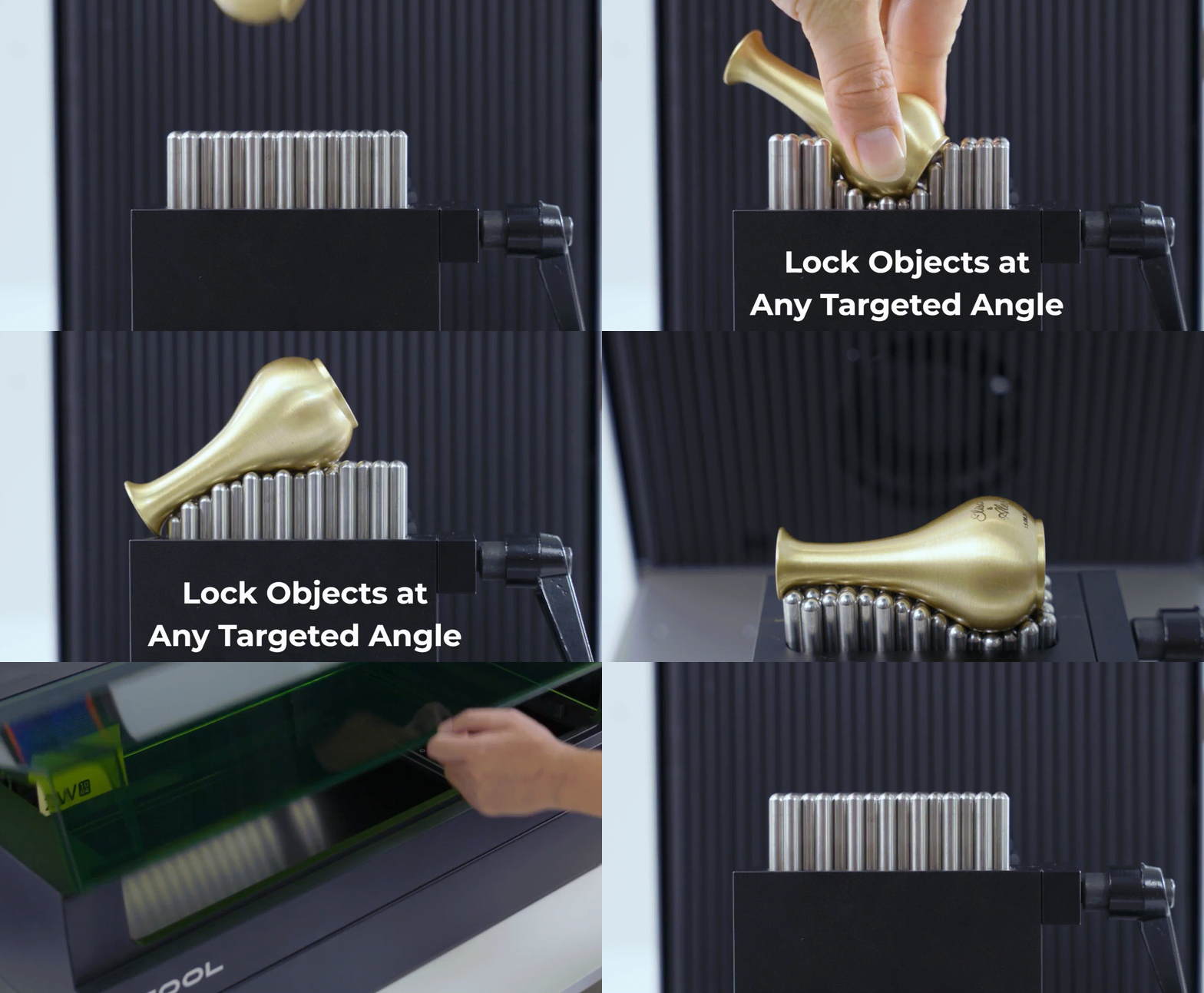
As customers ask for more unconventional pieces, you end up engraving curved or oddly shaped objects — glasses, bottles, gadgets — that slip and shift on a flat bed, wasting material. A flexible fixture’s adjustable clamp system grips them firmly and keeps alignment precise, so engraving a curved surface is as repeatable as working on flat stock.
- Price: from $149
- Works with: F / P / M Series, S1, D1 / D1 Pro
- Suitable for: curved & irregular items — glasses, bottles, gadgets
Key benefits
- Secures irregular and curved objects
- Adjustable sizing for many shapes
- Fewer misaligned, wasted pieces
2. Honeycomb Panel, Clamps & Pins — Hold Material Flat

Sheet goods warp and lift as they heat, and even a tiny shift ruins a cut. A honeycomb panel gives you a flat, breathable bed that supports small parts and improves airflow, while hold-down clamps, pins, or magnets lock the material down so edges stay crisp and cuts land exactly where you placed them. Together they’re the cheapest upgrade on this list — and some of the most useful for clean cutting and batch work.
- Material: Aluminum (honeycomb)
- Suitable for: flat sheet goods — wood, acrylic, leather, card
Key benefits
- Flat, breathable bed with small-parts support
- Keeps warping, lifting sheet flat
- Crisp edges and accurate placement
Tip: magnets grip well on a honeycomb bed, while pins or small clamps suit a slatted or flat baseplate — keep an assortment on hand for different materials.
3. Rotary Attachment — Engrave Tumblers, Bottles & Rings

A rotary attachment spins round objects under the laser so you can engrave all the way around them — turning a flat-bed engraver into one that handles tumblers, bottles, pens, and even rings. Cylindrical, personalized drinkware is one of the best-selling categories for small shops, and a rotary is what makes it possible. For ring and jewelry work, pair it with our laser cut and engraved jewelry guide.
- Price: from $259 (RA3 Lite)
- Weight: 2.26 kg
- Dimensions: 324 × 187 × 148 mm
- Works with: P / M / F Series (except F1 & F1 Lite)
- Suitable for: tumblers, bottles, pens, rings
Key benefits
- Engraves cylinders, cones, and rings
- Unlocks top-selling personalized drinkware
- Smart, quick-swap MagSwap setup
4. Air Assist — Cleaner, Sharper Cuts
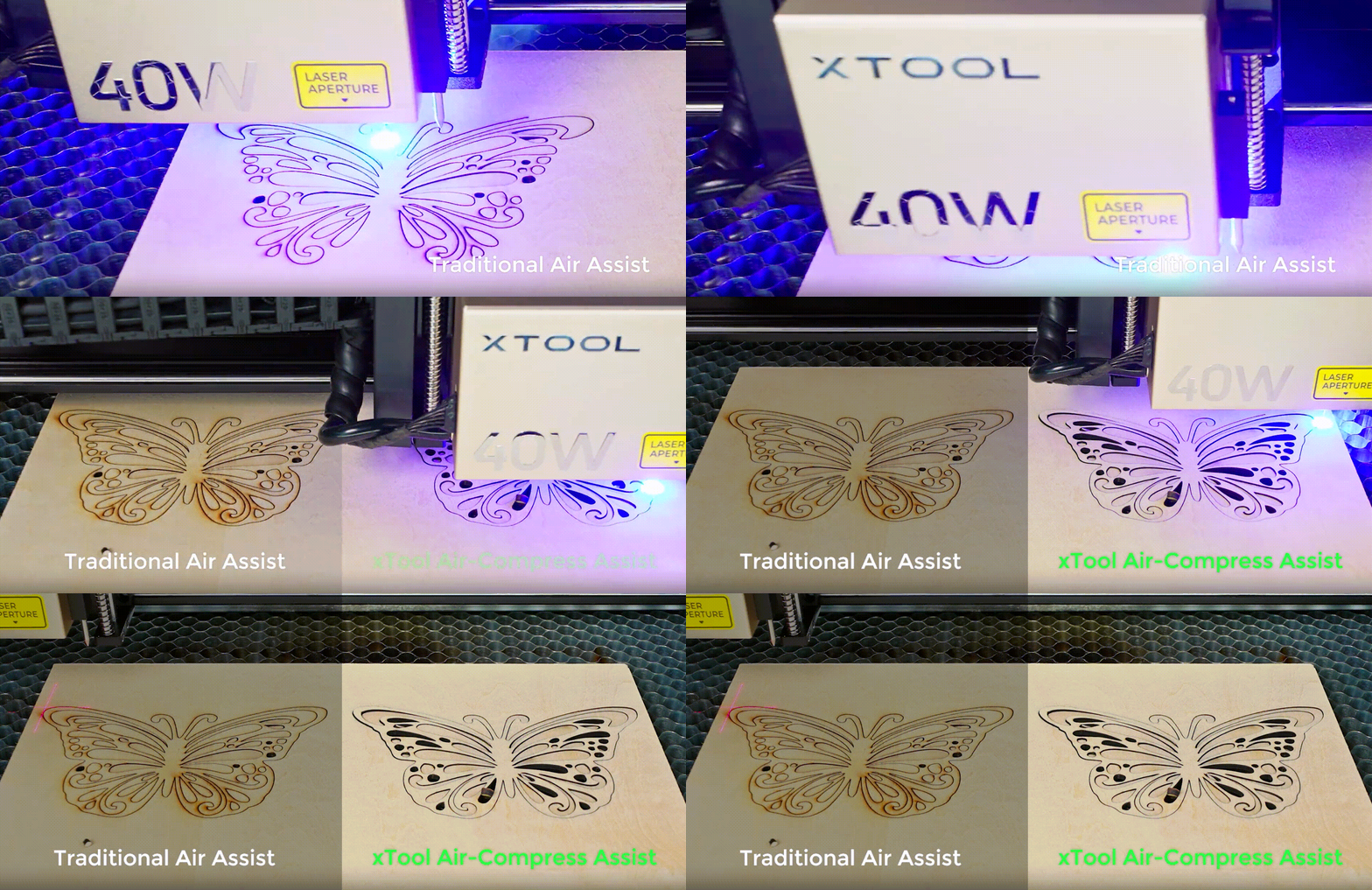
Air assist blows smoke and debris out of the cut as the laser works, preventing scorch marks and giving clean, precise edges. The good news: it’s now built into most current xTool machines (P2S, F1 Ultra, F2, S1), and older models take a low-cost add-on kit — so this is less a separate purchase than a feature to switch on and tune. Dial in the right power and speed for each material with Atomm’s Materials Lab.
- Availability: Built into most current xTool machines; add-on kits for older models
- Suitable for: cutting — especially thick or dense material
Key benefits
- Clears smoke for scorch-free edges
- Stronger airflow for thick material
- Faster cutting, less post-cleanup
5. Air Purifier & Fume Extraction — Work Safely Indoors

Cutting and engraving release smoke and fine particles you don’t want to breathe. A fume extractor vents them outdoors; an air purifier filters them in a closed loop when you can’t run a duct. Either one protects your lungs, keeps odors down, and stops soot from settling on your workpieces — essential if your laser lives in a home or studio.
- Price: $999
- Weight: 2.33 kg
- Works with: P3 / M2 / S1 / P2S / F2 / F2 Ultra / F1 Ultra — all xTool lasers
- Suitable for: indoor smoke, fume & odor removal
Key benefits
- Removes smoke, particles, and odor
- Safe indoor operation, no window duct needed
- Keeps the workspace and products clean
6. Electrostatic Mat — Hold Lightweight Materials
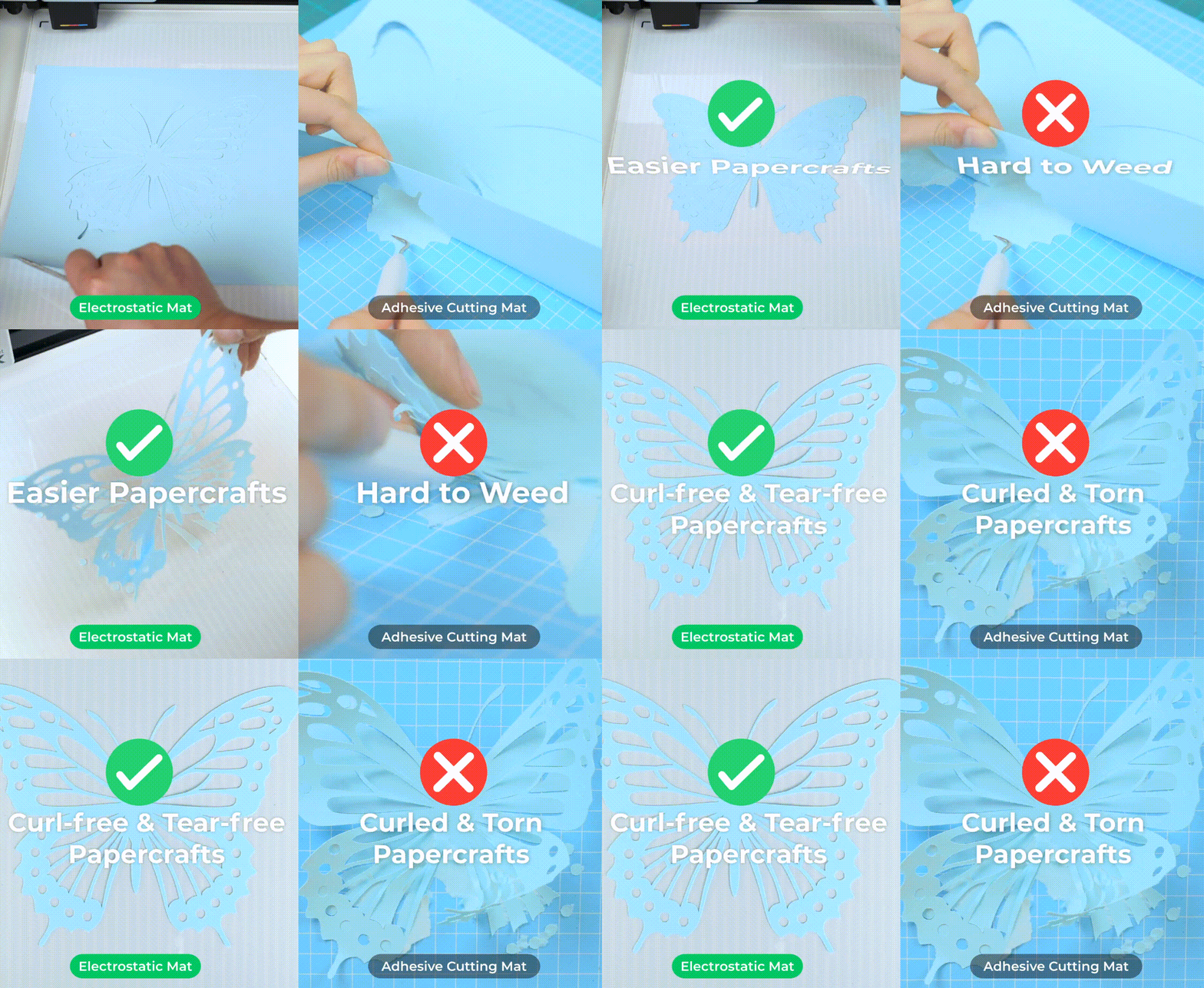
Cardstock and vinyl curl and slide during cutting, and adhesive mats leave sticky residue. An electrostatic mat uses static to hold lightweight materials flat and still — no adhesive, no residue — which is perfect for small crafts and batch runs where alignment has to be exact.
- Price: $99
- Weight: 0.85 kg
- Dimensions: 442 × 354 × 12.5 mm
- Works with: M1 Ultra
- Suitable for: lightweight cardstock & vinyl
Key benefits
- Static grip, no adhesive residue
- Keeps cardstock and vinyl from shifting
- Ideal for precise, repeatable batch work
7. Laser Marking Paper — Cleaner Engraving on Reflective Surfaces
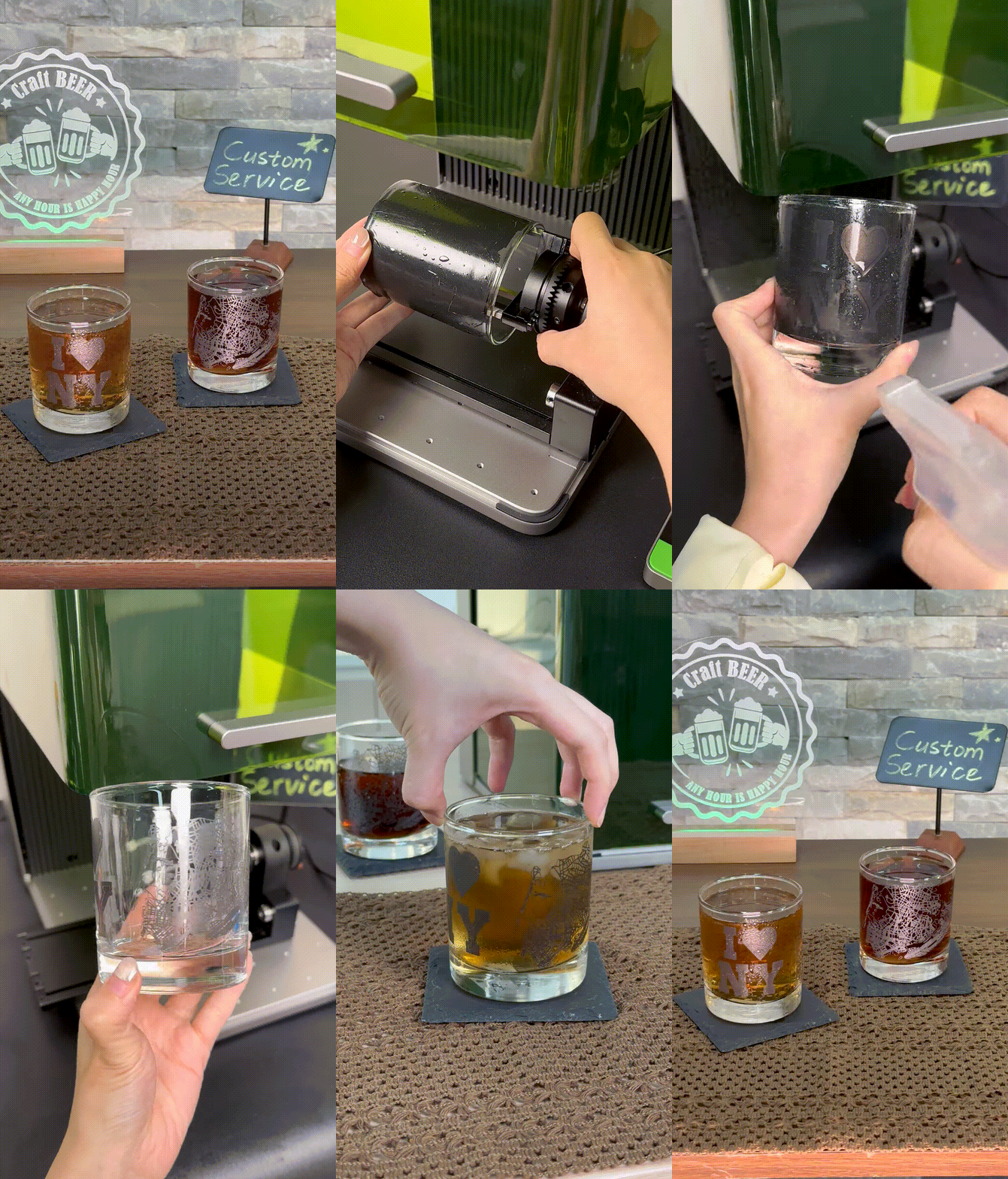
Reflective surfaces — glass, ceramic, clear acrylic — scatter the laser and give inconsistent results. Laser marking paper’s dark matte surface cuts glare and focuses the beam for sharper, more detailed marks. On ceramic, the laser burns through the masking to reveal clean dark lines that double as crisp guides for adding color.
- Price: $5.99
- Weight: 128 g
- Pack: 4 sheets
- Suitable for: glass, ceramic, steel, acrylic
Key benefits
- Reduces glare on reflective surfaces
- Sharper, more detailed engravings
- Clean color boundaries for hand-coloring
8. Hot Foil Pen — Add a Metallic, Premium Finish
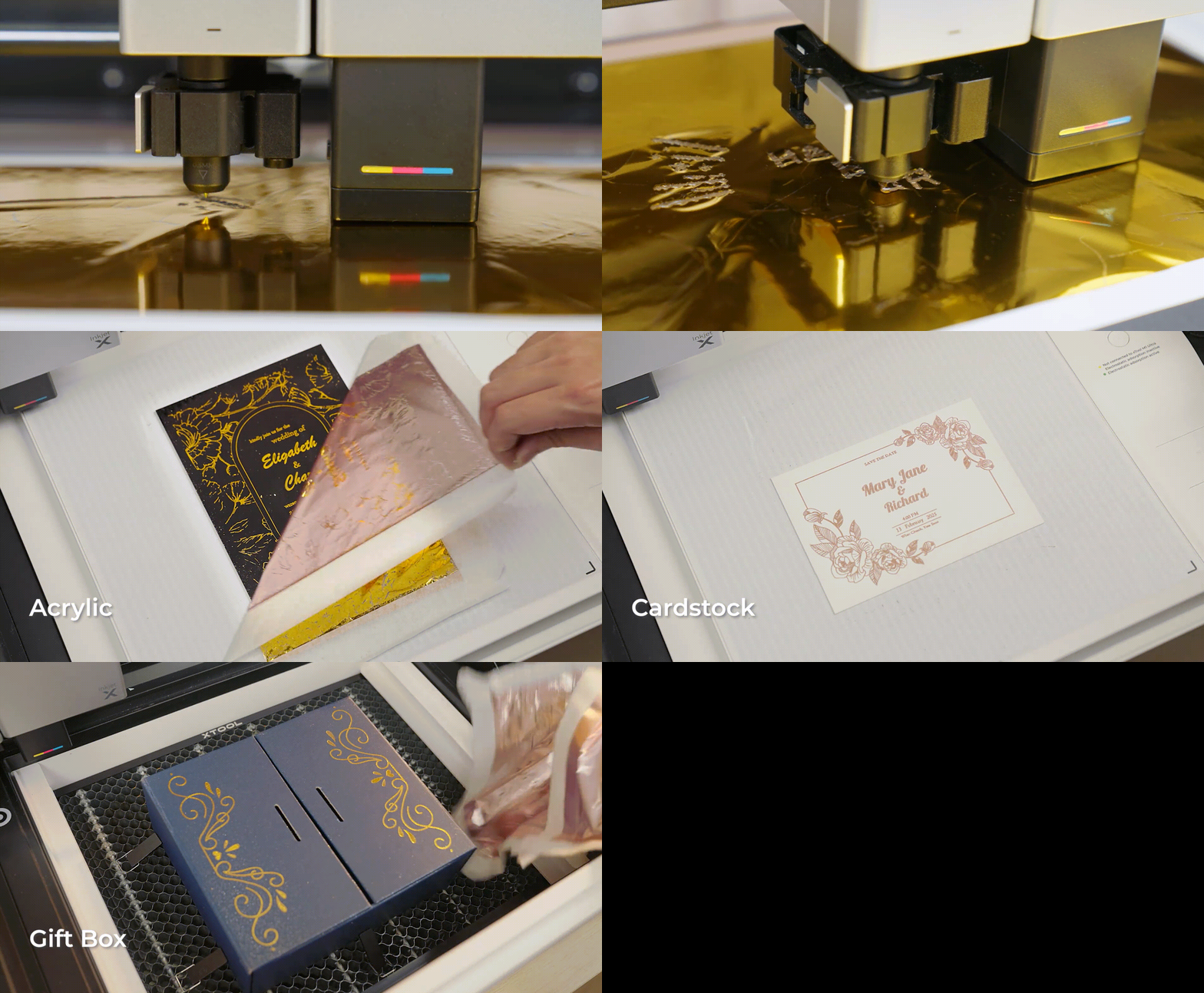
A touch of metallic shine instantly raises the perceived value of a piece. A hot foil pen lays gold, silver, or colored foil onto fine details — great on leather, cardstock, and wood for elegant invitations, gift packaging, and keepsakes that sell for more.
- Price: $89
- Weight: 0.126 kg
- Tips: 0.5 / 1.5 / 2.5 mm
- Works with: M1 Ultra
- Suitable for: paper, cardstock, leather, acrylic
Key benefits
- Gold, silver, and colored metallic accents
- A premium, giftable finish
- Easy to use on leather, card, and wood
9. AI Background Removal & Image Cleanup

Image prep is the slowest part of laser crafting — especially with busy backgrounds or low-resolution photos. Atomm AI removes backgrounds, sharpens and upscales images, and outputs a clean, laser-ready file in a click, so custom photo jobs go from fiddly to fast.
- Price: Free
- Runs in: Any browser (Atomm AI)
- Suitable for: prepping photos & images for engraving
Key benefits
- One-click background removal
- HD enhancement and cleanup
- Laser-ready output in seconds
10. AI Pattern Generator — Laser-Ready Designs from a Prompt

Stuck for ideas? Describe what you want — "art deco coaster", "floral earring", "camping sign" — and Atomm AI generates unique, laser-ready vector patterns tailored to your material and style. It keeps your catalog fresh without hours in design software, and it lives in the same free Atomm AI studio linked above.
- Price: Free
- Runs in: Any browser (Atomm AI)
- Suitable for: generating laser-ready vector designs
Key benefits
- Text-prompt to laser-ready vectors
- Styles and sizes tuned for laser
- Keeps your product range fresh
11. AI Style Filters — Turn Photos into Art

Plain photo engraving is fine, but AI style filters make it stand out. Atomm AI turns any photo into line art, papercut, cartoon, and other styles that are both eye-catching and laser-friendly — so they engrave faster and cleaner than a raw photo while looking far more distinctive.
- Price: Free
- Runs in: Any browser (Atomm AI)
- Suitable for: turning photos into laser-friendly art
Key benefits
- Line art, papercut, cartoon, and more
- Laser-friendly — faster, cleaner engraving
- Distinctive results that sell
Must-Have Laser Crafting Tools FAQs
What tools do laser crafters really need to get started?
Beyond the laser itself, the highest-impact add-ons are a way to hold your material (a flexible fixture, clamps, or an electrostatic mat), air assist for cleaner cuts, a fume extractor or air purifier for safe indoor use, and good design software. A rotary attachment comes next once you start on tumblers and cylinders.
Do I need air assist for laser cutting?
For cutting, yes — air assist blows smoke and debris out of the cut, which prevents scorch marks, improves edge quality, and reduces flare-ups. Many machines include basic air assist; adding a dedicated air compressor gives the stronger, steadier airflow that thick or dense materials need.
What does a rotary attachment do?
A rotary attachment spins round objects — tumblers, bottles, rings, pens — under the laser so you can engrave all the way around them. It turns a flat-bed engraver into one that handles curved and cylindrical products, which are some of the best-selling personalized items.
Do I need an air purifier or fume extractor?
If you run a laser indoors, yes. Cutting and engraving release smoke and fine particles; a fume extractor vents them outdoors, while an air purifier filters them in a closed loop when outdoor venting isn’t possible. Either one protects your lungs and keeps your workspace (and your prints) clean.
How do I hold small or curved objects while engraving?
Use the right fixture for the shape: a flexible fixture or clamp system grips irregular and curved items (glasses, bottles, gadgets), honeycomb pins and magnets lock down flat sheet goods, and an electrostatic mat holds lightweight cardstock or vinyl without adhesive residue.
Is free AI design software good enough for laser projects?
Yes — modern AI tools like Atomm AI remove backgrounds, generate laser-ready vector patterns from a text prompt, and apply laser-friendly styles (line art, papercut, cartoon) to photos. They cut the slowest part of the workflow (prep) down to minutes, which is a real efficiency win for small shops. For full design and machine-control software beyond AI prep, see our best laser software guide.
Conclusion
You don’t need every gadget on the market — but a handful of the right tools transforms what you can make and how fast you can make it. Start with solid material holding and air assist, add a fume extractor for safe indoor runs, bring in a rotary when you move to drinkware, and lean on free AI tools to speed up design. Each one pays for itself in time saved and products you can finally sell.
