
If you’ve searched for laser-cut designs, engraving ideas, or project files for an xTool machine, you’ve likely landed on Atomm. But Atomm is more than a design library — it’s a full creative community with tools, tutorials, and a way for makers to earn from their work.
This guide explains what Atomm is, who it’s for, what you can do on it, whether it’s free, and how it compares to other maker communities.
Key Takeaways
- Atomm is a free global creative community for makers and craft enthusiasts, built by xTool.
- It offers a large library of ready-to-make project files (laser, DTF printing, and more), plus AI design tools like AImake.
- Creators can publish projects, build a following, and earn from paid content through Atomm’s creator program.
- It’s free to join and browse, with a mix of free and paid projects and optional credits for premium content.

What is Atomm?
Atomm is a free, global creative community for makers and craft enthusiasts, built and run by xTool. It’s where owners of xTool laser engravers, cutters, and printers — and makers more broadly — go to find ready-to-make designs, share their own projects, and learn new techniques.
At its core, Atomm is a project-sharing platform: members publish detailed tutorials with materials lists, design files, and step-by-step instructions, so anyone can recreate (or remix) what they see. It covers laser engraving and cutting, DTF printing, and other digital-fabrication projects.
| Type | Free maker & craft community / project platform |
|---|---|
| Built by | xTool (Makeblock) |
| Core offering | Downloadable project files, tutorials, and design tools |
| Notable tools | AImake, Generators, Smart Templates |
| Cost | Free to join; mix of free and paid projects |
| Best for | xTool owners, laser/craft hobbyists, and creators who want to sell designs |
What does Atomm provide?
Atomm’s own mission is to “empower creativity that anyone can bring to life,” connecting creators and makers so ideas can be produced, shared, and improved together. In practice, that comes down to a few core pieces:
| Feature | What it does |
|---|---|
| A project library | Thousands of downloadable, step-by-step maker projects, from beginner practice pieces to advanced builds |
| A place to publish | Creators post their own projects, tutorials, and files to build a personal following |
| AI design tools | AImake, Generators, and Smart Templates turn a simple idea or photo into a usable design |
| A community | Likes, comments, and discussion around shared projects and techniques |
| Creator rewards | A system for creators to earn from high-quality paid content |
Who is Atomm for?
Atomm serves a few overlapping groups of makers:
- xTool machine owners — the fastest way to find tested designs and settings for a specific model.
- Hobbyist makers & crafters — anyone doing laser engraving, cutting, or DTF printing, regardless of which machine they use.
- Designers & creators — people who want to publish their work, build an audience, and earn from paid projects.
- Small businesses — makers sourcing sellable product ideas and production-ready files.
What can you make with projects from Atomm?
Atomm’s library spans a huge range of categories — jewelry, home decor, seasonal gifts, wall art, and more. Here are six real projects shared on the platform that show the range:
1. Color-Engraved Stainless Steel Tumbler

A color-engraved tumbler shared on Atomm, with the full project file and steps available to download and remake.
Get this design →2. Tree-of-Life Wooden Dangle Earrings

Fine, laser-cut wooden earrings posted with a full tutorial — the kind of detailed, ready-to-make project Atomm is built to host.
Get this design →3. Custom “MAMA” Acrylic Keychain
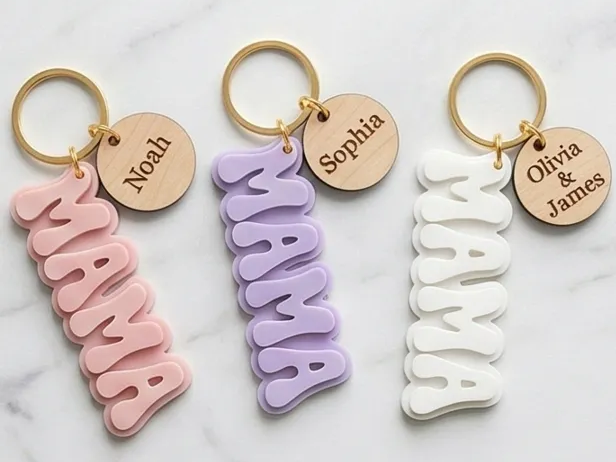
A simple personalized keychain design — a popular starter project category on Atomm for new makers and small sellers alike.
Get this design →4. Colorful Cat Christmas Ornaments
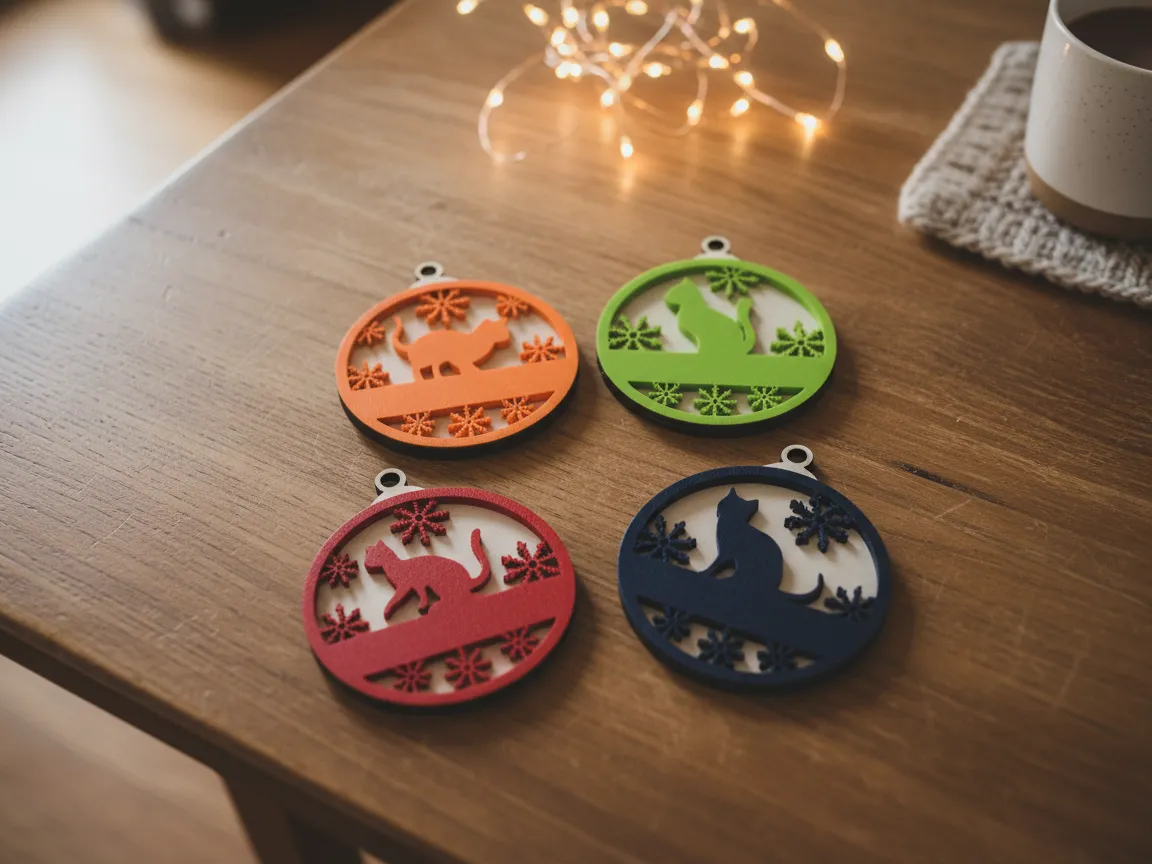
A color-printed, laser-cut ornament set — seasonal projects like this are some of the most downloaded designs on Atomm.
Get this design →5. Photo Acrylic Standee Night Light

A UV-printed photo night light shows the range of projects on Atomm beyond lasers — from full-color prints to mixed-material builds.
Get this design →6. Millennium Falcon Blueprint Wall Art
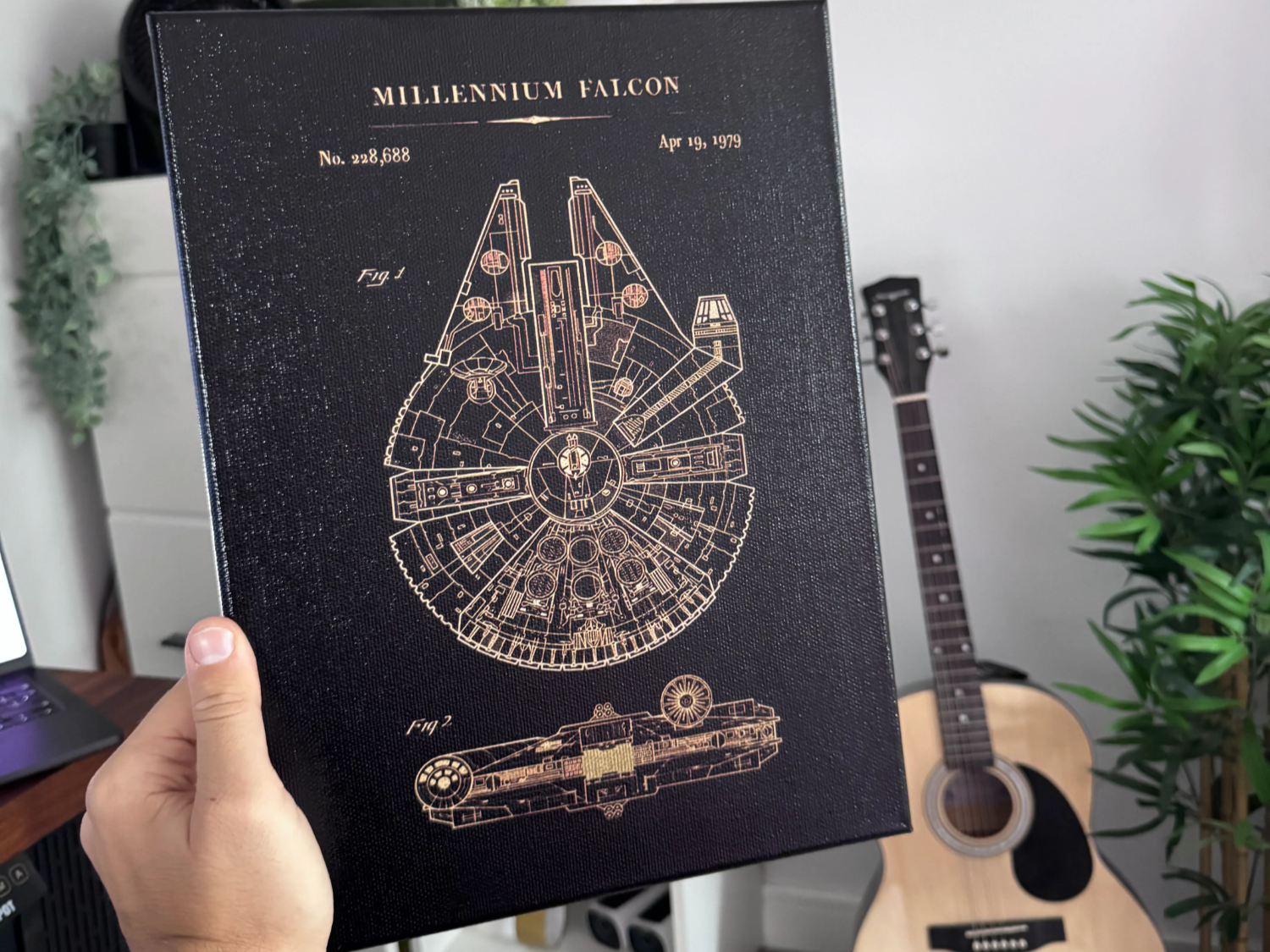
A fine-detail engraved blueprint print — the kind of fandom and pop-culture project that consistently draws a big following on Atomm.
Get this design →Atomm’s AI design tools
Beyond the project library, Atomm builds tools that make design more approachable, even without design experience. AImake is an AI-assisted design workspace that turns a simple idea or a rough photo into a usable design, alongside a set of Generators and Smart Templates for common project types.

You can explore the full toolset on the Atomm creative tools page, which covers everything from quick generators to more advanced design workspaces.
Becoming a creator on Atomm
Atomm isn’t just for downloading projects — creators can publish their own work, build a personal brand, and get paid for it. The platform sets out clear rules on originality, copyright, and monetization through its Creator Conduct Guidelines, so contributors’ work and rights are protected.
In return, Atomm asks creators to prioritize originality, share honestly (including what didn’t work), and maintain real production quality — a complete file, a clear tutorial, and honest photos of the finished piece.
Is Atomm free?
Yes — joining, browsing, and downloading a large share of Atomm’s content is free. Alongside that free library sits a curated selection of paid projects from creators, priced individually or unlocked with credits, which is how the platform funds creator payouts.
There’s no subscription required just to use Atomm; you only pay if you choose to buy a specific paid project or premium tool.
How Atomm relates to xTool
Atomm is built and operated by xTool, the brand behind the laser engravers, cutters, and printers many Atomm projects are designed for. xTool makes the machines; Atomm is the community and content layer around them — though its designs and tools are useful to any maker, not only xTool owners.
Atomm alternatives
Atomm isn’t the only maker community with shareable project files. Here are four well-known alternatives and how they compare.
Instructables
Broadest DIY community
One of the oldest and broadest DIY communities, covering everything from woodworking to electronics. Less focused on laser/craft-machine projects specifically than Atomm, but huge in scope.
Printables (Prusa)
Best for 3D printing
Run by Prusa, this is the go-to library for 3D-printable STL files. Great if 3D printing is your main tool, but it doesn’t cover laser cutting or DTF printing the way Atomm does.
Thingiverse
3D printing veteran
One of the original 3D-print file-sharing sites, with a massive back catalog. Like Printables, it’s 3D-print focused rather than a laser/craft community.
Cults3D
Marketplace for 3D designs
A marketplace mixing free and paid 3D-print designs, with a creator-payout model similar in spirit to Atomm’s. Its catalog is 3D-print only, without laser or DTF projects.
How to choose a maker community
Match the platform to your machine and goals:
| If you want… | Best fit |
|---|---|
| Laser, cutting & DTF projects, plus AI design tools | Atomm |
| The broadest general DIY project range | Instructables |
| 3D-printable files specifically | Printables or Thingiverse |
| To buy or sell 3D-print designs | Cults3D |
If you own an xTool machine, or work mainly in laser engraving, cutting, or DTF printing, Atomm’s tested project files and AI tools make it the most relevant choice. For 3D printing specifically, Printables, Thingiverse, or Cults3D are the more established libraries, and Instructables remains the best all-round DIY resource if your projects span many different crafts.
Final thoughts
Atomm brings together a huge library of maker projects, AI design tools, and a way for creators to earn, all built around the machines xTool makes. Whether you want to download a tested design, learn a new technique, or publish and sell your own work, it’s a free starting point.
Ready to see it for yourself? Browse the xTool machines Atomm supports, then explore the project library and AI tools on Atomm.
Frequently asked questions about Atomm
Is Atomm free to use?
Yes. Joining, browsing, and downloading most content is free. A curated selection of paid projects from creators sits alongside the free library.
Who owns Atomm?
Atomm is built and run by xTool, the maker of desktop laser engravers, cutters, and printers.
Do I need an xTool machine to use Atomm?
No. While many projects are designed with xTool machines in mind, the designs and tutorials are useful to makers using other laser cutters and craft tools too.
Can I earn money on Atomm?
Yes. Atomm has a creator program that lets you publish paid projects and get rewarded for high-quality content, backed by its Creator Conduct Guidelines on originality and copyright.
What is AImake?
AImake is Atomm’s AI-assisted design workspace that turns a simple idea or photo into a usable design, alongside Generators and Smart Templates for common project types.
