
Report
![[Laser cut and engrave] Square Slate Coaster Featuring an Australian Shepherd Dog Portrait](https://image-res.atomm.com/resource/xtool/community/attachment/xtool-community/3243402a-5765-4e49-91e6-445f59bea31b.jpg?x-oss-process=image/resize,w_1200,h_900,limit_0/interlace,1/format,webp/auto-orient,1)
Shepherd Slate Coaster – 3D Breakthrough Effect
 Remix
Remix Instruction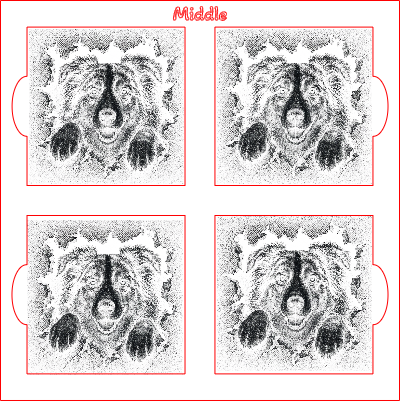
berger australien
.xs
Show 1 more
Application scenario
Laser processing
Machine & module

xTool S1
20WCompatible xTool Machine
New
M2
3W, 10W, 20WF2 Ultra UV
5WF2
5W, 15WP3
5W, 80WF2 Ultra
40W, 60WF1 Ultra
20WM1
5W, 10WD1
2W, 5W, 10W, 20WD1 Pro
2W, 5W, 10W, 20W, 40WP2
55WF1
2W, 10WS1
2W, 10W, 40WM1 Ultra
10W, 20WP2S
55WF2 Ultra (Single)
60WMaterial used

Square Rock Coaster

53
556
Information
      This project features a realistic Australian Shepherd portrait engraved onto a natural slate coaster using an xTool S1 20W laser. The design creates a striking 3D breakthrough effect, giving the impression that the dog is emerging through the slate surface.

The coaster was engraved directly onto the slate without paint, masking, or additional finishing. All contrast and detail are produced naturally by the laser engraving process. Fine fur texture, facial features, and depth effects are achieved using grayscale engraving settings.

This project is ideal for pet lovers, personalised gifts, memorial keepsakes, and decorative home accessories. The settings provided can be used as a starting point for similar slate engraving projects on the xTool S1 20W.

Machine: xTool S1 20W
Power: 40%
Speed: 220 mm/s
Passes: 1
Material: Natural Slate Coaster
This remix is based on

Australian Shepherd Slate Coaster – 3D Laser Engraving Effect
 Naelys Création
4 inch Slate Coaster Jig
 j3crafted
Instruction
1
Step1: Australian Shepherd Slate Coaster – 3D Breakthrough Effect (xTool S1 20W)
Step 1
Engraving Settings
Process: Bitmap / Grayscale
Machine: xTool S1 40W
Power: 40%
Speed: 220 mm/s
Passes: 1
Air Assist: ON
Image Mode: Grayscale
Material: Natural Slate Coaster
Procedure
- Import the image into XCS.
- Convert the image to grayscale if required.
- Position the slate coaster on the honeycomb or baseplate.
- Ensure the coaster is clean and free from dust.(I pre-sprayed with clear lacquer and let dry)
- Frame the design to confirm correct positioning.
- Run the engraving using:
- Power: 40%
- Speed: 220 mm/s
- Passes: 1
- Once complete, wipe the coaster with a soft cloth to remove engraving dust.
- Optionally apply a light coat of food-safe mineral oil to deepen the slate colour and increase contrast.
Results
- Direct engraving onto natural slate
- Excellent detail in fur texture
- Strong contrast between engraved and non-engraved areas
- Realistic 3D breakthrough appearance
Comments
Remixes



You may also like

German Shepherd Dog Coaster

14
205

Slate coaster with German Shepherd and cat portrait

0
0

The Lord is my Shepherd Psalm 23:1 slate coaster
15
102

Round slate coaster featuring a portrait of two dogs

0
0

Round Slate Coaster Featuring Personalised Dog Portrait
0
0

Life Is Better With A Dog And A Beer Slate Coaster

19
74

German Shepherd - 2 coasters

2
2

Laser Engraved Slate Coaster with Dog Portrait

1
3

Laser Engraved Dog Themed Slate Coaster with Funny Quote
26
144

Bernese Mountain Dog slate coaster

22
235

Halloween Dog Design Laser Engraved Round Slate Coaster

10
5

Slate Coaster with Dog Image and Spotify Code
0
0

Golden Retriever Portrait Slate Coaster

2
22

Shiba Inu Dog Mandala Slate Coaster

0
4

Spaniel Dog Portrait on Square Slate Coaster
3
29

Square Slate Coaster with Beware of the Kids Dog Sign
2
2

Intricate Staffy engraving on a slate coaster
 (3).png?x-oss-process=image/resize,m_fill,w_240,h_240,limit_0/interlace,1/format,webp/auto-orient,1)
62
293

Less People More Dogs Slate Coaster with Heart and Paw Print
.jpg?x-oss-process=image/resize,m_fill,w_240,h_240,limit_0/interlace,1/format,webp/auto-orient,1)
0
2