
Key Takeaways
- Wood is the friendliest laser material — both diode and CO2 machines engrave and cut it well.
- Diode machines are affordable and engrave fine detail; CO2 machines cut thicker hardwood faster.
- For a wood machine, weigh power (cut depth), air assist (clean edges), and an enclosure (safety and fumes).
- Fiber lasers are for metal — skip them for wood.
- Expect to spend ~$650 for a budget diode up to ~$6,000 for a premium CO2 machine.
Whether you engrave signs and coasters or cut layered art and model kits, a laser machine turns sheets of wood into finished pieces with detail hand tools can't match. Woodworkers, craft sellers, and hobbyists love how one machine both engraves grain-rich art and cuts intricate shapes.
Wood works on two laser types — diode and CO2 — so the decision is really about how thick you cut and how much you want to spend. Below we compare seven machines that excel on wood, with specs, pros and cons, and clear advice.
The best wood laser machines at a glance
We ranked these on wood engraving quality, cut depth, value, and ease. Prices are approximate and move with promotions.
xTool S1
Best overall
The S1 engraves rich, detailed wood tones and cuts plywood and thinner hardwood, all inside a safe enclosed body with air assist and auto-focus. It's the machine that does the most wood work without complication.
Very thick hardwood is better on CO2, but for the vast majority of wood projects the S1 is the easiest capable pick — pair it with a set of laser-engraved gift ideas to put it to work fast.
Pros
- Excellent wood engraving detail
- 40W module cuts plywood fast
- Enclosed and class-1 safe
Cons
- Thick hardwood needs CO2
- Diode edge char on some woods
- Add-ons cost extra
xTool S1: the do-it-all wood laser machine for most makers.
xTool P2S
Best for thick hardwood
The P2S cuts black walnut up to 18 mm in a single pass with smooth, dark edges, and its big bed and passthrough handle large boards. It engraves wood panels beautifully too.
The tube is a consumable and venting is required, but for serious wood cutting it's the desktop benchmark.
Pros
- Cuts 18 mm hardwood in one pass
- Large bed + passthrough
- Clean, fast wood edges
Cons
- CO2 tube is a consumable
- Requires venting
- Bigger and pricier
xTool P2S: the CO2 wood machine for thick hardwood.
WeCreat Vision Pro
Best value all-in-one
The Vision Pro's 45W diode cuts wood faster than most diodes and engraves clean detail, in an enclosed body with a camera and auto pass-through for longer boards.
It's a strong grow-with-you wood machine that often undercuts the S1. The brand is newer and full capability needs add-ons.
Pros
- Strong 45W diode for wood
- Pass-through + camera
- Great enclosed value
Cons
- Newer brand
- Add-ons for full kit
- Not CO2-level on thick stock
WeCreat Vision Pro: the best-value enclosed wood laser machine.
Creality Falcon2 Pro
Best budget enclosed
The Falcon2 Pro brings enclosed, air-assisted wood work with a camera and built-in fume extraction at a budget price, with modules up to 60W for deeper cuts.
The software trails xTool, but the value for safe, enclosed wood work is excellent.
Pros
- Enclosed + air assist, cheap
- Up to 60W for deep cuts
- Built-in fume extraction
Cons
- Software less refined
- Needs external venting
- Diode, slower than CO2
Creality Falcon2 Pro: the cheapest enclosed wood laser machine.
Ortur Laser Master 3
Best budget
The Ortur Laser Master 3 engraves and cuts thin wood affordably, with a big area for signs and ornaments and solid safety features for the price.
It's open-frame, so laser glasses and ventilation are essential. For budget wood work, it's superb value.
Pros
- Lowest price for wood
- Large work area
- Good safety features
Cons
- Open frame — glasses/venting
- Thin wood only at speed
- No camera
Ortur Laser Master 3: the most wood machine for the money.
Glowforge Pro
Premium
The Glowforge Pro cuts and engraves wood with autofocus, camera alignment, and unlimited-length passthrough for long boards, wrapped in the easiest software in class.
It costs a premium for 45W and leans on cloud software, but for hands-off wood work it's a benchmark.
Pros
- Passthrough for long boards
- Autofocus + camera
- Easiest software
Cons
- Expensive for 45W
- Cloud software, no LightBurn
- Requires venting
Glowforge Pro: the premium hands-off wood laser machine.
Glowforge Aura
Best for beginners
The Glowforge Aura makes engraving and light cutting of thin wood effortless, with camera preview and simple software ideal for signs, ornaments, and cards.
At 6W it only cuts thin wood and slowly, but for easy beginner wood crafts it's the friendliest option.
Pros
- Easiest software for wood
- Camera preview
- Compact and quiet
Cons
- Only thin wood, slow
- Cloud-oriented software
- Small work area
Glowforge Aura: the easiest wood laser machine for beginners.
Atomstack A20 Pro
Best open-frame power
The A20 Pro packs a 20W quad-diode module that engraves crisp wood detail and cuts thin plywood on a generous 400 mm bed, at a keen price. Its open frame keeps costs down but means laser glasses and ventilation are non-negotiable.
There's no built-in enclosure, so it suits a garage or workshop more than a living room.
Pros
- Strong 20W diode for the price
- Large 400 mm work area
- Engraves wood and marks metal
Cons
- Open frame — glasses and venting
- Enclosure costs extra
- Slower than CO2 on thick stock
Atomstack A20 Pro: Atomstack A20 Pro: the open-frame wood laser machine for budget power.
Glowforge Plus HD
Premium CO2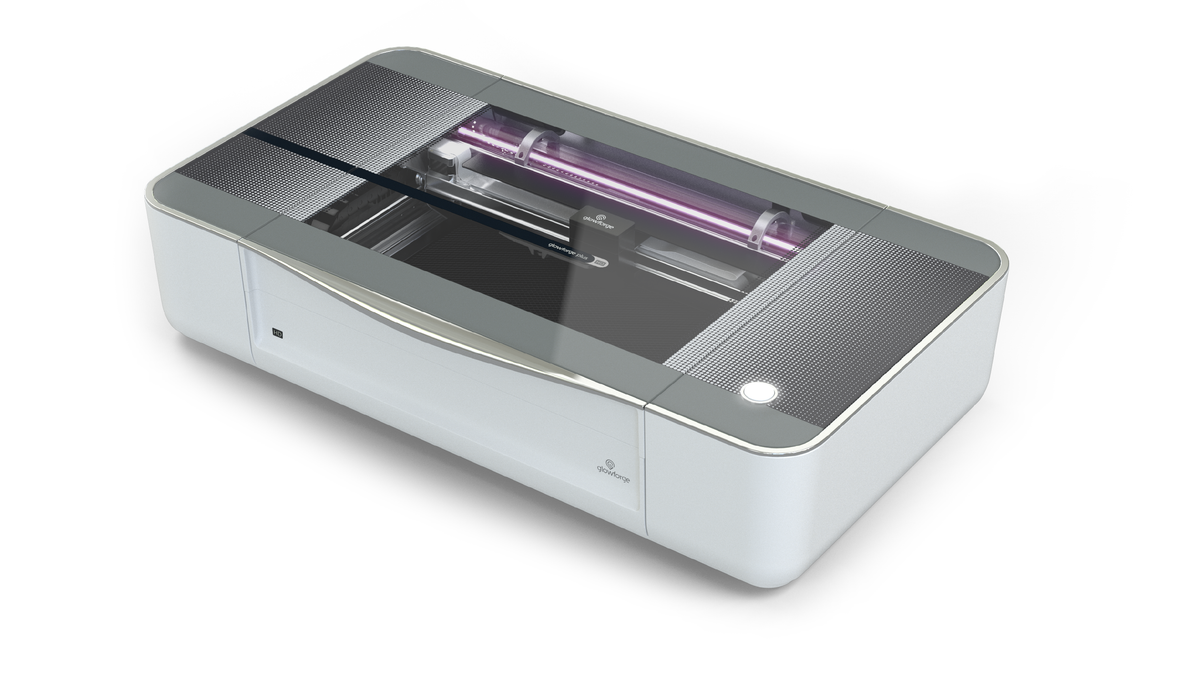
The Plus HD brings Glowforge's camera alignment and effortless software to a 40W CO2 tube that cuts and engraves wood with clean, dark edges. It's a polished, hands-off machine for makers who want results without fuss.
At nearly $7,000 it's dear for 40W, and it leans on cloud software with required venting.
Pros
- Camera alignment and autofocus
- Clean CO2 wood edges
- Easiest software in class
Cons
- Very expensive for 40W
- Cloud software, no LightBurn
- Requires venting
Glowforge Plus HD: Glowforge Plus HD: the premium enclosed CO2 wood laser machine.
How to choose a laser machine for wood
We compared every machine in this guide on the same factors — laser type and power, work area, enclosure and safety, software, and value — and here's what each means for wood. Wood is forgiving, so focus on depth and clean results:
- Engrave, cut, or both? Most machines do both; diodes engrave beautifully and cut thin stock, CO2 cuts thick. If engraving is your priority, our best laser engraver for wood guide goes deeper.
- How thick do you cut? Thin plywood → diode. Thick hardwood → CO2.
- Air assist. Essential for clean cuts and less charring.
- Enclosure and fume extraction. Wood smoke needs venting; an enclosure keeps it manageable.
- Work area. Match the bed to your boards; passthrough helps with long pieces.
Here's how the picks compare:
| Model | Laser | Power | Work area | Approx. price | Best for |
|---|---|---|---|---|---|
| xTool S1 | Diode | 20/40W | 498 × 319 mm | From $1,299 | Best overall |
| xTool P2S | CO2 | 55W | 600 × 305 mm | From $3,399 | Thick hardwood |
| WeCreat Vision Pro | Diode | 45W | 500 × 320 mm | ~$2,140 | Value all-in-one |
| Creality Falcon2 Pro | Diode | 22–60W | 400 × 400 mm | ~$1,899 | Budget enclosed |
| Ortur Laser Master 3 | Diode | 10–40W | 400 × 400 mm | ~$650 | Budget |
| Glowforge Pro | CO2 | 45W | 11″ × 19.5″ | ~$5,999 | Premium |
| Glowforge Aura | Diode | 6W | 12″ × 12″ | ~$1,199 | Beginners |
| Atomstack A20 Pro | Diode | 20W | 400 × 400 mm | ~$1,099 | Open-frame budget power |
| Glowforge Plus HD | CO2 | 40W | 11″ × 19.5″ | ~$6,999 | Premium enclosed |
Our buying advice
- Most wood work: the xTool S1 engraves and cuts wood superbly for the price.
- Thick hardwood: the xTool P2S CO2, or Glowforge Pro and Glowforge Plus HD for premium ease.
- Best value: the WeCreat Vision Pro or Creality Falcon2 Pro.
- Tightest budget: the Ortur Laser Master 3, or the Atomstack A20 Pro for more open-frame power.
- Beginners: the Glowforge Aura.
Match the machine to your typical wood thickness — that sorts diode from CO2 faster than anything else. If your focus is cutting rather than engraving, our best laser cutter for wood guide compares the strongest cutters.
What real makers create with a laser
From keychains to layered wall art, puzzles, bookmarks, and hair accessories, wood laser machines cover a huge range — and each project below comes with a free file to try.
Stitch wooden keychain

This little Stitch keychain combines fine engraving with a clean cut-out, all on a scrap of wood. It shows how a capable machine nails small, detailed pieces that sell well at craft fairs.
Get this design free →Layered hummingbird wall art
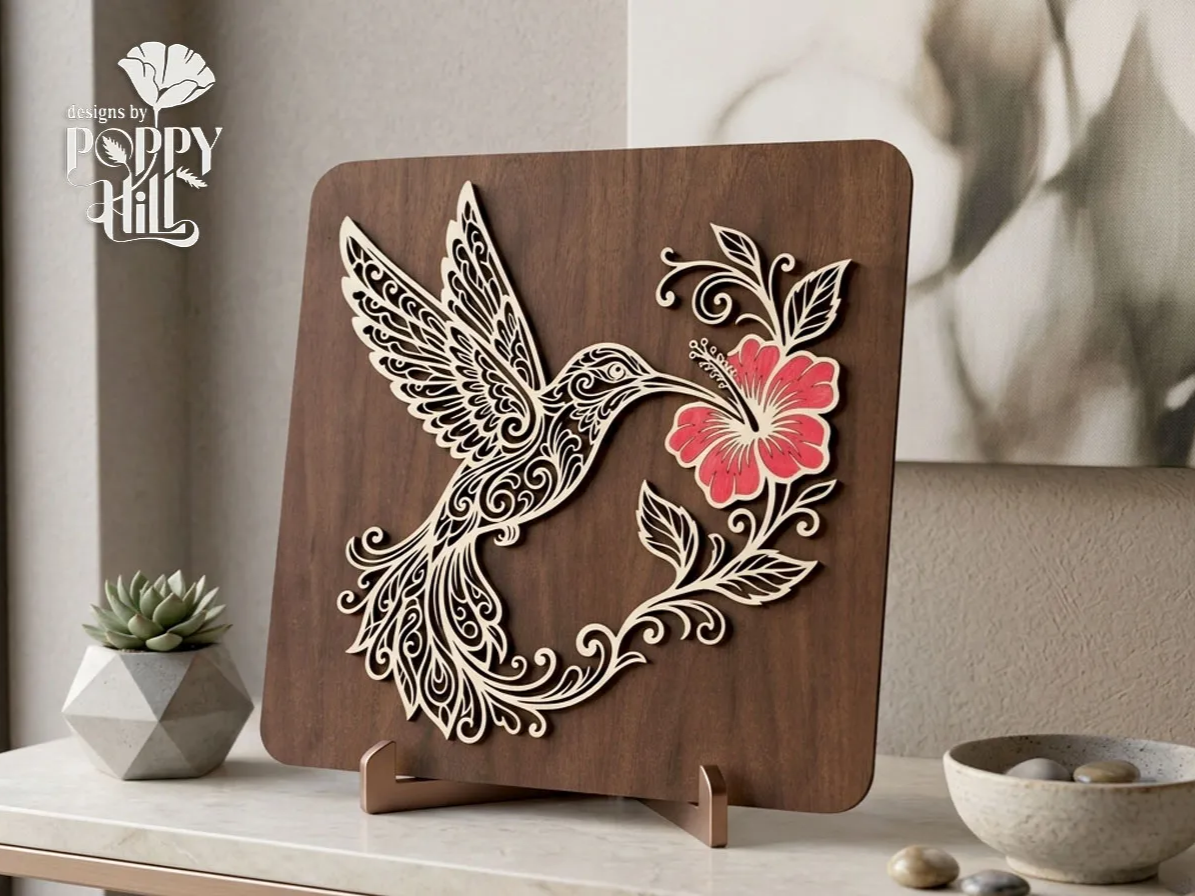
Stacked wood layers build this hummingbird and hibiscus into three-dimensional wall art. It proves a machine can cut clean, repeatable layers that assemble into a polished decor piece.
Get this design free →Sleeping fox wooden bookmark

This sleeping-fox bookmark cuts a delicate silhouette from thin wood with engraved detail on top. It's a great example of the fine, fragile shapes a well-tuned laser handles without splintering.
Get this design free →Safari animals learning puzzle

This eight-piece Montessori-style puzzle pairs cut animal shapes with engraved names. It highlights how precise cutting and engraving together make durable, kid-safe wooden toys.
Get this design free →Wooden dragon hair stick
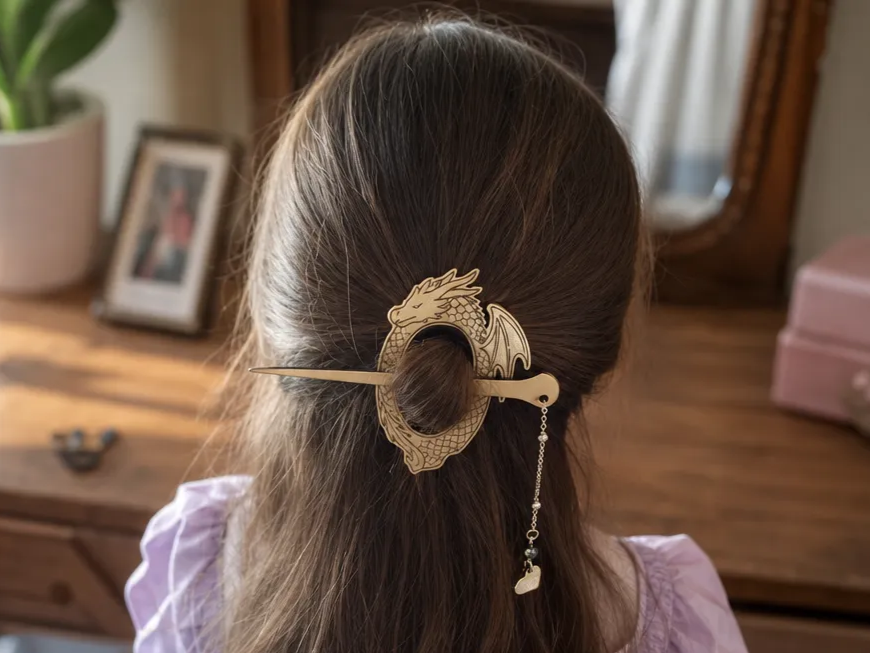
This fantasy dragon hair stick cuts a slender, ornate accessory from a thin wood blank. It shows the range a wood laser has, from flat art all the way to wearable pieces.
Get this design free →Frequently asked questions about wood laser machines
What laser machine is best for wood?
For most makers, a capable diode like the xTool S1 engraves and cuts wood beautifully for the price. If you regularly cut thick hardwood, step up to a 55W CO2 machine.
Is diode or CO2 better for wood?
Both work well. Diodes are cheaper and engrave fine detail; CO2 cuts thicker hardwood faster with cleaner edges. Choose CO2 only if you cut thick stock often.
What wattage do I need for wood?
A 20W diode engraves and cuts thin plywood; 40W diode or 45–55W CO2 handles thicker hardwood. More power mainly buys faster, deeper cuts.
What is the best wood for laser work?
Light, even-grained woods like basswood, birch plywood, and maple engrave and cut cleanest. Avoid resinous or very hard woods for fine detail; always test on scrap.
Do wood laser machines make a lot of smoke?
Cutting wood produces smoke, so air assist and an exhaust or fume filter are important. An enclosed machine contains it far better than an open frame.
Ready to work wood?
Explore free, ready-to-make wood designs — or generate your own artwork in seconds.