
Atomm is an online community and set of tools for people who make things with laser cutters, printers, and other craft equipment. You can use it to find a project, adapt a ready-made file, create a new design, check material settings, and prepare the result for your machine.
If you run or help moderate a DIY lovers group, Atomm can give your members a practical place to continue after a post sparks an idea. Beginners get clearer starting points. More experienced makers can share their work, compare settings, and take part in community activities.
You do not need to learn the whole platform at once. A simple first visit can be: find one project you like, try one tool, and save or make the result.
Explore the Atomm ecosystem
Home
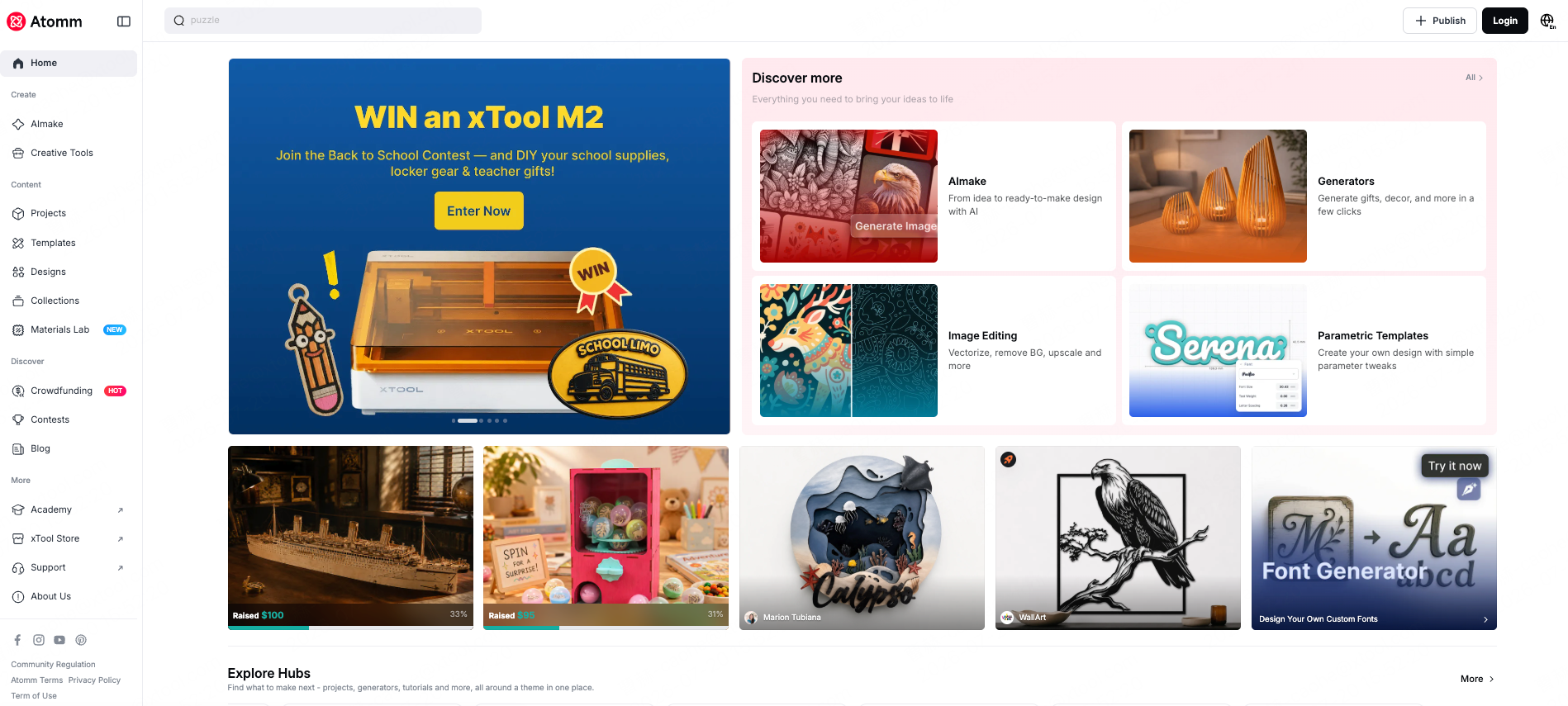
The Atomm home page brings together current projects, themed hubs, creators, contests, crowdfunding campaigns, and creative tools. It is the quickest place to see what is new or find a starting point when you do not have a specific project in mind.
Content
Projects
Projects are finished makes shared by the community. Many include photos, downloadable files, material details, machine information, and instructions. Use the filters to narrow the library by craft, material, machine, file type, or difficulty.
Best for: finding something you can make and learning how another maker approached it.
Templates
Templates are customizable designs made with Atomm generators. Change names, sizes, shapes, or other available settings, then export a file for your own project.
Best for: personalized gifts, signs, tags, ornaments, and other projects where you want a useful base without drawing everything yourself.
Designs
Designs are graphics for printing and product decoration. Check the license shown on each design before using it for items you plan to sell.
Best for: apparel, bags, mugs, stickers, and other printed or decorated products.
Collections
Collections group related projects and designs around a theme, season, material, or making style. They are useful when you want several ideas that already fit together.
Best for: planning a themed group post, seasonal challenge, workshop, or weekend project.
Materials Lab
Materials Lab is a settings library for materials and machines. You can look up starting points for power, speed, passes, thickness, and processing type. It includes shared community settings as well as official information where available.
Treat every setting as a starting point. Material batches, machine power, focus, and maintenance can change the result, so test on a small offcut before running the final piece.
Create
AImake
AImake helps turn a written idea or reference image into artwork suited to different making methods. Available options cover areas such as engraving, cutting, printing, vector work, relief, and 3D.
Start with a clear description of the object, material, style, and intended process. The result will usually still benefit from a quick check before production, especially for thin lines, small text, and fragile cut paths.

Creative Tools
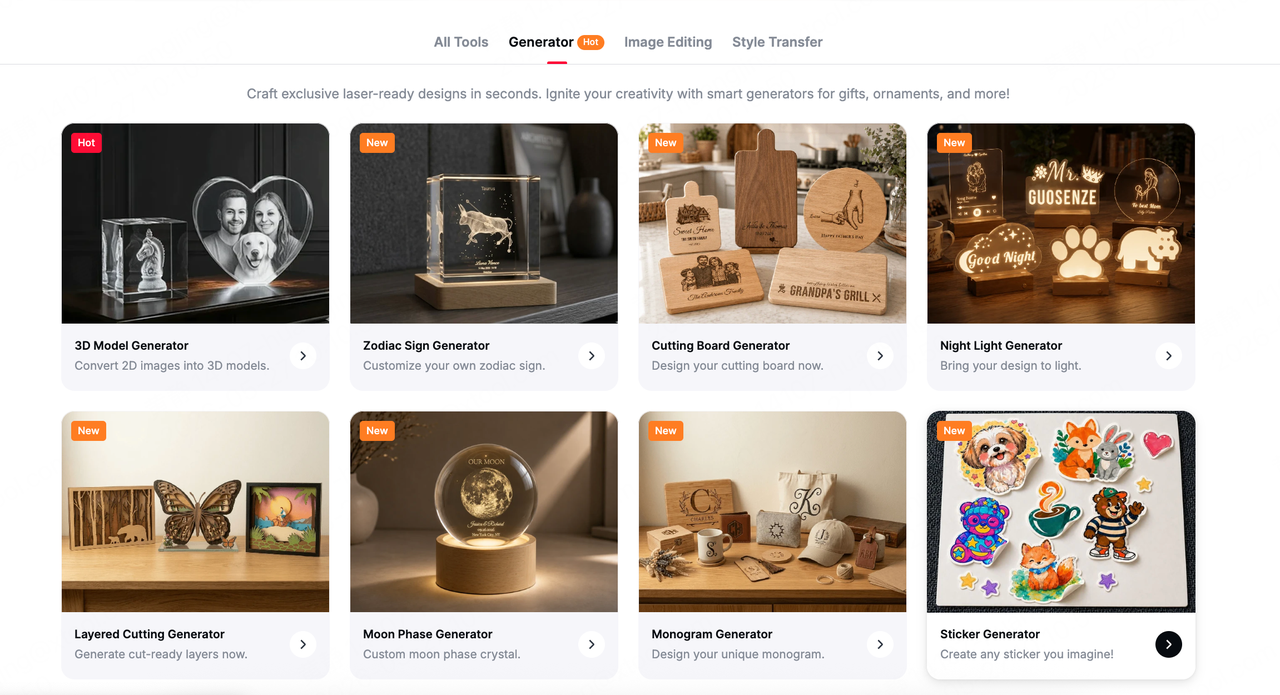
Creative Tools are focused tools for specific jobs. The current library includes generators, image editing, and style transfer. You can create items such as signs, frames, stickers, and 3D models, or prepare an existing image by vectorizing it, removing the background, improving resolution, or changing its style.
Use these when you know the job you need done and do not want to work through a full design app.
Community activities
Contests
Contests give makers a theme, a deadline, and a reason to finish and share a project. Prizes and entry rules vary, so check the page for the current brief before you begin.
For a Facebook group, a contest can also work as a ready-made activity prompt. Members can share progress in the group and submit their final work on Atomm if they want to join the official event.

Crowdfunding
Crowdfunding lets makers support selected creator-led products and DIY kits. Each campaign explains what is included, the funding goal, the timeline, and the available pledge options. Some rewards may be digital files, while others may include physical kits, so read the campaign details before pledging.
Creators with a developed idea can also apply to launch a campaign. Atomm reviews applications before they go live.

Get Your Personal Referral Link
Atomm gives each account a personal invitation link. When an active referral offer is available, both the person sharing the link and the new user receive Credits.
To find your link:
- Sign in and click your profile picture in the top-right corner.
- Select My Invitations.
- Click Invite.
- Copy your personal link and share it with the people who asked for it.
- Open Check My Invitations to see successful invitations and Credits earned.
For group admins, the easiest approach is to add the link to a useful post, such as a project roundup or contest reminder, with one sentence explaining why members may want to open it. Avoid posting the link without context.

Atomm Creator Program
Atomm is a place to make, share, and grow. Creators can build their presence, develop their own creative identity, and earn from the work they publish through platform support, monetization opportunities, and official promotion.
What is the Atomm Creator Program?
The Atomm Creator Program is a creator rewards program from Atomm, an xTool platform. It helps creators turn their ideas and content into income while gaining more opportunities for growth and exposure.
How to become an Atomm creator
Apply here: Atomm Creator Program
How creators earn
Video revenue
Earn up to $1,000 per qualified video—and even more as your views grow.
Machine referral revenue
Earn up to 6% commission on eligible xTool machines purchased through your referral link.
For example, you can earn $400 when someone purchases an eligible xTool P3 through your link.
Material commission
Earn up to 30% commission when users purchase materials tagged in your projects.
For example, if users purchase $1,000 worth of eligible materials from your project, you can earn up to $300.
Premium projects
Sell premium projects on Atomm and keep 80% of the revenue.
For example, if 50 users purchase a $2 project, you earn $80.
Paid promotion and exposure
Selected creators also receive paid promotional support from Atomm, helping their projects and content reach a wider audience.
xTool Studio
xTool Studio is the production side of the workflow for xTool users. It is where you can adjust a design, arrange it on the canvas, preview the result, and prepare a job for a compatible xTool machine.
A typical workflow is:
- Find a project or create a design on Atomm.
- Open or import the file in xTool Studio.
- Check the size, layers, placement, and processing settings.
- Run a framing or placement check on the machine.
- Test on scrap material, then make the final piece.
xTool Studio is free to use. Some connected AI features or resources may use Credits. The web version may still direct you to the desktop client for the smoother experience.
Credits
Credits are used for selected tools and paid resources on Atomm. You may spend them on AImake and generators, premium projects or templates, and other redemption options shown in the Credits Center. Free monthly uses may be available before Credits are deducted.
There are two types:
- Reward Credits are earned through activities such as publishing approved projects, referrals, daily tasks, and limited-time campaigns.
- Purchased Credits are bought directly.
Reward Credits and Purchased Credits have different expiry rules. Reward Credits generally expire at the end of the same calendar month one year after they were earned. Purchased Credits do not expire. Credits cannot be transferred or exchanged for cash.
Open the Credits Center from the icon next to your profile picture to check your balance, history, current earning tasks, and expiry dates. Because offers and usage costs can change, check the latest rules before sharing a specific amount with your group.
Read the current Credits guide

Quick Start Checklist
- Create or sign in to your Atomm account.
- Browse the home page and open one project that matches your interests.
- Check the project's files, materials, instructions, and license.
- Try one template, AImake option, or Creative Tool.
- Look up a starting setting in Materials Lab and run a small test.
- Move the design into xTool Studio if you use a compatible xTool machine.
- Make the project and share what you learned.
- Join a contest, follow a crowdfunding campaign, or invite a friend when it feels relevant.
Tip: Start small. One finished project will teach you more about Atomm than opening every section in one visit. Start your Atomm journey now!
Ready to make your first batch?
Spin up original, trademark-safe fan art, or jump straight to a product generator for bag tags, signs, and stickers — then start producing before kickoff.