

 Welcome everyone.
Happy Weekly Update and I hope you guys are doing great!
Three months ago, we started writing tips and updates. We want to help you easily design and create amazing projects, as well as keep you updated on the latest news.
Now three months have passed since the very first article (xTool Creative Space Beta 5) was posted. And now we’ve evolved to XCS version 1.0!
We grow as we exchange ideas with you in the community. It’s impressive to see your ideas come to life! Your feedback keeps inspiring us and helps us make xTool better. Thank you all for always being so supportive!
October just ended. Here are some works that were made by our team members. Can’t wait to share them with you:

Check out if there’s a work you want to learn how to make. We will do a step-by-step tutorial about it.
Alright, enough talk about us. Let’s see the update now~
Q&A
1. [M1] Laser head drop out problem
Regular maintenance is essential for your machine. You can check xTool M1 Maintenance Guide and [Video] How to Clean The Photoelectric Sensors of M1? for instructions.
These could prolong the life of your machine and reduce the chances of processing failure.
If you already have encountered the drop out problem and received the error prompt, please check out M1 Error Code Troubleshooting.
It provides solutions for errors such as:
M1 Error code: Qx14 1 (Reset failure – X-axis fails to return to origin.)
If that still does not fix the issue, please shoot a video of your problem and send it with the details to @Annie Liu/ @ Nicole Peng on FB, or mail [email protected].
You can also contact the support team this way if you encounter a similar problem, and don’t forget to add details so they can solve it faster.
2. [D1 Pro] How to solve the “The device has been moved.” problem?
- Place the machine on a steady and flat surface, avoiding tilting or shaking.
- Turn off the Stops when moved switch if necessary.

3. Why can’t I set the style of certain fonts?
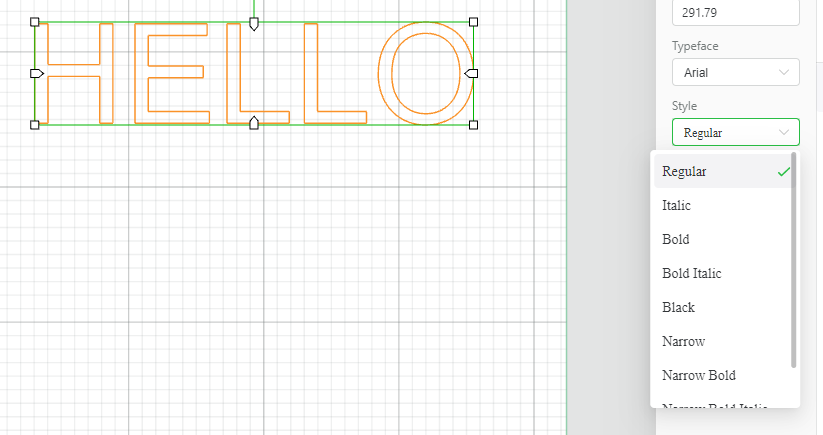
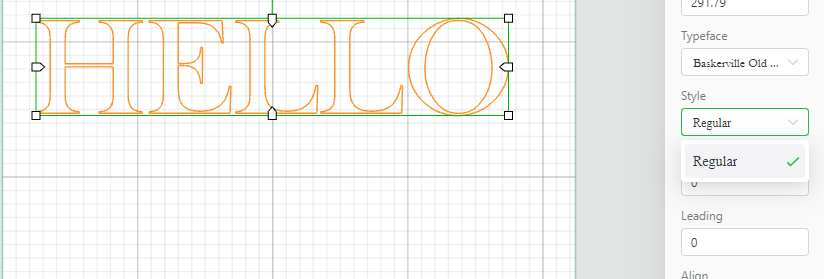
As you can see, the Ariel typeface comprises many different style options, while the Baskeville typeface only offers the regular style.
This is due to the design difference between the two typefaces. Therefore, please select a font that has the style you want.
Suggestions from the community
Last week, we received several suggestions from both the xTool community and FB group. I have forwarded them to relevant product managers, and now they’re added to the xTool suggestion list.
We appreciate your support a lot!!
XCS and xTool suggestions
- The ability to save my own settings @voisin Gérard
- Upgrade or swap the z-axis board from having an optical sensor to non-optical sensor. @John Carson
- The option to invert/swap colors @Arad
- Select all elements after the process is complete @John Walt
- A square formed eraser tool and a round cropping tool @Robert Guzmán
Community site suggestions
- A mobile platform of the community @Michael Mays
- xTool community exclusive images and icons @Robert Guzmán
- Add an option to choose “Score”, “Engrave” and “Cut” in Parameters Setting @Robert Guzmán, Arno Bücken, Michele Jaeb
- The ability to upload images with higher definition @Paola Garcia
Your suggestions will be taken into careful consideration!! Thank you all for the great feedback!
I’ll keep you informed if there are any updates.
Weekly Recap
Last week, we shared 5 articles each with our M1 and D-series members. Hope you guys find them helpful! Check the list to see if you missed some of them:
What is the Smart Fill Function?
xTool D1 Pro Maintenance Guide
If you have concerns about the above content, do not hesitate to tell us here.
Tips We’re Writing
Just like previous episodes of WU, we selected a couple of topics that might interest you. They are expected to be out next week;-)
- FAQs on firmware update
- FAQs on connecting machine
- How to fix XCS loading errors?
- Festival themed project ideas
Since ideas for Tips&Tricks are running short, we need your help and advice on them!! We are so ready to be inspired!
So, make sure you let us know what tips, project cases, or function introductions you want to see in later episodes. I’m sure you have lots of insights to share with us!
Now we’re coming to the end of this update. I hope you all have had a great celebration with the ones you love the most, and we’d love to see your festive projects and costumes!
Thank you for taking the time to read this. Have a wonderful day♥