
 Welcome, fellows! Thank you for sticking around for another week! You continue to exceed every expectation that we have. Keep on creating amazing laser projects!
Now it’s time for some WU! Fresh Q&A and Tips for the Week for y’all!
Q&A
1. Is there a plan to make the M1 camera more accurate?
Yes, we are working on improving the camera’s precision. Thank you for your valuable feedback!
Camera calibration function will soon be released in XCS V1.0.
When M1 is manufactured, the camera calibration is all set.
However, the position of the camera might shift a little due to vibrations during the shipment.
In XCS v1.0, we developed an algorithm to calibrate the camera position and restore the camera’s factory position settings.
2. Can we turn off or turn the fan down on M1 when we are not using the laser?
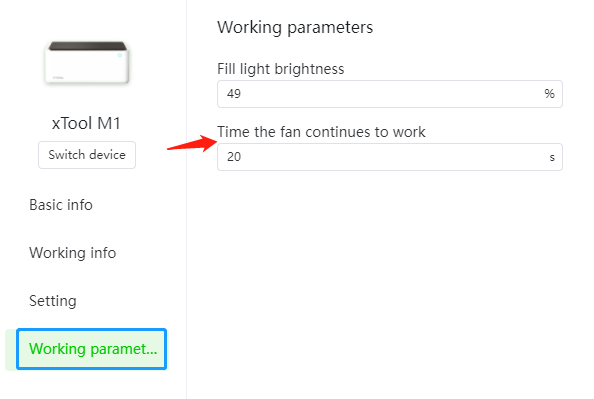
If you select the “Working parameters”option, you can see “Time the fan continues to work”, which sets the time the exhaust fan continues to work after the machine stops processing. It shows the time needed to clear the smoke, and is automatically calculated by algorithm.
When the smoke exhaust fan stops running, you can
1) manually set the time if you want to run it again;
2) finish processing if the smoke is cleared.

3. I received the cork desk pad, and there are recommended parameter settings for engraving and scoring but none for cutting. Why?
Our supplies team regularly updates the preset parameters for common materials. The reason is that the cork desk pad is not suitable for cutting. The same thing happens when the material isn’t suitable for certain processing modes.
Hope that you have done a perfect project with it!
Tips for the week
xTool M1 is the first hybrid laser & blade cutting machine.
Normally, laser cutters can perform very well on many materials, such as wood, metal and glass. However, for some soft materials such as vinyl, which can be used for DIY T-shirts, sign making, logos and more, it is better to use a blade cutter to avoid the burnt edges, discoloration and toxic fumes generated by laser cutting.
To help you make the most of M1’s blade cutting mode, we’re working on several related articles. If you have related questions, do let us know in the comment section below!
- Print & Blade Cut Project Walkthrough
- Available Blade-Cut Materials and Project Ideas
- What is Blade Cut Calibration?
- How to Get the Best Blade-Cut Parameters for My Material?
We’re still exploring a way to produce actionable content for you, so your feedback means a lot to us!
Feel free to comment on any questions or other tips that I haven’t mentioned!