
Key Takeaways
- The best laser cutter depends on what you cut — CO2 for thick wood and acrylic, fiber for metal, diode on a budget.
- For thick cutting a 55W CO2 machine leads; fiber is the only type that cuts metal.
- Diode machines cut thin stock cheaply; only fiber cuts bare metal; CO2 cuts the thickest non-metals fastest.
- Budget open-frame diodes start near $650; premium enclosed CO2 machines run past $5,000.
- Match the laser type to your material and thickness first, then compare power, work area, and enclosure.
The right laser cutter depends on your material: metal needs a fiber laser, budgets favor diodes, and production shops want the biggest CO2 bed they can fit. Below we compare eight top machines across brands, with specs, pros and cons, and clear advice. New here? Start with our explainer on what a laser cutter is.
The best laser cutters at a glance
We ranked these on cutting power, material range, value, and real-world reviews. Prices are approximate and change often with promotions, so confirm the current figure before buying.
xTool P2S
Best overall
The xTool P2S is the desktop cutting benchmark. Its 55W CO2 tube slices acrylic up to 20 mm and black walnut up to 18 mm in a single pass, with fast, polished edges that need little cleanup.
Dual 16MP cameras give 0.3 mm placement accuracy, and auto-passthrough handles stock up to 118″ long. The CO2 tube is a wear item and you'll need venting, but nothing else cuts this well on a desktop — whether you're producing wood engraving projects or acrylic signage.
Pros
- Cuts 20 mm acrylic / 18 mm wood in one pass
- Dual cameras + long passthrough
- Large 600 mm work area
Cons
- CO2 tube is a consumable
- Requires exhaust venting
- Larger footprint
xTool P2S: the desktop CO2 laser cutter for serious wood and acrylic.
Glowforge Pro
Premium CO2
The Glowforge Pro is the premium plug-and-play CO2 cutter. Autofocus, camera alignment, and unlimited-length passthrough make it one of the easiest machines to run, backed by polished software and strong support.
You pay a clear premium over similar-wattage rivals, and the software leans on the cloud. But for buyers who value ease and brand support over raw specs, it stays a benchmark.
Pros
- Unlimited-length passthrough
- Autofocus and camera alignment
- Refined software and support
Cons
- Expensive for its wattage
- Cloud-oriented software
- Requires venting
Glowforge Pro: the premium, hands-off CO2 laser cutter.
xTool F1 Ultra
Best for metal
To cut metal, you need a fiber laser — and the xTool F1 Ultra pairs one with a diode in a single portable body. The fiber side cuts and marks thin steel, aluminum, and brass; the diode side handles wood and acrylic.
A galvo head reaches 10,000 mm/s, making short work of jewelry, tags, and small parts. The native bed is small, but no other machine at this price cuts metal this cleanly.
Pros
- Cuts and marks thin metal
- Dual fiber + diode in one machine
- Extremely fast galvo
Cons
- Small native work area
- Premium price
- Thin metal only (not thick plate)
xTool F1 Ultra: the fastest dual fiber-and-diode laser cutter and engraver for metal.
WeCreat Vision Pro
Best all-in-one
The WeCreat Vision Pro's 45W diode with BeamFocus optics "cuts like 60W," in a fully enclosed body with an auto-lifting lid, camera, and LED alignment. An optional IR module adds metal marking.
Its auto pass-through feeder and rotary options make it a real out-of-the-box small-business cutter, often undercutting comparable machines. The brand is newer, and full capability needs some add-ons.
Pros
- Strong 45W diode cutting
- Auto pass-through feeder + rotary
- Great enclosed value
Cons
- Diode can't cut clear acrylic well
- Full kit needs bundle add-ons
- Newer brand
WeCreat Vision Pro: the best-value all-in-one enclosed laser cutter right now.
xTool S1
Best enclosed diode
The xTool S1 is the safest, most versatile diode cutter for home use. The 40W module cuts wood and dark acrylic quickly, and the fully enclosed, class-1 body keeps the beam contained.
It won't power through thick material like a CO2 machine, but for everyday cutting and engraving with the option to add metal marking, it's the do-it-all pick.
Pros
- Fully enclosed and class-1 safe
- 40W module for faster cuts
- Adds metal marking via IR
Cons
- Diode struggles with clear acrylic
- Slower than CO2 on thick stock
- Add-ons cost extra
xTool S1: the do-it-all enclosed laser cutter for most homes.
Creality Falcon2 Pro
Best budget enclosed
The Creality Falcon2 Pro brings an enclosure, air assist, camera, and fume extraction to a price where rivals are still open-frame. Modules run to 60W for faster, deeper cuts.
The software isn't as polished as Glowforge or xTool, and diodes can't touch clear acrylic, but the feature-per-dollar for enclosed cutting is outstanding.
Pros
- Enclosed + air assist + camera, cheap
- Modules up to 60W
- Built-in fume extraction
Cons
- Diode limits on clear acrylic
- Software less refined
- Still needs external venting
Creality Falcon2 Pro: the cheapest route to a fully enclosed laser cutter.
Ortur Laser Master 3
Best budget open-frame
The Ortur Laser Master 3 is the value champion for cutting thin stock. A few hundred dollars buys a large 400 × 400 mm area and a capable diode with real safety features like an emergency stop.
It's open-frame, so you'll need laser glasses and ventilation, and there's no camera. For makers comfortable with setup who want maximum area per dollar, it's excellent.
Pros
- Very low entry price
- Large 400 × 400 mm area
- Solid safety features
Cons
- Open frame — needs glasses and venting
- No camera
- Thin material only
Ortur Laser Master 3: the most laser cutter you can get for the money.
Glowforge Aura
Best for beginners
The Glowforge Aura is the friendliest way to start cutting. Its camera preview and polished software let you place a design and hit print — perfect for paper, cardstock, and thin wood.
At 6W it cuts slowly and only thin material, so it's not for heavy work. But for crafters who prioritize ease over power, nothing is simpler.
Pros
- Easiest software and preview
- Compact, quiet, well supported
- Great for paper and thin wood
Cons
- Only 6W — thin material, slow cuts
- Cloud-oriented software
- Small work area
Glowforge Aura: the easiest laser cutter for light, beginner projects.
Atomstack A20 Pro
Fastest budget diode
The Atomstack A20 Pro stacks four diodes into a 20W optical spot that cuts thin wood, acrylic, and leather noticeably faster than single-beam rivals in its price class. The large 400 × 400 mm frame leaves plenty of room for bigger cut sheets.
It ships open-frame, so you'll want laser glasses and a vent, and clear acrylic stays off the menu. For makers chasing maximum cutting speed per dollar who don't mind adding safety gear, it punches above its price.
Pros
- Quad-diode cuts faster than most budget lasers
- Roomy 400 × 400 mm bed
- Affordable entry into 20W cutting
Cons
- Open frame — needs glasses and venting
- Can't cut clear acrylic
- Enclosure kit costs extra
Atomstack A20 Pro: Atomstack A20 Pro: the fastest budget diode for cutting thin stock.
xTool F2 Ultra
Best metal marking and color
The xTool F2 Ultra pairs a 60W MOPA fiber with a 40W diode, so it cuts and marks thin steel, aluminum, and brass while the diode side handles wood and acrylic. The MOPA source also unlocks true color marking on stainless.
Its galvo head is blisteringly fast, though the 220 × 220 mm field suits small parts rather than big panels. If your work mixes thin-metal cutting with premium marking, nothing on this list is more versatile.
Pros
- Cuts and marks thin metal
- MOPA color marking on stainless
- Very fast dual-laser galvo
Cons
- Small 220 × 220 mm field
- Premium price
- Not for thick panels
xTool F2 Ultra: xTool F2 Ultra: the most versatile dual-laser for thin-metal cutting and color marking.
How to choose a laser cutter
We compared every machine in this guide on the same factors — laser type and power, work area, enclosure and safety, air assist, and value — and here's what each means. Work through them in order; the first narrows the field fastest.
- What material and thickness? Thin wood, acrylic, paper? A diode works. Thick wood and acrylic? Choose CO2. Metal? You need a fiber laser.
- How much power? More watts cut thicker in fewer passes. 40W+ diode or 45–55W CO2 handles real cutting; 6–20W suits thin stock.
- Enclosed or open? Enclosures add safety, fume control, and quiet. Open frames are cheaper and roomier.
- Work area and passthrough? Match the bed to your parts; passthrough helps with long material.
- Air assist? Essential for clean cutting — make sure it's included or available.
Here's how the picks compare:
| Model | Laser | Power | Work area | Approx. price | Best for |
|---|---|---|---|---|---|
| xTool P2S | CO2 | 55W | 600 × 305 mm | From $3,399 | Best overall |
| Glowforge Pro | CO2 | 45W | 11″ × 19.5″ | ~$5,999 | Premium CO2 |
| xTool F1 Ultra | Fiber + diode | 20W + 20W | 220 × 220 mm | From $2,999 | Metal |
| WeCreat Vision Pro | Diode | 45W | 500 × 320 mm | ~$2,140 | All-in-one |
| xTool S1 | Diode | 20/40W | 498 × 319 mm | From $1,299 | Enclosed diode |
| Creality Falcon2 Pro | Diode | 22–60W | 400 × 400 mm | ~$1,899 | Budget enclosed |
| Ortur Laser Master 3 | Diode | 10–40W | 400 × 400 mm | ~$650 | Budget open-frame |
| Glowforge Aura | Diode | 6W | 12″ × 12″ | ~$1,199 | Beginners |
| Atomstack A20 Pro | Diode | 20W | 400 × 400 mm | ~$1,099 | Fast budget diode |
| xTool F2 Ultra | Fiber + diode | 60W + 40W | 220 × 220 mm | From $4,299 | Metal + color |
Our buying advice
- Most people: the xTool P2S cuts the widest range of thick wood and acrylic on a desktop.
- Cutting metal: only a fiber machine works — the xTool F1 Ultra is the pick.
- On a budget: the Ortur Laser Master 3 open-frame, or the Creality Falcon2 Pro for an enclosure.
- Premium and hands-off: the Glowforge Pro if budget allows.
- Small-business all-in-one: the WeCreat Vision Pro delivers strong value out of the box.
- Thin metal plus color: the xTool F2 Ultra cuts thin metal and adds MOPA color marking on stainless.
- Fast budget diode: the Atomstack A20 Pro cuts thin stock quickly for around $1,099.
- Beginners cutting light material: the Glowforge Aura or xTool S1.
Pick the laser type that matches your material and thickness first — everything else is refinement. If you mostly mark and engrave rather than cut through material, our best laser engraver guide is the better starting point.
What real makers create with a laser cutter
From layered wall art to keepsakes and toys, here's the range a good laser cutter opens up — and every project below comes with a free file to start from.
Layered hummingbird wall art

This layered hummingbird-and-hibiscus panel stacks several cut wood profiles into a piece with real depth. It shows how cleanly an enclosed diode cuts fine, intricate detail across a large sheet.
Get this design free →3D tropical LED lightbox
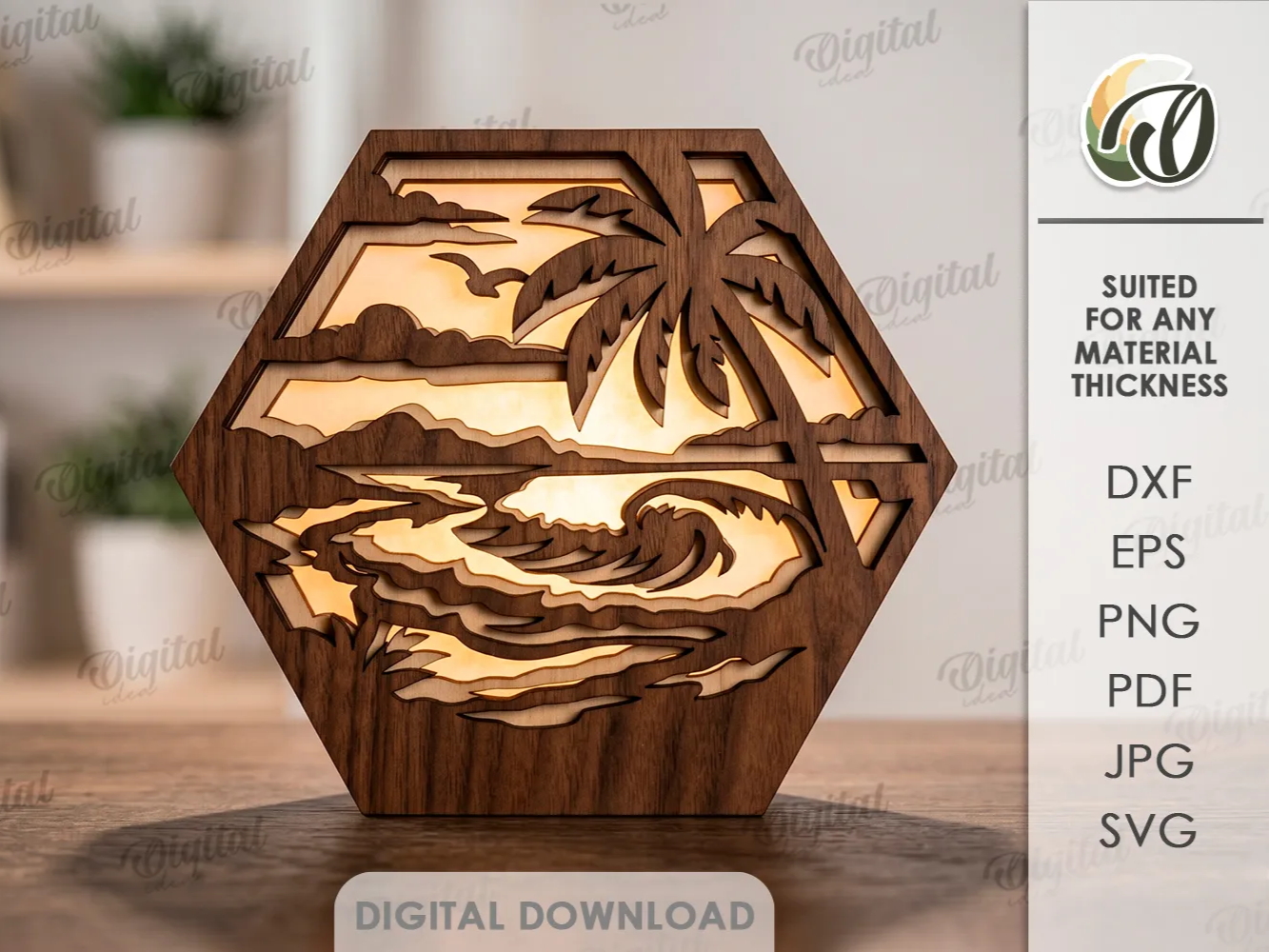
This tropical scene layers cut wood panels into a glowing LED lightbox. It's a great example of how CO2 precision and repeatable cuts turn flat stock into three-dimensional decor.
Get this design free →Safari animals learning puzzle

This Montessori-inspired safari puzzle cuts eight animal pieces plus a name-matching board. Tight interlocking parts like these show why kerf-accurate cutting matters for functional toys.
Get this design free →Stitch wooden keychain

This little Stitch keychain combines a cut outline with engraved detail in one job. Small runs like this are where a laser cutter shines for gifts and low-cost maker products.
Get this design free →Sleeping fox wooden bookmark

This sleeping-fox bookmark is cut from thin wood with delicate negative-space detail. It proves even an entry diode can produce sellable, gift-ready pieces from a single sheet.
Get this design free →Frequently asked questions about laser cutters
What is the best laser cutter for beginners?
The Glowforge Aura and xTool S1 are the easiest to start with. The Aura is simplest for thin, light material; the S1 adds far more cutting power in an equally safe enclosed body.
What is the best laser cutter for cutting metal?
Only a fiber laser cuts bare metal. The xTool F1 Ultra is our pick because it cuts and marks thin metal and also handles wood and acrylic with its diode laser. For a metal-focused shortlist, see our best fiber laser cutter guide.
How thick can a laser cutter cut?
A 55W CO2 machine like the xTool P2S cuts about 20 mm acrylic and 18 mm wood. Diode cutters handle thinner stock; desktop fiber lasers cut roughly 1–3 mm metal.
Do I need a CO2 laser to cut acrylic?
For thick or clear acrylic, yes — CO2 cuts it cleanly. Diode lasers only cut thin, dark/opaque acrylic because clear acrylic passes the diode beam through. If acrylic and thick wood are your focus, compare options in our best CO2 laser cutter guide.
Is air assist necessary for cutting?
Effectively yes. Air assist blows away smoke and molten material, giving cleaner edges and deeper, full-through cuts. Most cutting-focused machines include it.
Ready to start cutting?
Turn any idea into a ready-to-cut design — or generate your own artwork in seconds.