











































報告
![[Laser cut and engrave] A mother's love is the heart of the Giving Tree wooden decor](data:image/png;base64,iVBORw0KGgoAAAANSUhEUgAAAAoAAAAKCAYAAACNMs+9AAAAAXNSR0IArs4c6QAAABdJREFUKFNjZCASMBKpjmFUId6QIjp4AAppAAuXjCs4AAAAAElFTkSuQmCC)
![[Laser cut and engrave] A mother's love is the heart of the Giving Tree wooden decor](https://storage-us.atomm.com/resource/xtool/community/attachment/xtool-community/2364155f-367f-4da8-8d7a-10bae3fad1d6.jpeg?x-oss-process=image/resize,w_200,h_150,limit_0/interlace,1/format,webp/auto-orient,1)
![[Laser cut and engrave] A mother's love is the heart of the Giving Tree wooden decor](https://storage-us.atomm.com/resource/xtool/community/attachment/xtool-community/bac24a84-4898-4578-91c1-06ff8c31af7f.jpeg?x-oss-process=image/resize,w_200,h_150,limit_0/interlace,1/format,webp/auto-orient,1)
![[Laser cut and engrave] A mother's love is the heart of the Giving Tree wooden decor](https://storage-us.atomm.com/resource/xtool/community/attachment/xtool-community/252598eb-5440-465b-91f1-f0c0814342dc.jpeg?x-oss-process=image/resize,w_200,h_150,limit_0/interlace,1/format,webp/auto-orient,1)
![[Laser cut and engrave] A mother's love is the heart of the Giving Tree wooden decor](https://storage-us.atomm.com/resource/xtool/community/attachment/xtool-community/606ac697-8916-4c36-96d0-ea8e5bca1268.jpeg?x-oss-process=image/resize,w_200,h_150,limit_0/interlace,1/format,webp/auto-orient,1)
愛が育つ場所
 指示
指示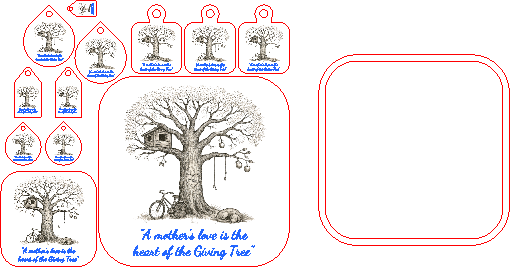
WhereLoveGrows
.xcs
アプリケーションシナリオ
レーザー加工 (60min)
機械とモジュール

xTool P2S
55W互換性のある · 12
使用される材料

3mmバーチ合板
153
1458
指示
1
ステップ1: 「マテリアル」と「実行ファイル」を選択してください

プレビュー

プレビュー
始めるには、デザインを含むCreative Spaceファイルが必要です。ファイルをCreative Spaceに読み込み、以下の手順に従ってください:
1. 素材を選ぶ
• お好みの素材を選択してください。このプロジェクトは3mm合板で設計されています。
2. xToolレーザーマシンをセットアップ
する• 合板シートをxToolレーザーマシンに入れます。
• レーザーフォーカスを、3mm合板の機械設定に合わせて設定します。
・ファイルの仕様に従ってカットおよび彫刻領域を設定すること。
3. パーツをカットして彫刻
する• すべてのパーツをカットする。
2
ステップ2: 選択肢、選択肢、選択肢

プレビュー

プレビュー
このファイルにはさまざまな切り抜きがあります。 コースター、キーチェーン、特別なプレート用の切り抜きがあります。
装飾- 的な縁取り(黒いウォールナットなどお好みのもの)を加え 、
- キーチェーンの金具でキーチェーンを作り、
- コースターを一つか二つ仕上げるコルクの層を加えましょう。
コメント
リミックス
このプロジェクトで使用される xTool の材料


関連コレクション


関連タグ
ライセンス

この作品には人工知能によって生成されたコンテンツが含まれています。