
Report
![[Laser cut and engrave] Laser Engraved Crystal Cube with 3D Dragon Design](https://storage-us.atomm.com/resource/xtool/community/attachment/xtool-community/866b396b-cc21-4966-9531-ac1391ec8ac9.jpg?x-oss-process=image/resize,w_1200,h_900,limit_0/interlace,1/format,webp/auto-orient,1)
3D Dragon - Inner Engrave - 64mm K9 Crystal Cube
 Instruction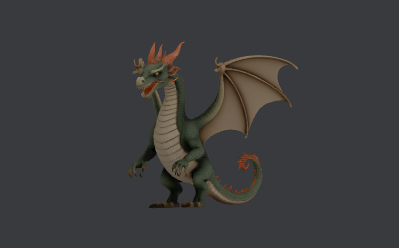
dragon crystal-K9-64mm
.xcs
Application scenario
Laser processing (70min)
Machine & module

xTool F2 Ultra UV
5WMaterial used

K9 Inner Carved Glass

100
1695
Information
3D K9 crystal inner engrave with the F2 Ultra UV laser of an aiMake generated dragon model
Instruction
1
Step1: Prepare the project and material

Preview

Preview
- Select Inner engrave process mode
- Install Inner Engraving lens
- Select material: K9 Inner Carved Glass
- Install Riser base
- Center K9 crystal glass block on riser (64x64x64mm)
- Click on Inner Engraving Settings
- Follow onscreen instructions to set material dimensions and position
- Import the resulting canvas
2
Step2: Position model, configure object settings, run the project

Preview

Preview

Preview
6 More images
- Click on the model, then in the object toolbar, click on the Autofit icon
- Alternately use the scale, rotation, place at center and other controls to position model within the block outline on canvas
- Set the object parameters

- Process the project… it takes about 70 minutes for this size
- For best viewing results, place on LED lighted base
3
Step3: A few videos of the process and finished crystal block
- A quick narrated look at the finished project
- A timelapse video of the engrave
Comments
Remixes
License

This work contains AI-generated content.