
Report
![[Laser cut and engrave] Butterfly´s](https://image-res.atomm.com/resource/xtool/community/attachment/xtool-community/d6fd2eff-8cd1-4af9-adfc-2565fa311423?x-oss-process=image/resize,m_fill,w_1280,h_960,limit_0/interlace,1/format,webp/auto-orient,1)
![[Laser cut and engrave] Butterfly´s](data:image/png;base64,iVBORw0KGgoAAAANSUhEUgAAAAoAAAAKCAYAAACNMs+9AAAAAXNSR0IArs4c6QAAABdJREFUKFNjZCASMBKpjmFUId6QIjp4AAppAAuXjCs4AAAAAElFTkSuQmCC)
![[Laser cut and engrave] Butterfly´s](https://image-res.atomm.com/resource/xtool/community/attachment/xtool-community/d6fd2eff-8cd1-4af9-adfc-2565fa311423?x-oss-process=image/resize,m_fill,w_160,h_120,limit_0/interlace,1/format,webp/auto-orient,1)
![[Laser cut and engrave] Butterfly´s](https://image-res.atomm.com/resource/xtool/community/attachment/xtool-community/f8d5b33b-3822-4426-8ad0-a50ca13f2959/20240609_180834.jpg?x-oss-process=image/resize,m_fill,w_160,h_120,limit_0/interlace,1/format,webp/auto-orient,1)
![[Laser cut and engrave] Butterfly´s](https://image-res.atomm.com/resource/xtool/community/attachment/xtool-community/6b66d960-7878-4b00-b87d-378a5bfabd8c/20240609_180825.jpg?x-oss-process=image/resize,m_fill,w_160,h_120,limit_0/interlace,1/format,webp/auto-orient,1)
![[Laser cut and engrave] Butterfly´s](https://image-res.atomm.com/resource/xtool/community/attachment/xtool-community/5bb1702c-e100-4e8e-b6b2-6f3485560665/20240609_182408(0).jpg?x-oss-process=image/resize,m_fill,w_160,h_120,limit_0/interlace,1/format,webp/auto-orient,1)
![[Laser cut and engrave] Butterfly´s](https://image-res.atomm.com/resource/xtool/community/attachment/xtool-community/7b0d5fc3-78bb-4b67-bb2c-beec132cf154/20240609_182359.jpg?x-oss-process=image/resize,m_fill,w_160,h_120,limit_0/interlace,1/format,webp/auto-orient,1)
![[Laser cut and engrave] Butterfly´s](https://image-res.atomm.com/resource/xtool/community/attachment/xtool-community/f6b21686-35cf-4f25-820f-1e48d09c0c3d/20240609_182404.jpg?x-oss-process=image/resize,m_fill,w_160,h_120,limit_0/interlace,1/format,webp/auto-orient,1)
![[Laser cut and engrave] Butterfly´s](https://image-res.atomm.com/resource/xtool/community/attachment/xtool-community/d49c9b7a-e422-481f-b9fd-5dc3eb452a71/20240609_182406.jpg?x-oss-process=image/resize,m_fill,w_160,h_120,limit_0/interlace,1/format,webp/auto-orient,1)
![[Laser cut and engrave] Butterfly´s](https://image-res.atomm.com/resource/xtool/community/attachment/xtool-community/4e77cd81-806f-456c-8c94-c5d8b90d7537/20240609_182423.jpg?x-oss-process=image/resize,m_fill,w_160,h_120,limit_0/interlace,1/format,webp/auto-orient,1)
![[Laser cut and engrave] Butterfly´s](https://image-res.atomm.com/resource/xtool/community/attachment/xtool-community/1765c0ad-dc3f-4de0-9b65-b8bd354182a8/20240609_182400.jpg?x-oss-process=image/resize,m_fill,w_160,h_120,limit_0/interlace,1/format,webp/auto-orient,1)
![[Laser cut and engrave] Butterfly´s](https://image-res.atomm.com/resource/xtool/community/attachment/xtool-community/d161e56d-a151-4880-ba47-4bbd84c3080e/20240609_182407.jpg?x-oss-process=image/resize,m_fill,w_160,h_120,limit_0/interlace,1/format,webp/auto-orient,1)
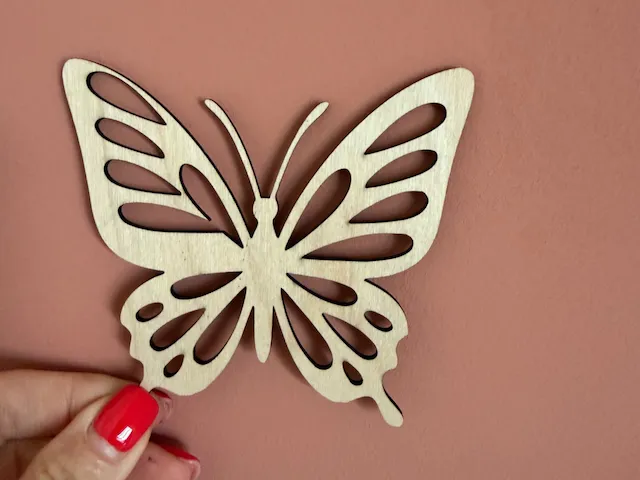
Butterfly´s
 Instruction
butterfly
.xcs
Application scenario
Laser (60min)
Machine & module

xTool M1
10WCompatible xTool Machine
P3
F2
F2 Ultra UV
F2 Ultra(Single)
F2 Ultra
F1 Ultra
F1
F1 Lite
S1
P2S
P2
M1 Ultra
D1 Pro 2.0
D1 Pro
D1
Laserbox
M2
Material used

1/8"(3mm) Basswood Plywood

744
4230
Information
the file has 2 sizes of butterflies each for 3mm wood
Instruction
1
Step1: outline

Preview

Preview

Preview

Preview
- first we create the large part of the wing
to do this, create a wavy line with the path tool
the length doesn't matter because we can scale it - then create a curved line from the top point downwards to make the head with a corner point
- continue with the body downwards to make the smaller part of the wing
a template can help well here but only as a guideline because otherwise it is tracing. ok for your own use but for no other use
2
Step2: inner details

Preview

Preview

Preview
create an oval circle and copy it several times and always change the shape
then create the same with circles in different sizes
then make a rectangle which is behind the head with one half from the top and the other half upside down see photo
Comments
Remixes



.png?x-oss-process=image/resize,m_fill,w_80,h_80,limit_0/interlace,1/format,webp/auto-orient,1)
You may also like

Beautiful wooden butterfly decorations with intricate cutouts

77
487

Butterfly magnet

22
24

Butterfly Set

6
27

Papillon Floral Butterfly Wall Art

23
269

Monarch Butterfly Wall Decor

62
311

Wooden Butterfly Ornament
16
17

Butterfly and Floral Wall Art Silhouette

3
21

butterfly

15
178

Magnet Small Butterfly

19
21

Remix for 3mm d1 pro 5w laser
0
1

$2.49
$2.49
$4.98
Credits249
3D Butterflies - Set of 9

49


Butterflies decoration
142
1.1k

Butterfly magnet
22
21

$6.00
$6.00
Credits600
Nine butterfly vector patterns

2
Papillon ajouré en bois pour décoration murale
21
27

Butterfly Moments

43
145

Butterfly magnet
19
20

Multi-layered butterfly wall decoration with floral motifs

14
73