









































![[Laser cut and engrave] Laser Cut Coffee Capsule Holder with Take Your Coffee Sign](https://storage-us.atomm.com/resource/xtool/community/attachment/xtool-community/63dba1b6-faa6-4a80-a80b-f1371e7a8e92.png?x-oss-process=image/resize,w_1200,h_900,limit_0/interlace,1/format,webp/auto-orient,1)
![[Laser cut and engrave] Laser Cut Coffee Capsule Holder with Take Your Coffee Sign](data:image/png;base64,iVBORw0KGgoAAAANSUhEUgAAAAoAAAAKCAYAAACNMs+9AAAAAXNSR0IArs4c6QAAABdJREFUKFNjZCASMBKpjmFUId6QIjp4AAppAAuXjCs4AAAAAElFTkSuQmCC)
![[Laser cut and engrave] Laser Cut Coffee Capsule Holder with Take Your Coffee Sign](https://storage-us.atomm.com/resource/xtool/community/attachment/xtool-community/63dba1b6-faa6-4a80-a80b-f1371e7a8e92.png?x-oss-process=image/resize,w_200,h_150,limit_0/interlace,1/format,webp/auto-orient,1)
![[Laser cut and engrave] Laser Cut Coffee Capsule Holder with Take Your Coffee Sign](https://storage-us.atomm.com/resource/xtool/community/attachment/xtool-community/d137a163-33b5-4f13-a072-ee7f6c9c532f.jpeg?x-oss-process=image/resize,w_200,h_150,limit_0/interlace,1/format,webp/auto-orient,1)
Take Your Coffee - Coffee Capsule Holder
 Coffee Décor Contest
  Instruction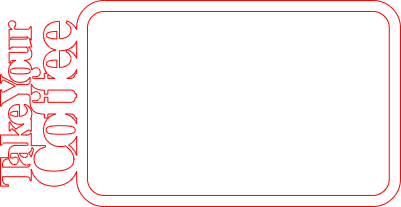


Information
This rectangular coffee capsule holder is designed to store up to three different coffee varieties in a clean and organized way. Capsules are inserted from the top and slide down into place, staying securely stored until removed. The front features the engraved text “Take Your Coffee”, giving the holder a modern and decorative look. It can be wall-mounted or freestanding, making it a versatile addition to any kitchen or coffee corner.
Instruction
Step1: Laser Cut All Parts


Laser cut all parts: the frame, back panel, middle layer, front panel, and stand feet.
Switch between the different worksheets as shown in the images to cut all elements correctly.
Step2: Optional: Color the Layers

Some layers can be made from colored MDF.
If only natural MDF is available, the parts can optionally be painted before assembly.
Step3: Assemble the Middle part on the Background

Glue the middle layer onto the back panel.
Step4: Attach the Frame & the Front on the Middle Layer


Then glue the front frame with the “Take Your Coffee” text onto the middle layer.
Insert and glue the front panel into the frame, flush with the middle layer.
Step5: Choose Wall Mount or Stand Option

On the back, two upper holes are provided for wall mounting using nails or screws.
Alternatively, glue the included stand feet into the two lower holes to use the holder as a freestanding unit.
Step6: Fill with Coffee Capsules

Insert the coffee capsules through the top opening. They slide down and stay in place until pulled out from the top.




