









































Report
![[Laser cut and engrave] Laser Engraved Metal Test Plate with Power and Speed Settings](https://storage-us.atomm.com/resource/xtool/community/attachment/xtool-community/d1893df0-b8fc-4bb3-a3b0-1c6eb029ea78.jpeg?x-oss-process=image/resize,w_1200,h_900,limit_0/interlace,1/format,webp/auto-orient,1)
Quick, Pale & Shallow Engraving Grid Test For Painted or Stained Wood - Plywood/Wood
 Instruction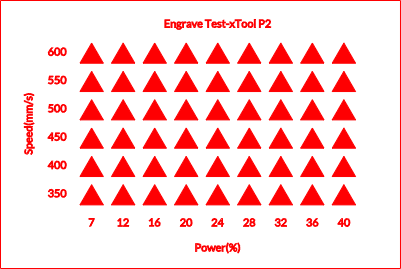
Water Based Exterior Paint Grid Test
.xcs
Application scenario
Laser processing (3.5min)
Machine & module

xTool P2
55WCompatibles · 12
Material used

1/8"(3mm) Basswood Plywood

1/4"(6mm) Basswood Plywood

1/4"(6mm) Birch Plywood

1/8"(3mm) Birch Plywood
1
7
Information
Test the colour tones of engraving on painted wood and test the edges of the triangles to see the depth of the engrave for each setting
Instruction
1
Step1
Add your wood to the machine and use the built-in camera to show the software where the wood is. If using other machines, use the pinpoint positioning system
2
Step2
Move the design over your material
3
Step3
Check your exhaust is vented outside
4
Step4
Hit start on the software and on the machine when ready. Do not leave the machine unattended whilst in use
5
Step5
After processing has completed, remove the wood and inspect it. If needed, wipe gently with alcohol to remove soot
6
Step6
If you do not achieve the desired colour or depth, adjust the settings and run the grid test again until you reach the desired engrave
Comments


