









































Report
![[Laser cut and engrave] Laser Engraved Paint Test Chart on Black Wood Panel](https://storage-us.atomm.com/resource/xtool/community/attachment/xtool-community/e67d1304-6f5d-4331-ae90-c991776ccf37.jpeg?x-oss-process=image/resize,w_1200,h_900,limit_0/interlace,1/format,webp/auto-orient,1)
![[Laser cut and engrave] Laser Engraved Paint Test Chart on Black Wood Panel](data:image/png;base64,iVBORw0KGgoAAAANSUhEUgAAAAoAAAAKCAYAAACNMs+9AAAAAXNSR0IArs4c6QAAABdJREFUKFNjZCASMBKpjmFUId6QIjp4AAppAAuXjCs4AAAAAElFTkSuQmCC)
![[Laser cut and engrave] Laser Engraved Paint Test Chart on Black Wood Panel](https://storage-us.atomm.com/resource/xtool/community/attachment/xtool-community/e67d1304-6f5d-4331-ae90-c991776ccf37.jpeg?x-oss-process=image/resize,w_200,h_150,limit_0/interlace,1/format,webp/auto-orient,1)
![[Laser cut and engrave] Laser Engraved Paint Test Chart on Black Wood Panel](https://storage-us.atomm.com/resource/xtool/community/attachment/xtool-community/12ba4ece-ec14-4e7d-8a43-d6dc1ee8b11a.jpeg?x-oss-process=image/resize,w_200,h_150,limit_0/interlace,1/format,webp/auto-orient,1)
![[Laser cut and engrave] Laser Engraved Paint Test Chart on Black Wood Panel](https://storage-us.atomm.com/resource/xtool/community/attachment/xtool-community/c1d749e9-0eb9-4f99-bf14-231cc4782272.jpeg?x-oss-process=image/resize,w_200,h_150,limit_0/interlace,1/format,webp/auto-orient,1)
![[Laser cut and engrave] Laser Engraved Paint Test Chart on Black Wood Panel](https://storage-us.atomm.com/resource/xtool/community/attachment/xtool-community/3e0c7daf-870e-491f-bcd5-cc9447fb1d17.jpeg?x-oss-process=image/resize,w_200,h_150,limit_0/interlace,1/format,webp/auto-orient,1)
![[Laser cut and engrave] Laser Engraved Paint Test Chart on Black Wood Panel](https://storage-us.atomm.com/resource/xtool/community/attachment/xtool-community/4e00b692-15fa-4b31-acd6-068280084793.jpeg?x-oss-process=image/resize,w_200,h_150,limit_0/interlace,1/format,webp/auto-orient,1)
Painted Wood Pale Engrave Grid Test - Also Suitable For Wood Stain - Plywood/Wood Test
 Instruction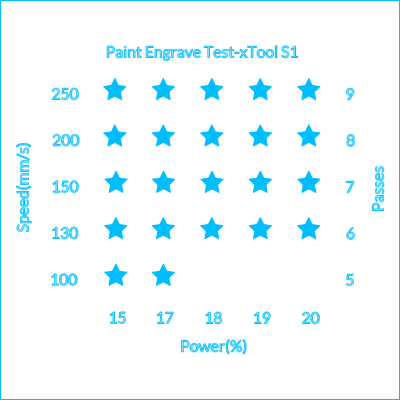
Paint Engrave Test S1
.xcs
Application scenario
Laser processing (23min)
Machine & module

xTool S1
10W, 20W, 40WCompatibles · 12
Accessories

xTool S1 Honeycomb Panel
Material used

1/8"(3mm) Basswood Plywood
1
7
Information
Test the best settings for painted or stained wood. This is a shallow pale engrave grid test, designed for speed and pale colours.
Instruction
1
Step1
Add your painted or stained wood to the laser bed. Use the built in positioning system or camera to tell the software where the material is on the laser bed
2
Step2
Arrange the design on your material
3
Step3
Once ready, hit start in the software, then again on the machine
4
Step4
Wait with the machine whilst it processes the grid test. Once finished, remove from the machine and wipe with alcohol to remove any soot
5
Step5
Inspect the results, and if needed, tweak the settings and run the test again until you get the tone and colour that you desire
Comments


