









































Report
![[Laser cut and engrave] Laser Cut Burn Free Test Calibration Board with Speed and Power Settings](https://storage-us.atomm.com/resource/xtool/community/attachment/xtool-community/6cfed0cf-a228-4af4-aab1-1e26d659e96d.jpeg?x-oss-process=image/resize,w_1200,h_900,limit_0/interlace,1/format,webp/auto-orient,1)
![[Laser cut and engrave] Laser Cut Burn Free Test Calibration Board with Speed and Power Settings](data:image/png;base64,iVBORw0KGgoAAAANSUhEUgAAAAoAAAAKCAYAAACNMs+9AAAAAXNSR0IArs4c6QAAABdJREFUKFNjZCASMBKpjmFUId6QIjp4AAppAAuXjCs4AAAAAElFTkSuQmCC)
![[Laser cut and engrave] Laser Cut Burn Free Test Calibration Board with Speed and Power Settings](https://storage-us.atomm.com/resource/xtool/community/attachment/xtool-community/6cfed0cf-a228-4af4-aab1-1e26d659e96d.jpeg?x-oss-process=image/resize,w_200,h_150,limit_0/interlace,1/format,webp/auto-orient,1)
![[Laser cut and engrave] Laser Cut Burn Free Test Calibration Board with Speed and Power Settings](https://storage-us.atomm.com/resource/xtool/community/attachment/xtool-community/b0e513e2-88fc-432f-9285-fba0faefc403.jpeg?x-oss-process=image/resize,w_200,h_150,limit_0/interlace,1/format,webp/auto-orient,1)
![[Laser cut and engrave] Laser Cut Burn Free Test Calibration Board with Speed and Power Settings](https://storage-us.atomm.com/resource/xtool/community/attachment/xtool-community/b1130c40-0fdb-43f2-98e4-deaecff1aef9.jpeg?x-oss-process=image/resize,w_200,h_150,limit_0/interlace,1/format,webp/auto-orient,1)
![[Laser cut and engrave] Laser Cut Burn Free Test Calibration Board with Speed and Power Settings](https://storage-us.atomm.com/resource/xtool/community/attachment/xtool-community/9443b308-38f7-4b39-b416-b1b6135e9ae9.jpeg?x-oss-process=image/resize,w_200,h_150,limit_0/interlace,1/format,webp/auto-orient,1)
![[Laser cut and engrave] Laser Cut Burn Free Test Calibration Board with Speed and Power Settings](https://storage-us.atomm.com/resource/xtool/community/attachment/xtool-community/085d3745-a8ea-48a2-941c-ab495b2775e8.jpeg?x-oss-process=image/resize,w_200,h_150,limit_0/interlace,1/format,webp/auto-orient,1)
![[Laser cut and engrave] Laser Cut Burn Free Test Calibration Board with Speed and Power Settings](https://storage-us.atomm.com/resource/xtool/community/attachment/xtool-community/04ce7227-afd4-4a41-b290-a8de70f67d51.jpeg?x-oss-process=image/resize,w_200,h_150,limit_0/interlace,1/format,webp/auto-orient,1)
Burn Free Cut Test Grid - CO2 or Diode - Material Grid Test For Wood/Plywood
 Instruction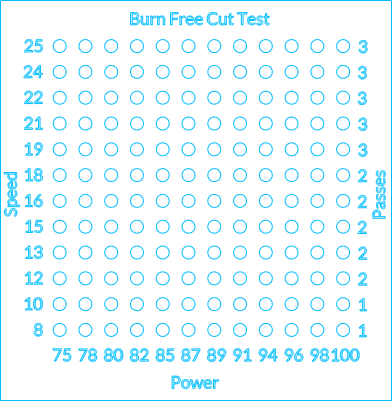
Burn Free Cut Grid Test
.xcs
Application scenario
Laser processing (12min)
Machine & module

xTool S1
10W, 20W, 40WCompatibles · 8
Material used

1/8"(3mm) Ash Plywood

1/8"(3mm) Aspen Plywood

1/8"(3mm) Bamboo Plywood

1/8"(3mm) Basswood Plywood

1/8"(3mm) Betula Alnoides Plywood

1/8"(3mm) Birch Plywood

1/8"(3mm) Ebony Plywood

1/8"(3mm) Faux Ebony MDF Board

1/8"(3mm) Faux Maple MDF Board

1/8"(3mm) Faux Marble MDF Board

1/8"(3mm) Faux Rosewood MDF Board

1/8"(3mm) Faux Walnut MDF Board

1/8"(3mm) Grey MDF Board

1/8"(3mm) Hickory Plywood

1/8"(3mm) Maple Plywood

1/8"(3mm) MDF Board

1/8"(3mm) Okoume Plywood

1/8"(3mm) Pine Ponderosa Plywood

1/8"(3mm) Red Oak Plywood

1/8"(3mm) Red Rose Plywood

1/8"(3mm) Sapele Plywood

1/8"(3mm) Technological Plywood

1/8"(3mm) Terminalia Plywood

1/8"(3mm) Walnut Plywood

1/8"(3mm) White Ash Plywood

1/8"(3mm) White Oak Plywood

1/8"(3mm) Zebrawood Plywood

Poplar Plywood
1
17
Information
Test burn free cuts with this free grid test that allows you to find the sweet spot for your machine. Each laser is different, so get to know your machine and the limitations for the material you're working with.
Instruction
1
Step1
Sand your wood if needed with 180 + 220 grit sand paper
2
Step2
Add your material to the laser bed and use the built-in camera or positioning system to show the software where your material is on the laser bed
3
Step3
Centre the design on your material
4
Step4
Check your exhaust is vented outside
5
Step5
Hit start on the software, then okay the job by pressing the button on the machine
6
Step6
Stay with the machine as it works, as some materials can be flammable with slow speeds and high power
7
Step7
Once finished, remove your grid from the machine. Do not sand it, as the point of the test is to try to get clean cuts. If you sand it, you won't know in future which ones were clean or dirty.
8
Step8
Finished - check the results and tweak the settings if needed
Comments





