









































Report
![[Laser cut and engrave] Laser Cut Wooden Question Mark Puzzle Box](https://storage-us.atomm.com/resource/xtool/community/attachment/xtool-community/5e1b2245-f364-4157-94e5-c62287f87d98.jpeg?x-oss-process=image/resize,w_1200,h_900,limit_0/interlace,1/format,webp/auto-orient,1)
Super Mario Bros Question Block Keychain
 Instruction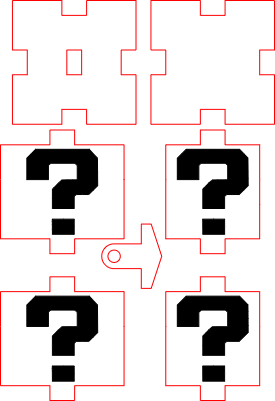
Super Mario Bros Question Block Keychain
.xcs
Application scenario
Laser processing
Machine & module

xTool S1
40WCompatibles · 9
Material used

1/8"(3mm) MDF Board
5
23
Information
This Super Mario–inspired question block is designed as a small keychain pendant and makes a fun accessory for keys, backpacks, or as a gift for gaming fans. The iconic cube design is laser cut and assembled into a compact, lightweight pendant that is easy to personalize with different materials or colors.
Instruction
1
Step1: Laser Cut All Parts

Preview
Laser cut all parts of the question block from your chosen material.
2
Step2: Insert the Keychain Attachment

Preview
Insert the keychain attachment through the top lid and glue it securely in place.
3
Step3: Assemble the Side Walls

Preview

Preview

Preview

Preview
Glue the four side walls together one after another to form the cube.
4
Step4: Attach the Lid

Preview
Glue the top lid onto the assembled walls and let it dry completely.
5
Step5: Attach to Your Keyring
Fix the finished question block to your keyring or key board.
Comments




