









































Report
![[Laser cut and engrave] Laser Cut Wooden UNO Card Game Storage Box](https://storage-us.atomm.com/resource/xtool/community/attachment/xtool-community/d1868b2a-bbe8-4967-8366-df80201fded9.jpeg?x-oss-process=image/resize,w_1200,h_900,limit_0/interlace,1/format,webp/auto-orient,1)
![[Laser cut and engrave] Laser Cut Wooden UNO Card Game Storage Box](data:image/png;base64,iVBORw0KGgoAAAANSUhEUgAAAAoAAAAKCAYAAACNMs+9AAAAAXNSR0IArs4c6QAAABdJREFUKFNjZCASMBKpjmFUId6QIjp4AAppAAuXjCs4AAAAAElFTkSuQmCC)
![[Laser cut and engrave] Laser Cut Wooden UNO Card Game Storage Box](https://storage-us.atomm.com/resource/xtool/community/attachment/xtool-community/d1868b2a-bbe8-4967-8366-df80201fded9.jpeg?x-oss-process=image/resize,w_200,h_150,limit_0/interlace,1/format,webp/auto-orient,1)
![[Laser cut and engrave] Laser Cut Wooden UNO Card Game Storage Box](https://storage-us.atomm.com/resource/xtool/community/attachment/xtool-community/a8f16938-50b2-4890-9d75-347ca1877374.jpeg?x-oss-process=image/resize,w_200,h_150,limit_0/interlace,1/format,webp/auto-orient,1)
UNO Card Storage Box
 Instruction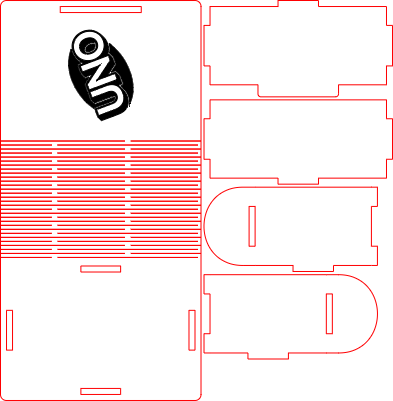
UNO Card Box
.xcs
Application scenario
Laser processing
Machine & module

xTool S1
40WCompatibles · 13
Material used

1/8"(3mm) Bamboo
12
68
Information
This laser-cut UNO card storage box is a practical and compact solution for organizing and protecting UNO cards. Designed for easy assembly, the box securely holds the full deck and can be neatly folded closed after inserting the cards. Ideal for home use, travel, or as a handmade gift, it combines functionality with a clean, minimal design.
Instruction
1
Step1: Laser Cut All Parts

Preview
Laser cut all parts of the UNO card box from your chosen material.
2
Step2: Assemble the First Side Wall

Preview
Insert the first side wall into the back panel as shown in the images and glue it in place.
3
Step3: Attach the Second Side Wall

Preview
Insert the second side wall and glue it while assembling.
4
Step4: Mount the Assembly onto the Base

Preview
Insert the assembled walls into the bottom plate as shown and glue them in place.
5
Step5: Add the Final Side Wall

Preview
Attach the last side wall and secure it with glue.
6
Step6: Insert the Cards

Preview
Place the UNO cards inside the box.
7
Step7: Fold Closed and Finished

Preview
Fold the box closed — your UNO card storage box is ready to use.
Comments


