









































![[Laser cut and engrave] Laser Engraved Heart-Shaped Romantic Couple Acrylic Art](https://storage-us.atomm.com/resource/xtool/community/attachment/xtool-community/de741e4d-8c14-474a-ad96-048a934b26ba.png?x-oss-process=image/resize,w_1200,h_900,limit_0/interlace,1/format,webp/auto-orient,1)
Eternal Love – Laser Engraved Heart Acrylic Artwork
 Instruction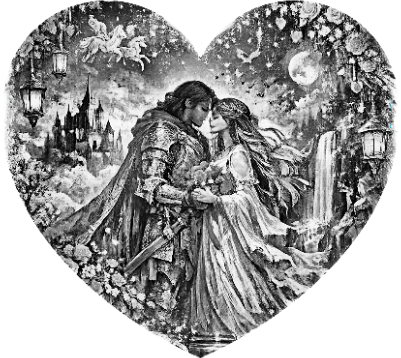


Information
      This heart-shaped acrylic artwork features a finely detailed laser engraving of a romantic couple, symbolizing love, connection, and timeless affection. The design is carefully optimized for laser engraving, achieving high contrast and precise line work that highlights depth and emotion within the motif.

Crafted from clear acrylic, the engraving interacts beautifully with light, creating elegant reflections and a refined, modern appearance. The heart shape makes this piece ideal as a decorative object or meaningful gift for special occasions such as anniversaries, weddings, or Valentine’s Day.

The artwork was created using AI-assisted image generation and refined specifically for laser processing, ensuring clean engraving results and professional visual quality. It serves as both an artistic piece and an example of precision laser engraving on acrylic materials.
Instruction
Step1
Material: Clear cast acrylic, 6 mm thickness
Protective film: Remove completely before engraving
Surface cleaning: Wipe with a lint-free cloth
Fixation: Place the acrylic flat and secure it to prevent movement
Air Assist: Enabled at low intensity
2. File Setup (xTool Creative Space)
File format: High-contrast PNG
Engraving mode: Bitmap / Grayscale
Image adjustments:
Slight contrast increase
Slight brightness reduction
No blur or smoothing
Scaling: Proportional scaling only (no interpolation)
Positioning: Minimum 5 mm safety margin from edges
3. Focus & Alignment
Focus: Standard focus precisely on the acrylic surface
Frame preview: Run frame function to verify placement
Origin: Set relative to the material (commonly bottom-left)
4. Recommended Engraving Settings (6 mm Acrylic)
Laser Power: 32–38 %
Speed: 190–220 mm/s
Passes: 1
Line Density: 100–120 lines/cm
Direction: Bidirectional
Z-Offset: 0 mm
5. Engraving Process
Start the engraving and observe the first 10–15 seconds
Ensure even frosting and consistent line depth
Avoid excessive heat buildup or flame formation
Pause and fine-tune settings if necessary
6. Post-Processing
Clean the surface with an acrylic-safe or glass cleaner
Polish lightly using a microfiber cloth
Optional: Lightly polish or flame-polish edges (off-machine)
Optional: Add LED edge lighting for enhanced visual depth
7. Quality Control
Uniform matte frosting across engraved areas
Clean, sharp line definition
No scorch marks or heat distortion
High visibility of the design from multiple viewing angles


