









































Report
![[Laser cut and engrave] Laser Engraved Wooden Power and Brightness Test Chart with Stars](https://storage-us.atomm.com/resource/xtool/community/attachment/xtool-community/f7179d94-00da-4e1e-beaa-9c6ebce48e45.jpeg?x-oss-process=image/resize,w_1200,h_900,limit_0/interlace,1/format,webp/auto-orient,1)
![[Laser cut and engrave] Laser Engraved Wooden Power and Brightness Test Chart with Stars](data:image/png;base64,iVBORw0KGgoAAAANSUhEUgAAAAoAAAAKCAYAAACNMs+9AAAAAXNSR0IArs4c6QAAABdJREFUKFNjZCASMBKpjmFUId6QIjp4AAppAAuXjCs4AAAAAElFTkSuQmCC)
![[Laser cut and engrave] Laser Engraved Wooden Power and Brightness Test Chart with Stars](https://storage-us.atomm.com/resource/xtool/community/attachment/xtool-community/f7179d94-00da-4e1e-beaa-9c6ebce48e45.jpeg?x-oss-process=image/resize,w_200,h_150,limit_0/interlace,1/format,webp/auto-orient,1)
![[Laser cut and engrave] Laser Engraved Wooden Power and Brightness Test Chart with Stars](https://storage-us.atomm.com/resource/xtool/community/attachment/xtool-community/ac17141e-e40a-443a-a880-fe0d4e3969da.jpeg?x-oss-process=image/resize,w_200,h_150,limit_0/interlace,1/format,webp/auto-orient,1)
![[Laser cut and engrave] Laser Engraved Wooden Power and Brightness Test Chart with Stars](https://storage-us.atomm.com/resource/xtool/community/attachment/xtool-community/4eed05fd-6112-4169-9534-8d531b204cb6.jpeg?x-oss-process=image/resize,w_200,h_150,limit_0/interlace,1/format,webp/auto-orient,1)
![[Laser cut and engrave] Laser Engraved Wooden Power and Brightness Test Chart with Stars](https://storage-us.atomm.com/resource/xtool/community/attachment/xtool-community/d179d287-ca4a-4f09-8d96-767186388de1.jpeg?x-oss-process=image/resize,w_200,h_150,limit_0/interlace,1/format,webp/auto-orient,1)
![[Laser cut and engrave] Laser Engraved Wooden Power and Brightness Test Chart with Stars](https://storage-us.atomm.com/resource/xtool/community/attachment/xtool-community/42268493-b63b-4aa1-96f0-e8e2da66e9fe.jpeg?x-oss-process=image/resize,w_200,h_150,limit_0/interlace,1/format,webp/auto-orient,1)
![[Laser cut and engrave] Laser Engraved Wooden Power and Brightness Test Chart with Stars](https://storage-us.atomm.com/resource/xtool/community/attachment/xtool-community/6fb38404-e346-4fd9-938b-173e1297ded4.jpeg?x-oss-process=image/resize,w_200,h_150,limit_0/interlace,1/format,webp/auto-orient,1)
Hardwood Engrave Grid Test - Shallow to Deep - Dark to Light - Plywood
 Instruction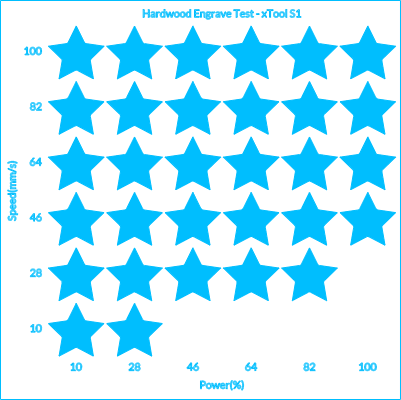
Hardwood Engraving Test Grid - xTool S1 - 4-6mm
.xcs
Application scenario
Laser processing (20min)
Machine & module

xTool S1
10W, 20W, 40WCompatibles · 11
Material used

1/4"(6mm) Cherry Plywood
1
37
Information
Test the perfect settings for hardwood engraves.
Instruction
1
Step1
Lightly sand your material using 120 + 180 grit paper, then remove all dust with a blower or a brush
2
Step2
Add your material to the laser bed
3
Step3
Add your material to XCS using either the material positioning map or a camera
4
Step4
Centre your design, then hit start in the software
5
Step5
Ensure your exhaust is vented outside
6
Step6
Hit the button on the laser to start the job
7
Step7
Once finished, lightly sand if needed with 220 grit, then 320 grit if needed or wanted
8
Step8
Done!
Comments


