
![[Laser cut and engrave] Laser Cut Wooden Gnome Valentine Decoration with Custom Names](https://image-res.atomm.com/resource/xtool/community/attachment/xtool-community/dd572d21-09f5-4217-83cb-25950f703108.png?x-oss-process=image/resize,w_1200,h_900,limit_0/interlace,1/format,webp/auto-orient,1)
![[Laser cut and engrave] Laser Cut Wooden Gnome Valentine Decoration with Custom Names](data:image/png;base64,iVBORw0KGgoAAAANSUhEUgAAAAoAAAAKCAYAAACNMs+9AAAAAXNSR0IArs4c6QAAABdJREFUKFNjZCASMBKpjmFUId6QIjp4AAppAAuXjCs4AAAAAElFTkSuQmCC)
![[Laser cut and engrave] Laser Cut Wooden Gnome Valentine Decoration with Custom Names](https://image-res.atomm.com/resource/xtool/community/attachment/xtool-community/dd572d21-09f5-4217-83cb-25950f703108.png?x-oss-process=image/resize,w_200,h_150,limit_0/interlace,1/format,webp/auto-orient,1)
![[Laser cut and engrave] Laser Cut Wooden Gnome Valentine Decoration with Custom Names](https://image-res.atomm.com/resource/xtool/community/attachment/xtool-community/56ba825b-5db2-4ffc-b316-33a001508c52.png?x-oss-process=image/resize,w_200,h_150,limit_0/interlace,1/format,webp/auto-orient,1)
![[Laser cut and engrave] Laser Cut Wooden Gnome Valentine Decoration with Custom Names](https://image-res.atomm.com/resource/xtool/community/attachment/xtool-community/723fa3ae-58c8-42c4-a03a-a077c78a8978.png?x-oss-process=image/resize,w_200,h_150,limit_0/interlace,1/format,webp/auto-orient,1)
![[Laser cut and engrave] Laser Cut Wooden Gnome Valentine Decoration with Custom Names](https://image-res.atomm.com/resource/xtool/community/attachment/xtool-community/1ae79fe7-baba-4096-9dbc-1ff6a3993f43.png?x-oss-process=image/resize,w_200,h_150,limit_0/interlace,1/format,webp/auto-orient,1)
Vassoio di Snack Personalizzato per Gnomi di San Valentino
 Istruzione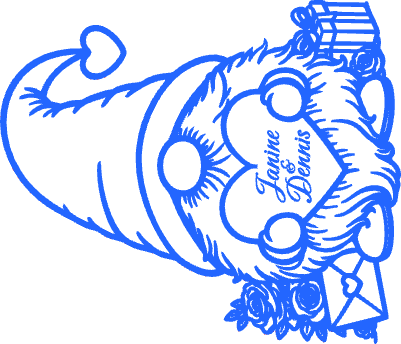


Informazione
      Si tratta di un tagliere inciso personalizzato per coppie. Può essere usato per servire dolcetti a San Valentino o come regalo meraviglioso per le nuove coppie che festeggiano un fidanzamento, una festa o una prima festa. Il disegno è inciso e tagliato in pino da 1/2 pollice a forma di gnomo personalizzato di 10 pollici per 11 1/2. Puoi ridimensionare il design per adattarlo a qualsiasi tagliere.

Se ti piace il progetto, mostragli un po' di affetto mettendo like e scaricandolo.
Istruzione
Passo1: Personalizza file

1. Modifica il testo per includere i nomi delle coppie e può aggiungere la data.
2. Metti la tavola di pino da 1/2 pollice in macchina.
3. Usa la misura automatica sul P2S per ottenere la distanza corretta.
4. Aggiungi un rettangolo della dimensione della lavagna, centra l'immagine nel rettangolo scegliendo allineare il centro.
5. Allineare i bordi con il lato della tavola.
Passo2: Incidere e tagliare la tavola

1. Inserisci le impostazioni dell'incisione. Ho usato 30 di potenza, 500 di velocità, 100 linee per cm, 1 passaggio. Taglia la potenza, 100 velocità, 3 passi 1.
2. Elaborare il consiglio.
3. Pulisci la tavola con un po' di sapone e acqua. Sigilla la tavola con un olio alimentare (minerale, cera d'api, ecc.).
4. Regala la tavola o condividi dolcetti con i tuoi cari!
Passo3: Generazione di immagini
L'idea di Gnome è nata da un'idea generata dall'IA che è stata inserita in Adobe Illustrator, dove ho semplificato e modificato l'immagine per creare la versione attuale.
Remix
Licenza

Progetto correlato


Potrebbe piacerti anche

Lettera e busta di San Valentino in legno tagliato al laser - Lettera di San Valentino con biglietto personalizzato (tutte a doppio verso)


Panda di legno tagliato al laser. Design libero. Sii mio Valentine. Ornamento di San Valentino. Buon San Valentino


Gnomo di San Valentino a strati


Taglio laser a forma di cuore | San Valentino Cuore grattacato


Decorazione di San Valentino in legno inciso a laser con cuori rossi


Decorazione per il matrimonio con statuette di coppia in legno tagliate al laser


Coppia di gnomi in legno tagliati al laser con decorazione con un cuore


Porta-Lindor Lindor al Cioccolato con Caramelle di San Valentino tagliato al laser e base a cuore XOXO


Gnomo 3D di San Valentino. Adoro il taglio laser da shelf sitter. Supporto per gnomi di legno. Gnomo con il cuore. Decorazioni domestiche


Decorazione di San Valentino in legno tagliata al laser


Statuetta di gnomi in legno tagliata al laser con segno d'amore e cappello d'amore


Taglio laser per il portacarte regalo di San Valentino. Decorazione per l'appendicere di San Valentino. SVG della Coppa del Caffè di San Valentino

Decorazione romantica per San Valentino in legno tagliata al laser 'Il nostro albero dell'amore'

Decorazioni a cuore per San Valentino con nomi personalizzati

Progetto Personalizzato dell'Albero del Cuore – Nomi Personalizzati | Progetto Laser (XCS)


Questa figura di San Valentino in legno tagliato al laser è progettata per posarsi elegantemente su un bordo, permettendo a piedi e braccia di penzolare naturalmente.


Gatto di San Valentino con il cuore di cioccolato


Ornamento decorativo a forma di cuore tagliato al laser in legno con vortici
