









































Report
![[Laser cut and engrave] Laser Cut Wooden Sample Card with Engraving and Cutting Examples](https://storage-us.atomm.com/resource/xtool/community/attachment/xtool-community/bdf41566-cf6c-4699-a526-850b28e14502.JPG?x-oss-process=image/resize,w_1200,h_900,limit_0/interlace,1/format,webp/auto-orient,1)
![[Laser cut and engrave] Laser Cut Wooden Sample Card with Engraving and Cutting Examples](data:image/png;base64,iVBORw0KGgoAAAANSUhEUgAAAAoAAAAKCAYAAACNMs+9AAAAAXNSR0IArs4c6QAAABdJREFUKFNjZCASMBKpjmFUId6QIjp4AAppAAuXjCs4AAAAAElFTkSuQmCC)
![[Laser cut and engrave] Laser Cut Wooden Sample Card with Engraving and Cutting Examples](https://storage-us.atomm.com/resource/xtool/community/attachment/xtool-community/bdf41566-cf6c-4699-a526-850b28e14502.JPG?x-oss-process=image/resize,w_200,h_150,limit_0/interlace,1/format,webp/auto-orient,1)
![[Laser cut and engrave] Laser Cut Wooden Sample Card with Engraving and Cutting Examples](https://storage-us.atomm.com/resource/xtool/community/attachment/xtool-community/5173db58-5793-4a58-8d3b-403a661297dd.JPG?x-oss-process=image/resize,w_200,h_150,limit_0/interlace,1/format,webp/auto-orient,1)
![[Laser cut and engrave] Laser Cut Wooden Sample Card with Engraving and Cutting Examples](https://storage-us.atomm.com/resource/xtool/community/attachment/xtool-community/37ff8133-d93e-4d62-950a-a899b6944967.JPG?x-oss-process=image/resize,w_200,h_150,limit_0/interlace,1/format,webp/auto-orient,1)
![[Laser cut and engrave] Laser Cut Wooden Sample Card with Engraving and Cutting Examples](https://storage-us.atomm.com/resource/xtool/community/attachment/xtool-community/79eeb7a0-34d7-4c1e-bca8-606ded5c5fc0.png?x-oss-process=image/resize,w_200,h_150,limit_0/interlace,1/format,webp/auto-orient,1)
![[Laser cut and engrave] Laser Cut Wooden Sample Card with Engraving and Cutting Examples](https://storage-us.atomm.com/resource/xtool/community/attachment/xtool-community/5842d2c8-3cf3-41cd-ab3b-efd562c25553.png?x-oss-process=image/resize,w_200,h_150,limit_0/interlace,1/format,webp/auto-orient,1)
![[Laser cut and engrave] Laser Cut Wooden Sample Card with Engraving and Cutting Examples](https://storage-us.atomm.com/resource/xtool/community/attachment/xtool-community/9b2a8a66-459b-4680-b382-092805b00d9a.png?x-oss-process=image/resize,w_200,h_150,limit_0/interlace,1/format,webp/auto-orient,1)
![[Laser cut and engrave] Laser Cut Wooden Sample Card with Engraving and Cutting Examples](https://storage-us.atomm.com/resource/xtool/community/attachment/xtool-community/70694fe0-5c05-4df9-9baf-e121be86a06a.png?x-oss-process=image/resize,w_200,h_150,limit_0/interlace,1/format,webp/auto-orient,1)
![[Laser cut and engrave] Laser Cut Wooden Sample Card with Engraving and Cutting Examples](https://storage-us.atomm.com/resource/xtool/community/attachment/xtool-community/8ac84fec-2cc9-4f57-8322-31bf0dcee995.png?x-oss-process=image/resize,w_200,h_150,limit_0/interlace,1/format,webp/auto-orient,1)
Laser Test Sample Card – Material & Process Reference
 Instruction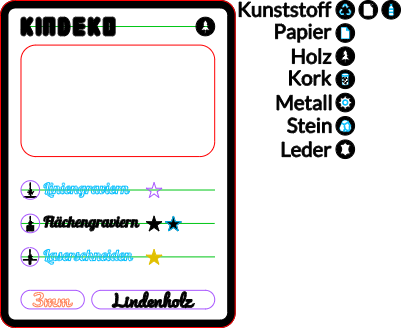
TradingCard_Linde_Basswood
.xcs
Application scenario
Laser processing
Machine & module

xTool M1 Ultra
20WCompatibles · 13
Material used

1/8"(3mm) Basswood Plywood
34
Information
Purpose
This project is a laser test sample in a trading card format.
It is designed for makers testing new materials, workshops documenting laser settings, optional customer-facing samples, and for comparing engraving and cutting results on a single piece.
The card combines cutting, surface engraving, and line engraving in one compact and repeatable design.

Design Overview
The layout follows a trading card style, but every element serves a technical purpose.
At the top, the card shows the company or project name.
In the top-right corner, a material icon indicates the used material.
The center of the card features a cutout window that allows material comparison by placing another card behind it.
Below that, process indicators with icons and star symbols visualise different laser techniques.
At the bottom, the material thickness and the material name are displayed.

The entire card is framed by an engraved border and finally cut to shape.
Instruction
1
Step1: Cutting (Laser Cutting)

Preview
Outer Shape
- The full card outline is cut using standard cutting settings
- This ensures the sample behaves like a real product part
Center Window
- The large central rectangle is fully cut out
- Purpose:
- slide another material card behind it
- flip it around
- compare how different materials interact visually
Detail Cuts
- Small text cutouts (e.g. material thickness)
- Used to test:
- fine cutting accuracy
- heat buildup on small contours
2
Step2: Surface Engraving (Fill / Area Engraving)

Preview

Preview
Material Icon (Top Right)
- Engraved deeper and more detailed
- Shows:
- how the material reacts to deeper surface engraving
- how fine details hold up at increased depth
Icons were created for:
- plastic
- paper
- wood
- cork
- metal
- stone
- leather
Stars (Engraving Comparison)
Stars are engraved using different surface engraving approaches:
- normal surface engraving
- deeper surface engraving
- surface engraving combined with line outlines
This creates a direct visual comparison of depth and texture.
Icons Next to Text
- Use the same engraving logic as the deep material icon
- Because the icons are smaller:
- they engrave less deeply
- but still preserve fine details
This makes them ideal to test detail limits at small scale.
Outer Frame
- The border around the card is surface engraved
- Adds contrast and shows how you can cover up burn marks
3
Step3: Line Engraving (Vector / Outline Engraving)
Text Elements
Settings are optimized for:
- clean edges
- readable fine lines
- minimal burn marks
Bottom Boxes
- Thin outlined boxes are created using line engraving
- Used to frame:
- material thickness
- material name
4
Step4: Why This Sample Is Useful

Preview

Preview
- One file tests multiple laser techniques
- Easy comparison of engraving depth and style
- Works as documentation for material settings
- Useful even without customer interaction
- Looks intentional, not like a random test piece
5
Step5: Conclusion
This Laser Test Sample Card is both:
- a technical reference for makers
- and a visual explanation tool when needed
It turns laser parameters into something repeatable, comparable, and tangible — all in a single, compact design.
Comments
Remixes
xTool Supplies Used in This Project


Related collections


Related tags
License

This work contains AI-generated content.