









































Report
![[Laser cut and engrave] Custom LED Mario Face Wall Sign with Name Theo](https://storage-us.atomm.com/resource/xtool/community/attachment/xtool-community/e5a2f58d-bc86-42a1-a65b-a8a09637e2f1.JPEG?x-oss-process=image/resize,w_1200,h_900,limit_0/interlace,1/format,webp/auto-orient,1)
![[Laser cut and engrave] Custom LED Mario Face Wall Sign with Name Theo](data:image/png;base64,iVBORw0KGgoAAAANSUhEUgAAAAoAAAAKCAYAAACNMs+9AAAAAXNSR0IArs4c6QAAABdJREFUKFNjZCASMBKpjmFUId6QIjp4AAppAAuXjCs4AAAAAElFTkSuQmCC)
![[Laser cut and engrave] Custom LED Mario Face Wall Sign with Name Theo](https://storage-us.atomm.com/resource/xtool/community/attachment/xtool-community/e5a2f58d-bc86-42a1-a65b-a8a09637e2f1.JPEG?x-oss-process=image/resize,w_200,h_150,limit_0/interlace,1/format,webp/auto-orient,1)
![[Laser cut and engrave] Custom LED Mario Face Wall Sign with Name Theo](https://storage-us.atomm.com/resource/xtool/community/attachment/xtool-community/1ea2b1e1-88f3-49df-bede-c26b779b16cd.JPEG?x-oss-process=image/resize,w_200,h_150,limit_0/interlace,1/format,webp/auto-orient,1)
Custom LED Mario Face Wall Sign with Name
 Instruction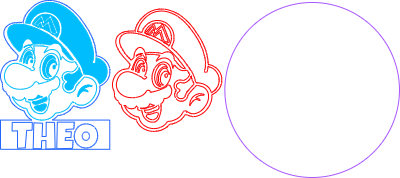
Mario Acrylic
.xcs
Application scenario
Laser processing (60min)
Machine & module

xTool P2S
55WCompatibles · 12
Material used

1/8"(3mm) Black Acrylic
39
Information
Acrylic Custom Sign Multi-Layer - #My2025
Instruction
1
Step1

Preview
To make a multi-layer Mario, you'll need to cut multiple pieces. I engraved a few components of my base Mario so that you could see some texture differences in Mario himself. Then you'll cut the other Mario pieces. Ignore the large circle for your acrylic cut, unless you want the circle to be acrylic as well. I chose to mount it to wood.
2
Step2
Once cut, you can then turn the output of the acrylic pieces off and cut your wood. From there, it's assembly.
Paint your wood, I used tacky glue to mount everything. The score lines on your base Mario face will assist you in lining up your top mount Mario face.
3
Step3
Enjoy!!
Comments


